Kode
Kode
Trying both of the vscode hxcpp debuggers with Kha results in a C++ Runtime Library error
I believe this issue is unique to Kha as I've tried 2 different debuggers and both seem to work in Haxe, OpenFL and with Haxeflixel. I think it would be a more convenient option to be able to use a cpp debugger from within vscode if it's all possible.
The two available debuggers are:
- JCWard's debugger
- VSHaxe's debugger *Devel branch
I am able to get the debugger to initiate and report in the console that it is running but at the moment of connection with vscode the program crashes with the following error:
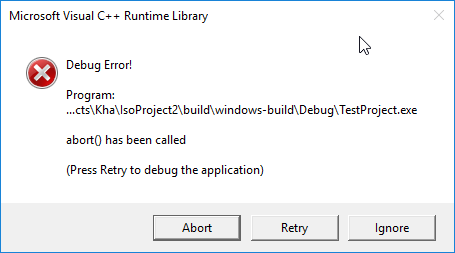
Does kha just not include things that these debuggers use during compilation? Or is it actually something to do with the debuggers themselves?

I don't know, never looked into it. Open it in Visual Studio and see where abort is called (or just debug in Visual Studio alltogether).

It's not quite running yet, but some progress.
- khafile.js:
project.addDefine('HXCPP_DEBUGGER');(not sure if actually required) - khafile.js:
project.addCDefine('HXCPP_DEBUGGER');so Kha passes down the compiler flag to Kore - khafile.js:
project.addLibrary('hxcpp-debugger'); - khafile.js
project.addParameter('-debug'); - it seems Debugger.cpp is excluded via Kha/korefile.js
- remove the exlusion so the line reads
project.addExcludes('Backends/Kore/khacpp/src/hx/Profiler.cpp', 'Backends/Kore/khacpp/src/hx/Telemetry.cpp');
- remove the exlusion so the line reads
- build solution
- (copy /build/windows-build/debug/myapp.exe to /build/windows)
- wait until https://github.com/vshaxe/vshaxe-debugadapter/issues/15 is fixed, b/c your app can't load the assets now
Edit: Maybe it will work with jcward's debugger as you can set the cwd it seems, but i'm too tired now to try 😪 Edit2: uncomment Kha/Backends/Kore/khacpp/src/hx/Thread.cpp line 332

@RobDangerous Debugging in Visual Studio is an option yes. When I'm away from my desktop and developing on a laptop, visual studio can be a huge battery drain and is generally not very "low performance" plus it's just nice and convenient to have a debugger which works with your haxe code rather than (HXLINE X) in an external IDE.
@sh-dave Thank you! I will try this later when I get a chance. Much appreciated!
We have the html5 debugger for that. But I'll integrate native debugging as an additional option once it's a bit less quirky of course.
@RobDangerous hxcpp-debugger is works now (after little fix), but very unstable and strange :D
 kha_application_dbg.zip
Also Kha/korefile.js:33 was replaced with:
//project.addExcludes('Backends/Kore/khacpp/src/hx/Debugger.cpp');
//project.addExcludes('Backends/Kore/khacpp/src/hx/Telemetry.cpp');
project.addExcludes('Backends/Kore/khacpp/src/hx/Profiler.cpp');
Lauched in Linux Mint 18.3 x64 vscode-debug-adapted and hxcpp-debugger is latest from git (for Linux needed gnome-terminal) Kha is latest from git

@RobDangerous think, it is needed much more work and tests, but it led to progress in this question :)
Maybe having an easy way to set it up (aka Kode Studio) will help the debugger along.
Did somebody have success with more older hxcpp-debugger (from branch protocol_v1.1) and KodeStudio (as I see, KodeStudio used this version of hxcpp-debugger)?
Kode Studio didn't use this yet, I just put in the repo for preparation a long while ago.
It is would be cool, to include into the KodeStudio. But still several troubles with hxcpp-debugger and Kha (clean HXCPP-projects haven't these troubles with debugger):
- Window of the debuggable application don't opening
- Breakpoints don't works correctly
And I think that both troubles have a one root. I'll do several experiments, maybe I'll find solution.
Also I'm not tested hxcpp-debugger for Windows, yet.
UPD: probably, [1,2] is bugs of the debugger. I reproduced it with clean HXCPP application.
breakpoints works with only with startStopped=true
so, debugger freezes on Kha/Backends/Kore/kha/SystemImpl.hx:113
untyped __cpp__('post_kore_init()');
UPD:
workaround: just needed to change this line to
#if !(debug && cpp)
	untyped __cpp__('post_kore_init()');
#end
profit: