

 KeyToon9
How to implement object coordinate in UE?
From the video in your demo, I glanced that you could implement object coordinate from blender to UE.
I've downloaded your plugin to blender 3.2 and tried to copy to UE5, but seems something is changed and plugin doesn't work anymore.
So I post the help here.
I'm trying to import a model textured with object coordinate rather than regular UV coordinate, I've search whole day still cannot find any valid solution.
Do you know how to implement object coordinate in UE?
Any hint will be very helpful, thanks!
Here is the object coordinate I'm talking about.
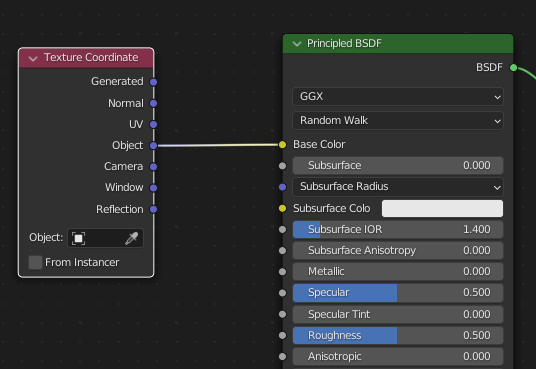
Above is a test I've done to visualize the coordinate through the base color.
I read Blender manual, cannot find the calculation detail, but guess it is related to local position of the object.
I tried BoundingBoxBased_0-1_UVW node in UE, seems I'm getting close, but still not there.

I apologize for replying to your question so late, I have been very busy lately. I will try to find time to look into why the plugin is not working.
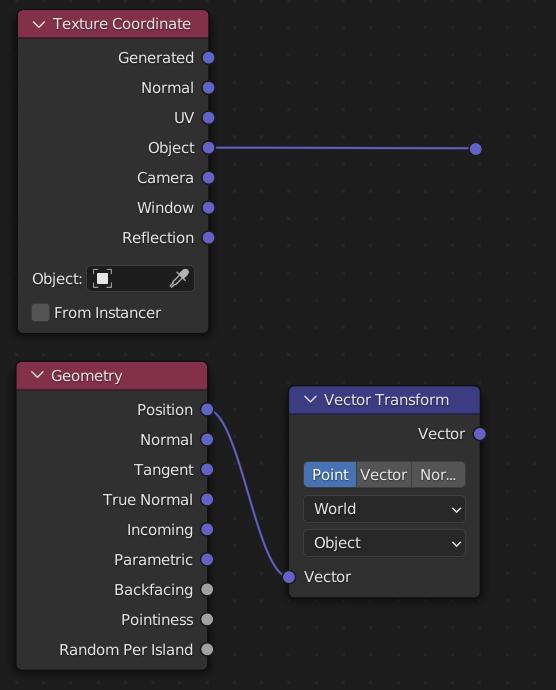
As far as I know, the "Object" coordinate is the transformational position of the world space coordinates to the object space coordinates. So, if you want to implement the same effect in the Unreal, just try to connect the nodes in the following pic.
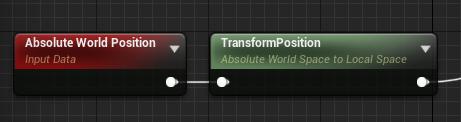
Note that the coordinate system and units between Blender and Unreal are different.
