

 KasperskyLab
DocLocScreenshotTestCase not change layout direction
I took screenshots for different locales using your library. And I noticed that layout direction wasn't changed to Rtl for Arabic localization. Rtl support is enabled in my project. Dependency: "com.kaspersky.android-components:kaspresso:1.2.0" Test device : Name: Pixel_2_API_23 CPU/ABI: Google APIs Intel Atom (x86_64) Target: google_apis [Google APIs] (API level 23)

I have to observe your tests to answer your question. But, the first mind is to check the constructor of your Screenshot test:
class ChangeSysLanguageTestCase : DocLocScreenshotTestCase(
    screenshotsDirectory = File("screenshots"),
    locales = "en,ru",
    changeSystemLocale = true
)
changeSystemLocale = true is extremely necessary for tests where you want to check RTL support.

I checked my tests and there was set changeSystemLocale = true. But it didn't work. Layout direction wasn't changed. During the running test I also added check resources.configuration.layoutDirection == View.LAYOUT_DIRECTION_RTL and it returned false. Could you check it?
For Textview and root layouts it is possible to set layout direction according locale android:layoutDirection="locale". But for ImageView and drawables it doesn't work. So my images are not mirrored (look at arrow on button - it should point to the left border of button). If you still need my code, please, let me know.
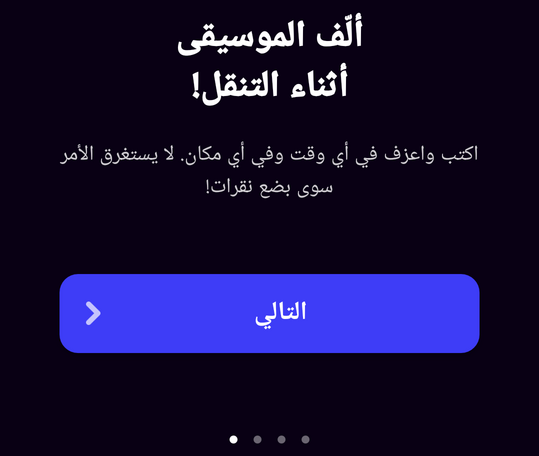
I would appreciate the small example reproducing such behavior if it's possible =) Really, it accelerates a potential fix. If you can't give the example it won't be a big problem. I am going to research the problem.
I asked my manager and I cannot provide you code. Sorry for that. But I think the problem is that when a configuration is updated only a locale is set. Maybe a layout direction also should be changed?
@anna-poddubnaya-gismart Hi! Is this behaviour apply only on Kaspresso autotest or it's reproduce when you manually change system locale on device?
changeSystemLocale = true in testcase changes locale for entire device, so I think there is may be bug in your application code.
This attr for imageView seems to be helpful (works with Android 4.4+. For lower versions you can override image resource via drawable-ldrtl folder). https://developer.android.com/reference/android/R.attr.html#autoMirrored
P.S. your layout is centered, so it's difficult to know, is device locale changed or not. If you can, for tests try to set gravity of texts to the sides and see what happens when you run autotest

@ele638
This behaviour apply only on Kaspresso autotest. Yeap, changeSystemLocale = true changes device locale but it doesn't change layout direction. You can check it using resources.configuration.layoutDirection for Arabic localization. It should be RTL but it is LTR.
Also you can run test for Arabic localization and you will see that status bar direction wasn't changed (time should be on right side and battery info should be on left side). It means that during the test locale was changed but layout direction wasn't.
@anna-poddubnaya-gismart Hi! @ele638 please, describe, what can we suggest right now and in the future
@anna-poddubnaya-gismart Hi! For now I can show you workaround:
- Install https://play.google.com/store/apps/details?id=net.sanapeli.adbchangelanguage&hl=ru&gl=US Android application on emulator
- In your
beforesection pass this command to grant app permissionadbServer.performShell("pm grant net.sanapeli.adbchangelanguage android.permission.CHANGE_CONFIGURATION")- Add this snippet to your screenshot-code
        if (this.localeRule.currentLocaleName == "ar") {
            adbServer.performShell("am start -n net.sanapeli.adbchangelanguage/.AdbChangeLanguage -e language ar-rAE")
        }
- In
aftersection you can restore your language of emulator withadbServer.performShell("am start -n net.sanapeli.adbchangelanguage/.AdbChangeLanguage -e language en-rUS")whereen-rUS- English language with United States country.
We will investigate this feature of Kaspresso, but this workaround can save some time for you
P.S. Highly recommend put Arabian locale to end of locales list because your emulator will change locale and country without rollback on another locales
Hi there! So, I actually do have a solution for this after doing some research.
Background
There is a famous tool by Fastlane called Screengrab that aims to take snapshots of the app in different languages by using a LocaleTestRule. MIT license :)
The approach they use is to access the APIs to change the locale by using reflection, as can be seen in LocaleTestRule
However, this would not work out of the box. We additionally need:
- Add permission in the
debug/manifest(same as the current Kaspresso solution)
<uses-permission android:name="android.permission.CHANGE_CONFIGURATION"
        tools:ignore="ProtectedPermissions" />
- grant CHANGE_CONFIGURATION permission for the app
regarding 2, Fastlane does it out of the LocaleTestRule (I believe inside a custom gradle task, not sure though).
Solution
However, one can grant the permission inside the LocaleTestRule before actually changing the Locale via UiAutomator:
override fun apply(base: Statement, description: Description): Statement {
        return object : Statement() {
            @Throws(Throwable::class)
            override fun evaluate() {
                /*
                  The following fails on API < 28
                  UiAutomation.grantRuntimePermission(...)

                  Therefore better to use .executeShellCommand(..)
                 */
                uiAutomation.executeShellCommand(
                    "pm grant $packageName android.permission.CHANGE_CONFIGURATION"
                )
                // screengrab code to change the locale via reflection
                ...
           }
       }
}
I've tested such a solution locally and it does work under several APIs (API 26-28) :)
WARNING: This solution changes the Locale System-wide! -> changeSystemLocale = true
Solution proposal
My suggestion is to let developers choose between the current LocaleTestRule (which is the default one) and the one via reflection aforementioned, for instance :
enum class LocaleScreenshotter {
    STANDARD
    REFLECTION_EXPERIMENTAL,
}

class ScreenshotSampleTest : DocLocScreenshotTestCase(
    locales = "en,ru"
    localeScreenshotter = LocaleScreenshotter.REFLECTION_EXPERIMENTAL // this is always changeSystemLocale = true though
) {
...
}
Any opinions on this? @ele638 @matzuk

@sergio-sastre Hi! Great work! It makes sense to refactor a little bit Permissions part of DocLoc functionality.
@sergio-sastre Hi! Great work! It makes sense to refactor a little bit Permissions part of DocLoc functionality.
I can open a PR next week :)
It will be very easy to create a testRule that fixes this once the AppCompatDelegate reaches the 1.6.0 release version, including AppCompatDelegate.setApplicationLocales() as seen here ;)
https://developer.android.com/jetpack/androidx/releases/appcompat#1.6.0-alpha04
I'll make the fix then :)
@sergio-sastre Have you tried the new AppCompatDelegate? Does it work?
Yes, it works wonderfully, and it is just one line of code (two to reset it ;))
Moreover, on 18th May, androidx.appcompat:appcompat:1.6.0-alpha04 was released, and it does not even need Android 13 Beta 1 to compile...
So I it is safe now to add it to Kaspresso. I'll open the correesponding PR in the upcoming days :)
However, I am not sure whether AppCompatDelegate changes just the locale for the app or for the device... I assume the first one
@matzuk @sergio-sastre @anna-poddubnaya-gismart Hi! I've tried to reproduce this issue and here're some conclusions:
- I can't reproduce this issue in 1.4.2 (see current.webm)
- I've tried AppCompatDelegate to see if there're any differences with out current approach: both work mostly fine, but AppCompatDelegate doesn't handle case described in #389 (see appcompat.webm)
- With changeSystemLocale=false app bar respects locale direction, but doesn't use localized resources
- With changeSystemLocale=true app bar uses localized resource, but doesn't respect locale direction
- What's funny - code below doesn't work. Seems like using AppCompatDelegate even once during test breaks our hack for sr-Latn-RS e.g. works like on appcompat.webm
if (shouldApplySrLatinHack(locale)) {
    applyCurrentLocaleToContext(
        context = wRefCachedActivity?.get() ?: context,
        locale = locale
    )
} else {
    AppCompatDelegate.setApplicationLocales(LocaleListCompat.create(locale))
}

private fun shouldApplySrLatinHack(locale: Locale) = Build.VERSION.SDK_INT >= Build.VERSION_CODES.LOLLIPOP
        && locale.country.equals("Latn", true)
        && locale.language.equals("sr", true)
TLDR: issue seems to be fixed. @anna-poddubnaya-gismart, please, try Kaspresso 1.4.2 and close issue if it is or leave feedback otherwise

@Nikitae57 I'll take a deeper look at this during this week. If I recall correctly, we are using updateConfiguration, and that method belongs to non-sdk interfaces since Android Oreo (i.e. it won't work on Android Oreo +), so depending on the version you've tested, it could work or not.
Moreover, in the videos there is no drawable that needs mirroring, as it was stated as a Problem.
I'll reopen the issue or write a comment with my findings once done with this ;)
@Nikitae57 I've tested this and can confirm it behaves as you described, what is actually not the expected behaviour, point 3 and 4, namely:
-
With changeSystemLocale=false app bar respects locale direction, but doesn't use localized resources ❌
-
With changeSystemLocale=true app bar uses localized resource, but doesn't respect locale direction ❌
Therefore, I'd likely reopen the ticket.
I'd gladly work on it