

 KartikTalwar
Is there any way to run dynamic content in gmail.tools.add_modal_window?
I want to render jQuery UI components in the non-modal dialog created from gmail.tools.add_modal_window(title, content_html, onClickOk, onClickCancel, onClickClose) but it seems content_html can only be a static html string. Is there any way around this?

What I’ve done is just add a static div with a known ID as the content, and apply more “dynamic” content to that div after the dialogue is opened (although I didn’t use jQuery UI).

I thought I tried that on the content div already created inside the modal dialog with id gmailJsModalWindowContent, but I didn't try upon opening. I will try that. Thanks. Great library, BTW!
I tried to modify a static <input/> that's passed in as a string to tools.add_modal_window(...) then I called jQuery on it's id and it didn't work or cause an error in the javascript console.
I'm trying to apply this: https://selectize.github.io/selectize.js/ which dynamically modifies an <input type="text"/> via:
$('#connector-tags').selectize({
              persist: false,
              createOnBlur: true,
              create: true
        });
where my markup looks like:
<input type="text" id="connector-tags" class="demo-default">
The only way it works is if I put that jQuery call inside the tools.add_modal_window(...) function, which I'd rather not have to do.
I’m not 100% sure I follow.
Could you create a minimal POC based on the node boilerplate repo?
sure - thanks!
Sent from mobile phone
On Aug 6, 2018, at 11:09 AM, Jostein Kjønigsen [email protected] wrote:
I’m not 100% sure I follow.
Could you create a minimal POC based on the node boilerplate repo?
— You are receiving this because you authored the thread. Reply to this email directly, view it on GitHub, or mute the thread.
I actually had it working with the legacy boilerplate repo (with the hack to gmail.js calling selectize from within add_modal).
Here's my half-baked attempt to get it working with the node boilerplate:
https://github.com/wolfch/gmailjs-node-boilerplate/tree/selectize_input_demo
https://github.com/wolfch/gmailjs-node-boilerplate/pull/1/files
In the legacy boilerplate, which I modified and is working (with gmail.js hack), I include the dependencies in this order:
var j = document.createElement('script'); j.src = chrome.extension.getURL('jquery-1.10.2.min.js'); (document.head || document.documentElement).appendChild(j);
var g = document.createElement('script'); g.src = chrome.extension.getURL('gmail.js');// hacked (document.head || document.documentElement).appendChild(g);
var sel = document.createElement('script'); sel.src = chrome.extension.getURL('selectize.js'); (document.head || document.documentElement).appendChild(sel);
var s = document.createElement('script'); s.src = chrome.extension.getURL('main.js'); (document.head || document.documentElement).appendChild(s);
I think the main problem with trying to apply dynamic changes to the modal dialog is that the main thread of execution is on-hold while until the modal dialog is acted on ("Ok" pressed) or dismissed.
On 8/6/18 11:09 AM, Jostein Kjønigsen wrote:
I’m not 100% sure I follow.
Could you create a minimal POC based on the node boilerplate repo?
— You are receiving this because you authored the thread. Reply to this email directly, view it on GitHub https://github.com/KartikTalwar/gmail.js/issues/510#issuecomment-410741387, or mute the thread https://github.com/notifications/unsubscribe-auth/AAh5ux6M22vokWYpTzpUHIZn2UF5uDD0ks5uOFwPgaJpZM4VvAG2.
-- Chris Wolf [email protected] mailto:[email protected]
I think the main problem with trying to apply dynamic changes to the modal dialog is that the main thread of execution is on-hold while until the modal dialog is acted on ("Ok" pressed) or dismissed.
That's absolutely not true (and in fact no JS library can work like that). The function creates the UI-stuff and then immediately returns. Try it for yourself in a browser-console:
gmail.tools.add_modal_window("boo!", "<div>boo!</div>", () => console.log("OK!"), () => console.log("CANCELLED!"));
You'll see the code immediately return. If you build your code on the assumption that this function is blocking, your code will fail.
Also... Thanks for the repo. That helps a lot!
I'm not sure exactly what your issue is, but when I clone it and run npm run build and reload the extension in Chrome, it runs just fine.
Note the console-log below:
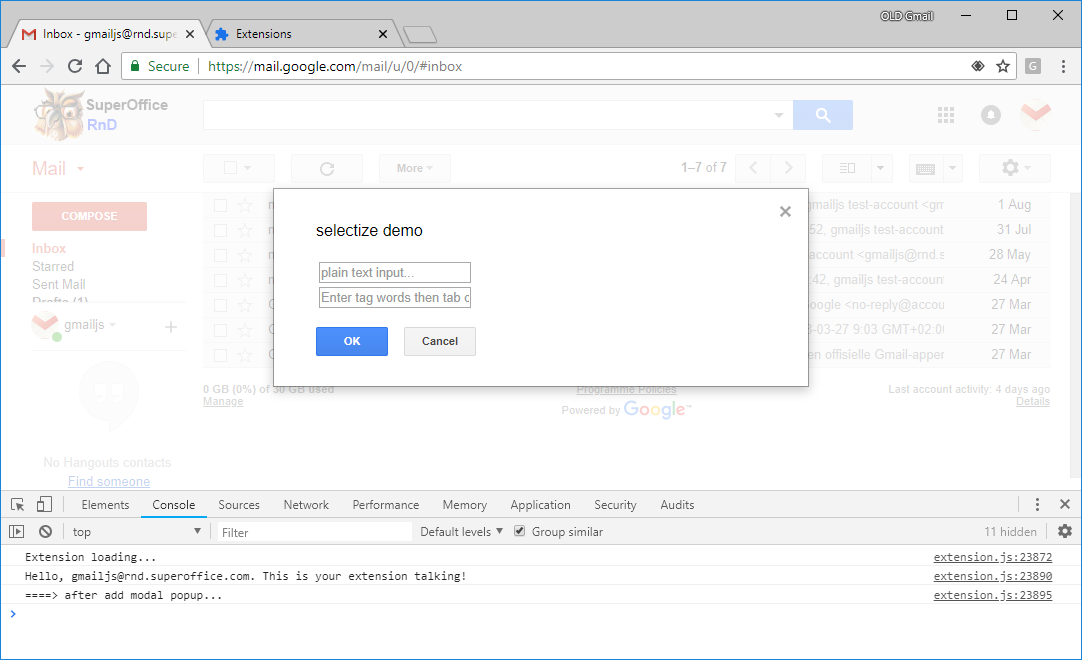
Looking at your issue with the jQuery plugins... I think that may be related to the plugins themselves not working/initializing properly when used in a require()-context?
You can see that here, you pull in the plugin module, but you don't really do anything with it:
https://github.com/wolfch/gmailjs-node-boilerplate/blob/5e16e7810e9a4da4d8dbe5ba919c355066f7c092/src/extension.js#L7-L8
You can probably inspect this in your runtime environment by checking the jQuery-instance and if $.fn.selectize is set to anything or not.
Anyway... It might be a bit complex to drag in a third party UI-framework into Gmail without messing things up, but that's a general challenge for any web-extension trying to integrate a third party UI into any existing application.
So basically, this seems more like a general Javascript or WebExtension- issue, more than anything speicific to gmail.js.
From what I can see gmail.tools.add_modal_window does exactly what it should (no more, no less), and it's up to the library consumer to use that in a way which works with the rest of the universe.
As such I'm inclined to close this issue, unless anyone can point out faults in gmail.js itself.