klayout
 klayout copied to clipboard
 KLayout
Issue with hotkeys when used in macro development
When I try to save a .py script (in macro development) using the hotkey cmnd+s in mac, the script doesn't save and kalyout assumes I am trying to save a layout. It gives me an error, see attached.
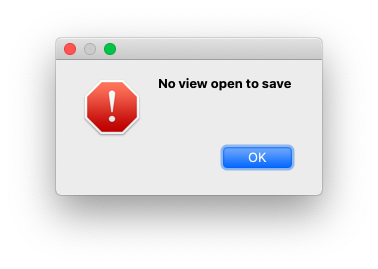

I also have this problem. The same problem extends to other keys:
- delete - rather than deleting characters, it deletes layout objects
- copy: doesn't grab text within the IDE
- paste: most of the time copies text that was grabbed earlier

Hi,
I have tried to reproduce this issue with the version 0.26.7 for Catalina that shares the MacPorts (Qt=5.14.2) environment. My observations and ideas are as follows.
In Mac, [control] key is mapped to [command] key. Therefore, [command+S] is bound to the "Show As New Top" menu, which is the default. Please note that I've not customized the shortcut keys.
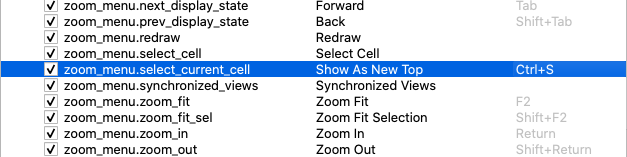
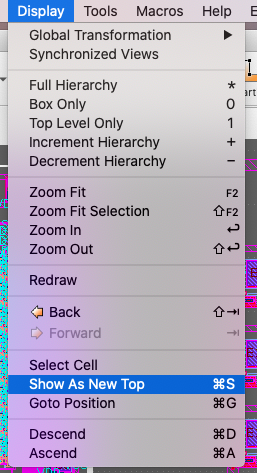
I guess you have mapped [Ctrl+S] to one of the "Save ..." menus. If so, the error should flag on if no design is open.
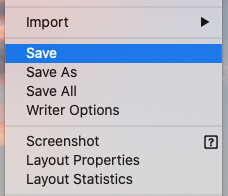
On the other hand, in the "Macro Development," we expect that the current file is saved by [command+S]. However, [command+S] triggers the "Show As New Top" menu instead. This looks a Qt's event handling issue, but I'm not sure.
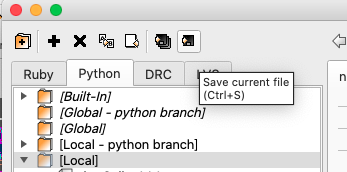
In Linux, these two [Ctrl+S] keystrokes are cleanly segregated in two different contexts. Hence, this problem does not take place.
A workaround could be to set a shortcut for the "Save ..." menu that differs from [Ctrl+S] or to remove the shortcut [Ctrl+S] itself. Then, [command+S] works as expected in the "Macro Development."
Since the shortcut [Ctrl+S] is hardcoded in the Designer's UI file for the "Macro Development," we cannot change it after the build.
I could not reproduce the problems mentioned by Lukas.
Regards, Kazzz-S

@kazzz Thanks for the analysis.
I pretty much rely on Qt when it comes to key mapping. I see there are many specialities on MacOS. I did not quite understand how they map Control and Command key - I am running MacOS on a VirtualBox and that seems to map the keys the reverse way to a Windows keyboard. Doesn't make things transparent.
Matthias

@hoshoman Could you check if this issue is fixed? There was some update on the MacOS menu handling.
Thanks Matthias for fixing this, updating my MacOS and Klayout now and then will test it.
Hi Matthias,
The issue yet persists. Here's what happens when I try to save the script, it thinks I am trying to save the layout instead.