
klayout
 klayout copied to clipboard
 KLayout
Problems with pin labels when opening a DEF
Hello,
I'm trying to open the following DEF file with Klayout.
VERSION 5.8 ;
DIVIDERCHAR "/" ;
BUSBITCHARS "[]" ;
DESIGN pins ;
UNITS DISTANCE MICRONS 2000 ;
TRACKS X 500 DO 399 STEP 1000 LAYER M6 ;
TRACKS Y 500 DO 425 STEP 1000 LAYER M6 ;
PINS 6 ;
    - GND + NET GND + SPECIAL + DIRECTION INOUT + USE GROUND
      + PORT
        + LAYER M6 ( -1500 -5000 ) ( 1500 5000 )
        + LAYER M6 ( -15000 -5000 ) ( -12000 5000 )
        + LAYER M6 ( -28500 -5000 ) ( -25000 5000 )
        + FIXED ( 30000 20000 ) N ;
    - VDD + NET VDD + SPECIAL + DIRECTION INOUT + USE POWER
      + PORT
        + LAYER M6 ( -1500 -5000 ) ( 1500 5000 )
        + LAYER M6 ( -15000 -5000 ) ( -12000 5000 )
        + LAYER M6 ( -28500 -5000 ) ( -25000 5000 )
        + FIXED ( 23250 20000 ) N ;
END PINS
END DESIGN
VDD and GND pins correspond to several polygons, but Klayout makes text labels for only one of them. I need to label each polygon. I tried to separate the first VDD pin polygon in the DEF file and Klayout labeled two polygons, the first and the last VDD:
    - VDD + NET VDD + SPECIAL + DIRECTION INOUT + USE POWER
      + PORT
        + LAYER M6 ( -1500 -5000 ) ( 1500 5000 )
        + FIXED ( 23250 20000 ) N ;
    - VDD + NET VDD + SPECIAL + DIRECTION INOUT + USE POWER
      + PORT
        + LAYER M6 ( -15000 -5000 ) ( -12000 5000 )
        + LAYER M6 ( -28500 -5000 ) ( -25000 5000 )
        + FIXED ( 23250 20000 ) N ;
I find it strange. I think this is an incorrect solution to the problem. Is there any way to fix the pin marking problem?

You see that is on my TODO list:
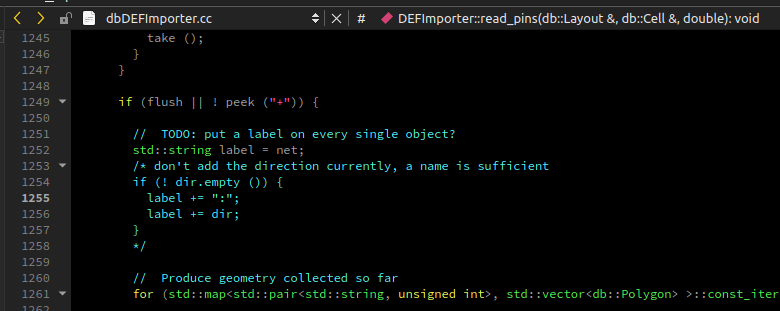
But I recall there was some discussion about the proper way. I'm used to one label on a net, regardless of how many shapes are there. LVS netlisting is happy with a single label. Placing a text on every shape seems like a lot of redundancy to me.
The DEF reader allows attaching net names as properties to every shape. Maybe that helps?
I'd leave the decision to the user community. So the discussion is open.

This problem is because I use a DEF-file to get a GDS-file using the Layout.read(string filename) function, and after that I generate a LEF file from GDS using the follow python script (gds2lef). Therefore, I need each polygon with pin to have its own label. Maybe in this case there is some alternative solution? gds2lef.txt
Hi @elena-chernykh,
thanks for sharing the script!
I think it's actually very simple to solve this problem. You need to use properties. These are lightweight tags that are attached to shapes if you configure the reader properly. In fact these properties are attached even by default: property "1" delivers the net name. No need to detect nets from labels.
Here is some code:
ly = pya.Layout()
ly.read("myfile.def", options)

for l in ly.layer_indexes():
  li = ly.get_info(l)
  for s in ly.top_cell().shapes(l).each():
    net_name = s.property(1)
    if net_name:
      print(f"Layer: {str(li)}")
      print(f"  Shape: {str(s)}")
      print(f"  Net: {str(s.property(1))}")
In a small test case of mine this delivers:
Layer: M2 (13/0)
  Shape: path (0,0;18760,0) w=320 bx=0 ex=0 r=false prop_id=1
  Net: VSS
Layer: M2 (13/0)
  Shape: path (0,3920;18760,3920) w=320 bx=0 ex=0 r=false prop_id=1
  Net: VSS
Layer: M2 (13/0)
  Shape: path (0,1960;18760,1960) w=320 bx=0 ex=0 r=false prop_id=2
  Net: VDD
If it is of interest for you, you can also define a second property to deliver pin names for pin shapes:
options = pya.LoadLayoutOptions()
lefdef_options = pya.LEFDEFReaderConfiguration()
lefdef_options.net_property_name = 1
lefdef_options.pin_property_name = 2
options.lefdef_config = lefdef_options

ly = pya.Layout()
ly.read("myfile.def", options)

for l in ly.layer_indexes():
  li = ly.get_info(l)
  for s in ly.top_cell().shapes(l).each():
    net_name = s.property(1)
    pin_name = s.property(2)
    if net_name:
      print(f"Layer: {str(li)}")
      print(f"  Shape: {str(s)}")
      print(f"  Net: {str(s.property(1))}")
    if pin_name:
      print(f"Layer: {str(li)}")
      print(f"  Shape: {str(s)}")
      print(f"  Pin: {str(s.property(2))}")
In my case this gives additional shapes for the pins:
Layer: M2.PIN (13/2)
  Shape: polygon (0,1800;0,2120;18760,2120;18760,1800) prop_id=1
  Pin: VDD
Layer: M2.PIN (13/2)
  Shape: polygon (0,-160;0,160;18760,160;18760,-160) prop_id=2
  Pin: VSS
Layer: M2.PIN (13/2)
  Shape: polygon (0,3760;0,4080;18760,4080;18760,3760) prop_id=2
  Pin: VSS
Layer: M2 (13/0)
  Shape: path (0,0;18760,0) w=320 bx=0 ex=0 r=false prop_id=3
  Net: VSS
Layer: M2 (13/0)
  Shape: path (0,3920;18760,3920) w=320 bx=0 ex=0 r=false prop_id=3
  Net: VSS
Layer: M2 (13/0)
  Shape: path (0,1960;18760,1960) w=320 bx=0 ex=0 r=false prop_id=4
  Net: VDD
Matthias
Thank you for the proposed solution to my problem! It can really help me.
However, it would be great if I could get the label of each polygon of pins from GDS obtained using the following code: https://github.com/The-OpenROAD-Project/OpenLane/blob/master/scripts/klayout/def2gds.py. Is it possible?
I've shown above how you can use another property to tag pins (bottom example, pin property key is 2). That should allow you to retrieve all polygons by pin name.
I guess by doing so you can achieve the same results than the Python code although I did not analyze it thoroughly.
Matthias
Actually the point of previous message was that we're trying to implement LEF abstract generation for Openlane flow with KLayout. GDS files in this flow are generated by def2gds.py mentioned above. I could try to make pull-request to Openlane with addition of properties to this script, but I'm not sure it will be accepted as it makes GDS files more different from ones produced by Magic (primary Openlane tool for this operation as for now). So in my opinion it will be more logical to mark all appropriate shapes with pin name.
I wasn't suggesting to change def2gds.py. Instead you can directly read DEF and produce LEF from that in a single step.
Alternatively you could add an option to def2gds to supply the properties for net and pin names for this particular flow. This is not entirely unusual - GDS with properties on shapes which tell the net name is called "annotated GDS". It is very useful as it saves you the effort to associate labels with shapes through a geometrical search.