

 Jupyter-contrib
jupyter_nbextensions_configurator server extension not visible
Hi Team,
As mentioned, I am not able to see the nbextension server extension on the UI in the browser.
I followed the installation instructions. 1.) Ran a conda installation -> "conda install -c conda-forge jupyter_nbextensions_configurator". 2.) Installation was successful, but after opening jupyter notebook I am not able to see the nbextension server extension on the UI. Link - "http://localhost:8888/tree/nbextensions" 2.) Also I am able to enable and disable the extension from CLI using "jupyter nbextension enable hinterland/hinterland". The command works perfect and I am able to use the hinterland extension.
I did try the installation through cloning the git repository. I am able to successfully install the nbextension but again not able to see the server extension on the UI.
Conda Version - 4.5.12 Python Version - 3.7.1 Browser - Google Chrome

same issue here, even after enabling the extension, relaunching Jupyter , nothing is displayed

Same here. I upgraded to 0.4.1 in the hope it was solving this issue but it still does not.
Neither does the tab appear:

nor does the link to https://localhost:8888/tree/nbextensions work.
Same versions as OP, running on the Mac platform.

Did you enable the configurator using jupyter nbextensions_configurator enable --user ?
Do you see in the log when starting the notebook [jupyter_nbextensions_configurator] enabled 0.4.1 ?

yes:
$ jupyter notebook .                                                                                                  (py37)
[I 14:24:43.163 NotebookApp] [nb_conda_kernels] enabled, 5 kernels found
[I 14:24:43.711 NotebookApp] Loading IPython parallel extension
[I 14:24:43.751 NotebookApp] [jupyter_nbextensions_configurator] enabled 0.4.1
For reproducing, one might need the notebook version I tried it with: 5.7.4.
Can you check what happens when browse to
view-source:http://localhost:8888/nbextensions/nbextensions_configurator/tree_tab/main.js (adjust this if you use another server or port).
You should see a Javascript file and line 3 should be var $ = require('jquery');
it does:
define(function (require, exports, module) {
    "use strict";

    var $ = require('jquery');
OK, so does http://localhost:8888/nbextensions work ?
If yes, check if you have activated the Nbextensions dashboard tab extension.
Ah, I realize I clicked on above link with the default port while I have a different port.
So, that link does work sporadically, but not at all like on notebook 5.6, where I get the whole list of available extensions. (Note, I'm using https, in case that matters). Here's what I see, when I go to the link the first time with notebook 5.7.4:

When I reload, it shows like this:

and when I reload again, it sporadically goes away, showing a blank page, or comes back again.
I'm unaware of the dashboard tab extension, but I'm guessing it's being activated by the conda package, because when I change the notebook to 5.6, everything is fine, the tab is there as well:

(note also the tree filter extension working again in this screenshot, which isn't the case for notebook=5.7.4), the list of nbextensions is shown at the link above:

I tried it on a Mac with Anaconda and notebook 5.7.4 in a fresh environment. Works fine here. I don't use https.
Do you get any errors in the Javascript log in the browser or in the notebook log when you start it with the --debug option ?
Confirmed, a new testing environment with the minimum required to work also works here with 5.7.4, using my https configuration. I will now:
- reinstall my large env and check if it works there.
- If not, I will successively install my packages in the testing environment to find out when it breaks.
I'll get back to you, thanks!
ok, after noticing that your package doesn't have a requirement on jupyter_contrib_nbextensions, I tried that first, and bingo, it's that which blocks it all.
I guess that's related to this issue I created over there a while ago, where you also once commented? https://github.com/ipython-contrib/jupyter_contrib_nbextensions/issues/1356
Did check out the https://github.com/ipython-contrib/jupyter_contrib_nbextensions/issues/1356 it looks like the problem in my case is caused by jqueryui .
If I check http://localhost:8888/nbextensions/nbextensions_configurator/tree_tab/main.js I got
define(function (require, exports, module) {
    "use strict";

    var $ = require('jqueryui');
which is using jqueryui and as per your comment in issue #1356 it seems the notebook 5.7 does not include jqueryui.
Not sure but maybe this is the issue.
NOTE: I am using the notebook on window 10.
notebook version - 5.7.4
Hi All,
Spend the last 4 hours trying to install this. But could not view the extensions. I am writing all the steps followed. Could you please tell me if I missed something.
Specs: Win10, FF 64, Py3.6.6, all 64 bit. Conda Version - 4.5.12.
- Ran a conda installation -> "conda install -c conda-forge jupyter_nbextensions_configurator".
2.) Installation was successful, but after opening jupyter notebook I can only see these extensions:

whereas, I was hoping to see something like this:
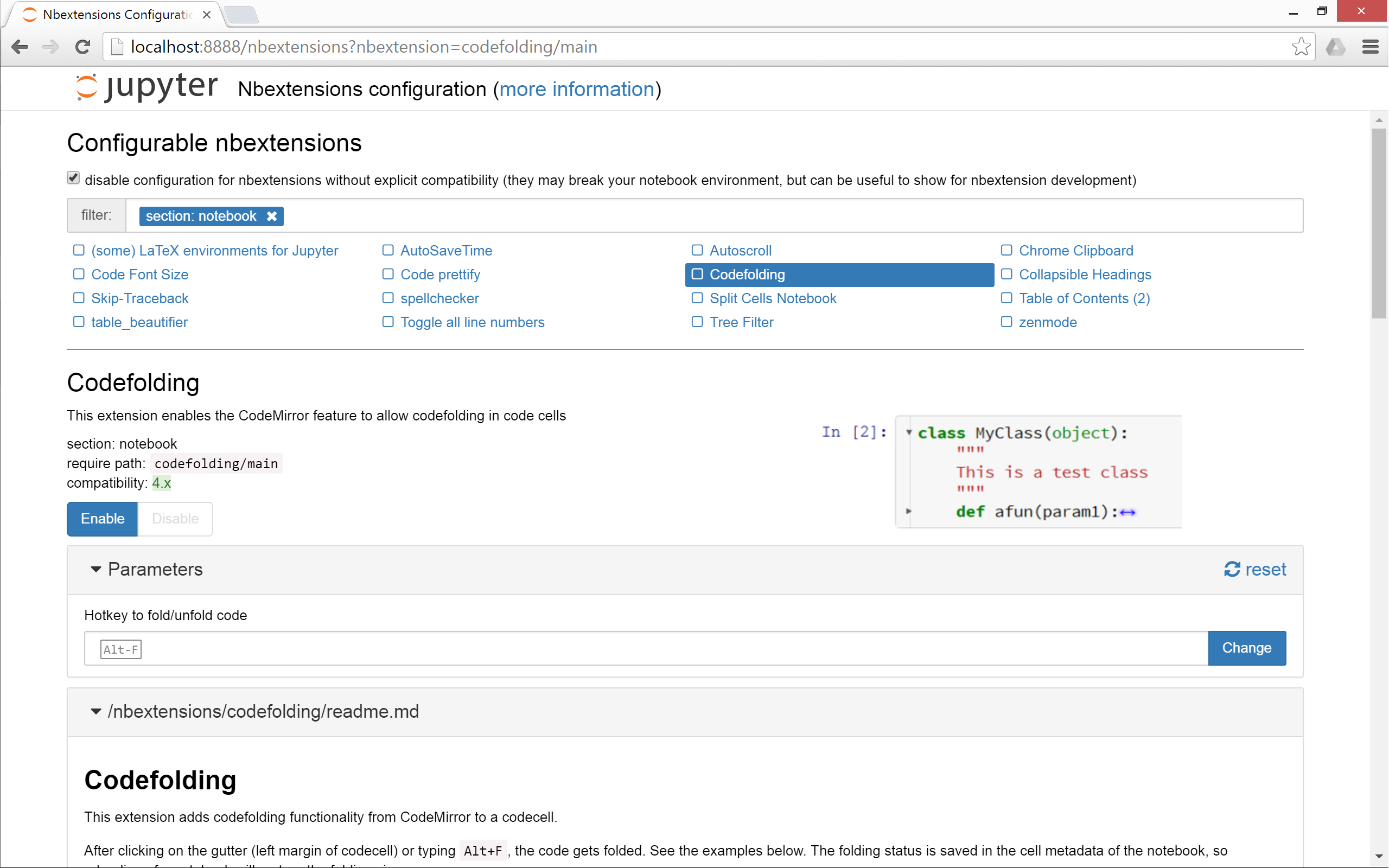
In the browser console, I do not see any error messages. I see 3 warnings:

3.) I have also tried enabling the configurator using jupyter nbextensions_configurator enable --user ?

4.) I am not able to enable and disable the extension from CLI using "jupyter nbextension enable hinterland/hinterland".


prasunkgupta, I solvedit with this:
conda remove jupyter_nbextensions_configurator
conda install -c conda-forge jupyter_nbextensions_configurator
conda install -c conda-forge jupyter_contrib_nbextensions


prasunkgupta, I solvedit with this:
conda remove jupyter_nbextensions_configurator
conda install -c conda-forge jupyter_nbextensions_configurator
conda install -c conda-forge jupyter_contrib_nbextensions
I enabled hinterland but in jupyter lab it is not working! Where am I getting it wrong? In notebook it is working fine!


This is working for me. Note: Type these command in the anaconda terminal
Source: https://www.codegrepper.com/code-examples/shell/installing+hinterland+for+jupyter+without+anaconda
