
atom-julia-client
 atom-julia-client copied to clipboard
 JunoLab
Uncaught Error: Pty seems to have been killed already
[Enter steps to reproduce:]
- update to the latest atom julia version
- start julia repl
- stop julia repl
Atom: 1.37.0 x64 Electron: 2.0.18 OS: PRZCV0111 Thrown From: julia-client package 0.8.5
Stack Trace
Uncaught Error: Pty seems to have been killed already
At C:\Users\k582186\.atom\packages\julia-client\node_modules\node-pty-prebuilt\lib\windowsPtyAgent.js:83

Error: Pty seems to have been killed already
    at WindowsPtyAgent.kill (/packages/julia-client/node_modules/node-pty-prebuilt/lib/windowsPtyAgent.js:83:13)
    at /packages/julia-client/node_modules/node-pty-prebuilt/lib/windowsTerminal.js:144:26)
    at WindowsTerminal._defer (/packages/julia-client/node_modules/node-pty-prebuilt/lib/windowsTerminal.js:155:24)
    at WindowsTerminal.kill (/packages/julia-client/node_modules/node-pty-prebuilt/lib/windowsTerminal.js:139:14)
    at /packages/julia-client/node_modules/node-pty-prebuilt/lib/windowsTerminal.js:134:19)
    at WindowsTerminal._defer (/packages/julia-client/node_modules/node-pty-prebuilt/lib/windowsTerminal.js:155:24)
    at WindowsTerminal.destroy (/packages/julia-client/node_modules/node-pty-prebuilt/lib/windowsTerminal.js:133:14)
    at InkTerminal.detach (/packages/ink/lib/console2/console.js:207:15)
    at /packages/julia-client/lib/runtime/console2.js:98:14
    at Function.simpleDispatch (~/AppData/Local/atom/app-1.37.0/resources/app/static/<embedded>:11:1174290)
    at Emitter.emit (~/AppData/Local/atom/app-1.37.0/resources/app/static/<embedded>:11:1175731)
    at Object.detach (/packages/julia-client/lib/connection/client.coffee:115:14)
    at /packages/julia-client/lib/connection/local.coffee:82:30)
    at emitNone (events.js:111:20)
    at Socket.emit (events.js:208:7)
    at endReadableNT (_stream_readable.js:1056:12)
    at _combinedTickCallback (internal/process/next_tick.js:138:11)
    at process._tickCallback (internal/process/next_tick.js:180:9)
Commands
     -1:18.1.0 julia-debug:open-debugger-pane (input.hidden-input)
  2x -1:10.7.0 julia-client:run-file (atom-pane.pane)
     -1:06.7.0 autocomplete-plus:cancel (atom-text-editor.editor.is-focused)
     -1:06.7.0 inline-results:clear-all (atom-text-editor.editor.is-focused)
     -0:58.6.0 julia-client:open-console (atom-pane.pane.active)
     -0:11.4.0 julia-client:kill-julia (input.hidden-input)
Non-Core Packages
indent-detective 0.3.2
ink 0.10.7
julia-client 0.8.5
language-julia 0.18.1
latex-completions 0.3.6
tool-bar 1.1.11
uber-juno 0.2.0

Fixed with https://github.com/JunoLab/atom-ink/commit/bb70f71018269a37c3396543030d67716351d773.

Thanks. It works. But I have another issue. The debugger doesn´t stop at the breakpoints anymore since the update of the atom julia client. Shall I post it as a new issue of the atom-julia-client?
No, not all. Somehow I can´t update Atom.jl via Pkg, because it doesn´t find a newer version
I´m working on julia-client version 0.8.5 ink version 0.10.8 Atom.jl version 0.8.5 Juno.jl version 0.7.0
Do you know how I can update it? Also tried it with the apm update command in the terminal.
You probably can update once https://github.com/JuliaRegistries/General/pull/1037 is merged (or temporarily uninstall Revise.jl).
First try a pkg> up, and then, if you still don't get the new Atom.jl version, try pkg> add [email protected] or pkg> add [email protected]. That should tell you what package is holding the update back.
I tried all of your tips. There were several dependencies, so that I decided to delete the .julia folder and load the packages again via the package manager. It worked for me really good, but I hadn´t so much packages, so that it wasn´t so much work for me.
I also tried above steps... I am also getting error while trying to stop Julia by using CTRL+J CTRL+K. The error is as follows:
Error: Pty seems to have been killed already
    at WindowsPtyAgent.kill (C:\Users\manu\.atom\packages\julia-client\node_modules\node-pty-prebuilt-multiarch\lib\windowsPtyAgent.js:160:29)
    at WindowsTerminal.<anonymous> (C:\Users\manu\.atom\packages\julia-client\node_modules\node-pty-prebuilt-multiarch\lib\windowsTerminal.js:148:26)
    at WindowsTerminal._defer (C:\Users\manu\.atom\packages\julia-client\node_modules\node-pty-prebuilt-multiarch\lib\windowsTerminal.js:155:24)
    at WindowsTerminal.kill (C:\Users\manu\.atom\packages\julia-client\node_modules\node-pty-prebuilt-multiarch\lib\windowsTerminal.js:143:14)
    at Object.kill (file:///C:/Users/manu/.atom/packages/julia-client/lib/connection/process/basic.js:125:20)
    at Socket.<anonymous> (file:///C:/Users/manu/.atom/packages/julia-client/lib/connection/local.coffee:77:12)
    at Socket.emit (events.js:182:13)
    at emitErrorNT (internal/streams/destroy.js:82:8)
    at emitErrorAndCloseNT (internal/streams/destroy.js:50:3)
    at process._tickCallback (internal/process/next_tick.js:63:19)
How can I solve it?

I have the same error during 2 cases:
1. When I read a large CSV file
CSV.read(xxx) |> DataFrame
Then REPL is frozen, does not accept any interrupts and then i press CTRL-J CTRL-K to kill Julia process, below error pop up:
C:\Users\ericche.atom\packages\julia-client\node_modules\node-pty-prebuilt-multiarch\lib\windowsPtyAgent.js:160
Error: Pty seems to have been killed already
at WindowsPtyAgent.kill (C:\Users\ericche.atom\packages\julia-client\node_modules\node-pty-prebuilt-multiarch\lib\windowsPtyAgent.js:160:29)
at WindowsTerminal.
2. Quickly Shutdown and Start a new Julia process
If REPL is interactive and responding, and I press CTRL - J CTRL - K to shut Julia down 2 second later press CTRL - J CTRL -S --> to start a new Julia process
then the inline evaluation does not work i.e. When I select my code and "CTRL - ENTER" REPL show nothing.
Status bar in the bottom of Atom show it is very busy. (How can I upload my screenshot??)
there is a winpty-agent.exe process running in background and never stop...
I think this two issue are related...
FYI I am using the "Basic" mode in julia client. I cannot use cycler since I need to restart Julia quite often.
I also enabled Powershell Wrapper but the "interrupt" command never works and once REPL is running some process, it will be frozen...
I am using Windows 10.
My debug info:
Atom:
Version: 1.44.0 Dev Mode: false Official Release: true { "http_parser": "2.8.0", "node": "10.11.0", "v8": "6.9.427.31-electron.0", "uv": "1.23.0", "zlib": "1.2.11", "ares": "1.14.0", "modules": "69", "nghttp2": "1.33.0", "napi": "3", "openssl": "1.1.0", "electron": "4.2.7", "chrome": "69.0.3497.128", "icu": "62.2", "unicode": "11.0", "cldr": "33.1", "tz": "2019a" }
julia-client:
Version: 0.12.2 Config: { "consoleOptions": { "cursorBlink": true, "shell": "cmd.exe" }, "firstBoot": false, "juliaOptions": { "bootMode": "Basic", "formattingOptions": { "always_for_in": true, "remove_extra_newlines": true, "whitespace_ops_in_indices": true, "whitespace_typedefs": true }, "optimisationLevel": 2, "persistWorkingDir": true }, "juliaPath": "C:\Users\ericche\AppData\Local\Julia-1.3.1\bin\julia.exe", "uiOptions": { "enableMenu": true, "errorInRepl": true, "layouts": { "defaultPanes": { "documentation": false, "plotPane": false, "workspace": false }, "openDefaultPanesOnStartUp": false }, "scrollToResult": true, "usePlotPane": false } }
ink:
Version: 0.12.2 Config: undefined
uber-juno:
Version: 0.3.0 Config: { "disable": true }
language-julia:
Version: 0.19.2 Config: undefined
language-weave:not installed
indent-detective:
Version: 0.4.0 Config: undefined
latex-completions:
Version: 0.3.6 Config: undefined
versioninfo():
Julia Version 1.3.1
Commit 2d5741174c (2019-12-30 21:36 UTC)
Platform Info:
OS: Windows (x86_64-w64-mingw32)
CPU: Intel(R) Xeon(R) CPU E5-2697 v4 @ 2.30GHz
WORD_SIZE: 64
LIBM: libopenlibm
LLVM: libLLVM-6.0.1 (ORCJIT, broadwell)
Environment:
JULIA_EDITOR = "C:\Users\ericche\AppData\Local\atom\app-1.44.0\atom.exe" -a
JULIA_NUM_THREADS = 18
Status C:\Users\ericche\.julia\environments\v1.3\Project.toml
[c52e3926] Atom v0.12.7
[6e4b80f9] BenchmarkTools v0.5.0
[336ed68f] CSV v0.5.25
[a93c6f00] DataFrames v0.20.2
[864edb3b] DataStructures v0.17.10
[e7dc6d0d] DataValues v0.4.13
[59287772] Formatting v0.4.1
[e5e0dc1b] Juno v0.8.0
[be6f12e9] ODBC v0.9.0
[a15396b6] OnlineStats v1.0.3
[925886fa] OnlineStatsBase v1.0.2
[429524aa] Optim v0.20.1
[91a5bcdd] Plots v0.29.4
[92933f4c] ProgressMeter v1.2.0
[d330b81b] PyPlot v2.8.2
[2913bbd2] StatsBase v0.32.1
[db12335b] StringBuilders v0.2.0
[f269a46b] TimeZones v1.0.1
[fdbf4ff8] XLSX v0.6.0
[ade2ca70] Dates
[37e2e46d] LinearAlgebra
[10745b16] Statistics

I get the same error
Atom: 1.44.0 x64 Electron: 4.2.7 OS: Windows 10 Thrown From: julia-client package 0.12.2
Stack Trace
Uncaught Error: Pty seems to have been killed already
At C:\Users\USER\.atom\packages\julia-client\node_modules\node-pty-prebuilt-multiarch\lib\windowsPtyAgent.js:160

Error: Pty seems to have been killed already
    at WindowsPtyAgent.kill (/packages/julia-client/node_modules/node-pty-prebuilt-multiarch/lib/windowsPtyAgent.js:160:29)
    at /packages/julia-client/node_modules/node-pty-prebuilt-multiarch/lib/windowsTerminal.js:148:26)
    at WindowsTerminal._defer (/packages/julia-client/node_modules/node-pty-prebuilt-multiarch/lib/windowsTerminal.js:155:24)
    at WindowsTerminal.kill (/packages/julia-client/node_modules/node-pty-prebuilt-multiarch/lib/windowsTerminal.js:143:14)
    at Object.kill (/packages/julia-client/lib/connection/process/basic.js:125:20)
    at Object.clientCall (/packages/julia-client/lib/connection/client.coffee:138:7)
    at Object.kill (/packages/julia-client/lib/connection/client.coffee:158:10)
    at /packages/julia-client/lib/package/commands.coffee:129:60)
    at CommandRegistry.handleCommandEvent (~/AppData/Local/atom/app-1.44.0/resources/app/static/<embedded>:11:349290)
    at CommandRegistry.dispatch (~/AppData/Local/atom/app-1.44.0/resources/app/static/<embedded>:11:347765)
    at AtomEnvironment.dispatchApplicationMenuCommand (~/AppData/Local/atom/app-1.44.0/resources/app/static/<embedded>:1:764636)
    at EventEmitter.t (~/AppData/Local/atom/app-1.44.0/resources/app/static/<embedded>:1:772559)
    at EventEmitter.emit (events.js:182:13)
Commands
  2x -6:26 julia-client:copy-or-interrupt (textarea.xterm-helper-textarea)
     -5:52.4.0 ink-terminal:paste (textarea.xterm-helper-textarea)
  2x -5:49.8.0 julia-client:copy-or-interrupt (textarea.xterm-helper-textarea)
  2x -2:58 julia-client:kill-julia (input.hidden-input)
     -2:09.0 julia-client:run-all (input.hidden-input)
     -2:09.0 autocomplete-plus:cancel (atom-text-editor.editor.is-focused)
     -2:09.0 inline-results:clear-all (atom-text-editor.editor.is-focused)
     -1:20.3.0 core:copy (input.hidden-input)
     -1:18.4.0 editor:newline (input.hidden-input)
     -1:18 core:paste (input.hidden-input)
     -1:17.7.0 editor:newline (input.hidden-input)
     -1:15.7.0 core:backspace (input.hidden-input)
  3x -1:14.8.0 core:move-down (input.hidden-input)
     -1:13.9.0 core:backspace (input.hidden-input)
     -1:13.7.0 core:save (input.hidden-input)
  2x -1:10.7.0 julia-client:kill-julia (input.hidden-input)
Non-Core Packages
atom-dark-fusion-syntax 2.2.1
cobalt2-syntax 0.5.3
cobolt-atom-theme 0.3.3
indent-detective 0.4.0
ink 0.12.2
julia-client 0.12.2
language-julia 0.19.2
latex-completions 0.3.6
tool-bar 1.2.0
uber-juno 0.3.0

I get the same error
Atom: 1.44.0 x64 Electron: 4.2.7 OS: Windows 10 Thrown From: julia-client package 0.12.2
Stack Trace
Uncaught Error: Pty seems to have been killed already
At C:\Users\USER\.atom\packages\julia-client\node_modules\node-pty-prebuilt-multiarch\lib\windowsPtyAgent.js:160

Error: Pty seems to have been killed already
    at WindowsPtyAgent.kill (/packages/julia-client/node_modules/node-pty-prebuilt-multiarch/lib/windowsPtyAgent.js:160:29)
    at /packages/julia-client/node_modules/node-pty-prebuilt-multiarch/lib/windowsTerminal.js:148:26)
    at WindowsTerminal._defer (/packages/julia-client/node_modules/node-pty-prebuilt-multiarch/lib/windowsTerminal.js:155:24)
    at WindowsTerminal.kill (/packages/julia-client/node_modules/node-pty-prebuilt-multiarch/lib/windowsTerminal.js:143:14)
    at Object.kill (/packages/julia-client/lib/connection/process/basic.js:125:20)
    at Object.clientCall (/packages/julia-client/lib/connection/client.coffee:138:7)
    at Object.kill (/packages/julia-client/lib/connection/client.coffee:158:10)
    at /packages/julia-client/lib/package/commands.coffee:129:60)
    at CommandRegistry.handleCommandEvent (~/AppData/Local/atom/app-1.44.0/resources/app/static/<embedded>:11:349290)
    at CommandRegistry.dispatch (~/AppData/Local/atom/app-1.44.0/resources/app/static/<embedded>:11:347765)
    at AtomEnvironment.dispatchApplicationMenuCommand (~/AppData/Local/atom/app-1.44.0/resources/app/static/<embedded>:1:764636)
    at EventEmitter.t (~/AppData/Local/atom/app-1.44.0/resources/app/static/<embedded>:1:772559)
    at EventEmitter.emit (events.js:182:13)
Commands
  2x -6:26 julia-client:copy-or-interrupt (textarea.xterm-helper-textarea)
     -5:52.4.0 ink-terminal:paste (textarea.xterm-helper-textarea)
  2x -5:49.8.0 julia-client:copy-or-interrupt (textarea.xterm-helper-textarea)
  2x -2:58 julia-client:kill-julia (input.hidden-input)
     -2:09.0 julia-client:run-all (input.hidden-input)
     -2:09.0 autocomplete-plus:cancel (atom-text-editor.editor.is-focused)
     -2:09.0 inline-results:clear-all (atom-text-editor.editor.is-focused)
     -1:20.3.0 core:copy (input.hidden-input)
     -1:18.4.0 editor:newline (input.hidden-input)
     -1:18 core:paste (input.hidden-input)
     -1:17.7.0 editor:newline (input.hidden-input)
     -1:15.7.0 core:backspace (input.hidden-input)
  3x -1:14.8.0 core:move-down (input.hidden-input)
     -1:13.9.0 core:backspace (input.hidden-input)
     -1:13.7.0 core:save (input.hidden-input)
  2x -1:10.7.0 julia-client:kill-julia (input.hidden-input)
Non-Core Packages
atom-dark-fusion-syntax 2.2.1
cobalt2-syntax 0.5.3
cobolt-atom-theme 0.3.3
indent-detective 0.4.0
ink 0.12.2
julia-client 0.12.2
language-julia 0.19.2
latex-completions 0.3.6
tool-bar 1.2.0
uber-juno 0.3.0
May I know how to generate this "Stack Trace", "Commands" and "non core package" ?
May I know how to generate this "Stack Trace", "Commands" and "non core package" ?
You can see in the attached image where I got it from
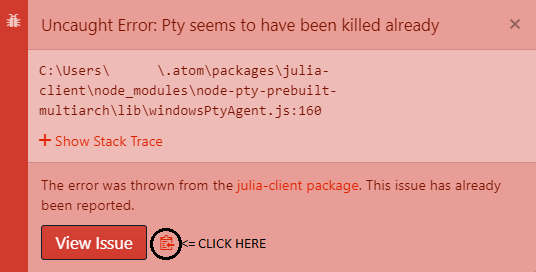
I assume you get the same error popup in atom
May I know how to generate this "Stack Trace", "Commands" and "non core package" ?
You can see in the attached image where I got it from
I assume you get the same error popup in atom
nice one, thanks!
Just to confirm that I'm getting the same when reading a large CSV file - not always, but most of the time. Julia just freezes, with little to no CPU usage, and all I can do is completely close down Atom. At times though the CSV read succeeds, so maybe there's an issue related to threading here (given that CSV.read is multithreaded now afaik)?

nice one, thanks!
You can also get more info by following the steps outlined in the attached image
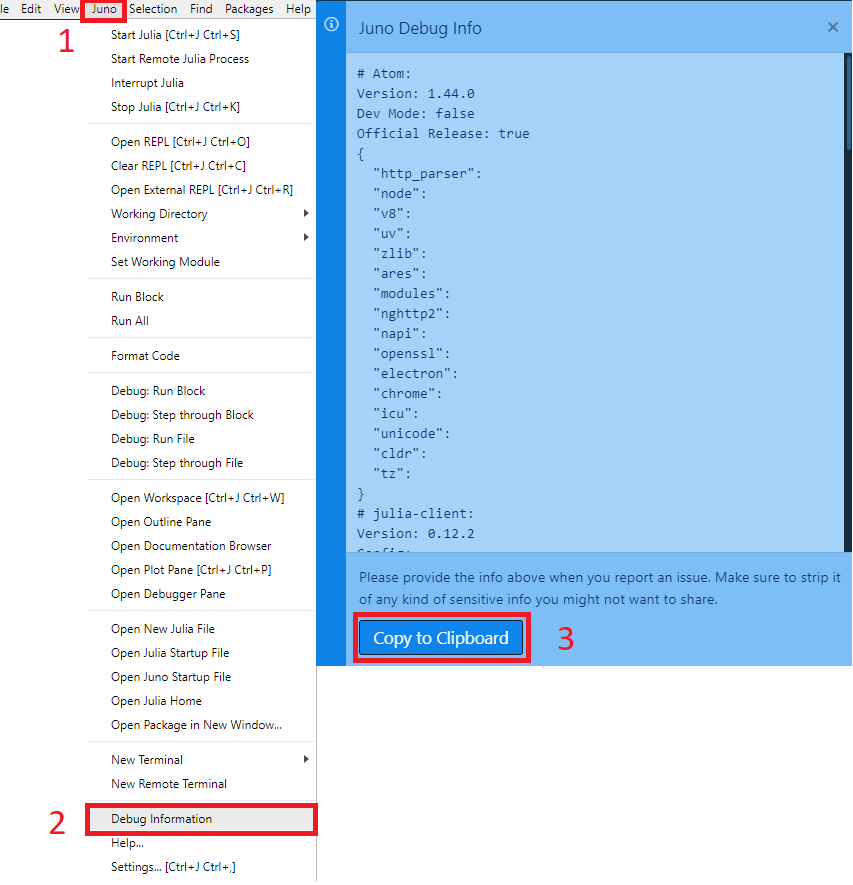
It will show you every setting, package, version etc. that you have.