
atom-julia-client
 atom-julia-client copied to clipboard
 JunoLab
Juno repl is stuck at starting julia
Sorry, but my juno is stuck at repl saying starting julia. My julia version works well, as I am able to run codes and commands from the julia.exe. I don't know what the problem is, did a re installation with no effect.


Update, if I change it to legacy mode, I see my console working. But then I also started seeing error like "Error loading julia snippet". And I cant try anything in REPL as the moment I press any key to start repl, I get the message starting julia and then its stuck.
The snippets error should be fixed with the latest version of language-julia. Can you still reproduce the error of not being able to start the console in repl (non-legacy) mode?

Did you make sure all of your packages (atom-julia-client and atom-ink in Atom, Atom.jl and Juno.jl in Julia) are up-to-date?
Yes, I installed Julia and Atom according to the installation instruction (http://docs.junolab.org/latest/man/installation.html) and packages are up-to-date. But, Juno repl is still stuck at starting julia.
I have a same problem after updating atom-julia-client. Also have up-to-date version of atom itself and all packages of atom and julia.
EDIT : works again after removing and reinstalling atom packages

Atom apparently messes up the update sometimes. If you don't see a settings button for atom-julia-client after initiating an update you'll need to reinstall it.
I have removed and reinstalled Atom packages, but Juno repl is still stuck at starting julia. Actually, it worked well before I uninstalled Atom two weeks ago. this problem just emerged when I reinstalled the latest Atom at last week. @pfitzseb
Alright. If you go to Settings > Packages > julia-client, do you see a settings button there?
Yes, I have seen the julia-client setting button in Atom packages.
I am wondering what I should do next step.
thanks.
On Sat, Apr 21, 2018 at 11:07 AM, Sebastian Pfitzner < [email protected]> wrote:
Alright. If you go to Settings > Packages > julia-client, do you see a settings button there?
— You are receiving this because you commented. Reply to this email directly, view it on GitHub https://github.com/JunoLab/atom-julia-client/issues/443#issuecomment-383317319, or mute the thread https://github.com/notifications/unsubscribe-auth/AkoZNUZi4DeUutwK34mMjdx84HwngZHfks5tq3VqgaJpZM4SvEjf .
-- Xinle Gong PhD Candidate, Mechanical Engineering of Beijing Institute of Technology & Visiting student, Mechanical Engineering of University of California, Berkeley 2169 Etcheverry Hall, Berkeley, CA 94720 Voice: 510-570-9676 Email: [email protected]
Hi,
If you want to get away with the problem of stuck repl. Try changing the repl setting to legacy and restart. It worked for me may be it might also work for you. Let me know.
On Sat, Apr 21, 2018, 4:16 PM XinleGong [email protected] wrote:
Yes, I have seen the julia-client setting button in Atom packages.
I am wondering what I should do next step.
thanks.
On Sat, Apr 21, 2018 at 11:07 AM, Sebastian Pfitzner < [email protected]> wrote:
Alright. If you go to Settings > Packages > julia-client, do you see a settings button there?
— You are receiving this because you commented. Reply to this email directly, view it on GitHub < https://github.com/JunoLab/atom-julia-client/issues/443#issuecomment-383317319 , or mute the thread < https://github.com/notifications/unsubscribe-auth/AkoZNUZi4DeUutwK34mMjdx84HwngZHfks5tq3VqgaJpZM4SvEjf
.
-- Xinle Gong PhD Candidate, Mechanical Engineering of Beijing Institute of Technology & Visiting student, Mechanical Engineering of University of California, Berkeley 2169 Etcheverry Hall, Berkeley, CA 94720 Voice: 510-570-9676 Email: [email protected]
— You are receiving this because you authored the thread. Reply to this email directly, view it on GitHub https://github.com/JunoLab/atom-julia-client/issues/443#issuecomment-383326732, or mute the thread https://github.com/notifications/unsubscribe-auth/ASWtrQPd1WMICoHyHZPROdlYUcFWj_hMks5tq5O1gaJpZM4SvEjf .
Great!
It does really work.
I change the REPL setting to legacy mode and then my console can work.
After that, I re-change it to REPL-based mode, It also works too.
Thanks. @sharabhs
Hi,
I am encounter another problem when add Mosek. I want to know how did you solve this problem? Thanks.
INFO: Building Mosek ====================================================[ ERROR: Mosek ]====================================================
LoadError: No download agent available; install curl, wget, fetch, or powershell. while loading C:\Users\xinle.julia\v0.6\Mosek\deps\build.jl, in expression starting on line 150
========================================================================================================================
====================================================[ BUILD ERRORS ]====================================================
WARNING: Mosek had build errors.
- packages with build errors remain installed in C:\Users\xinle.julia\v0.6
- build the package(s) and all dependencies with
Pkg.build("Mosek") - build a single package by running its
deps/build.jlscript
========================================================================================================================
On Sat, Apr 21, 2018 at 1:49 PM, Sharabh Shukla [email protected] wrote:
Hi,
If you want to get away with the problem of stuck repl. Try changing the repl setting to legacy and restart. It worked for me may be it might also work for you. Let me know.
On Sat, Apr 21, 2018, 4:16 PM XinleGong [email protected] wrote:
Yes, I have seen the julia-client setting button in Atom packages.
I am wondering what I should do next step.
thanks.
On Sat, Apr 21, 2018 at 11:07 AM, Sebastian Pfitzner < [email protected]> wrote:
Alright. If you go to Settings > Packages > julia-client, do you see a settings button there?
— You are receiving this because you commented. Reply to this email directly, view it on GitHub < https://github.com/JunoLab/atom-julia-client/issues/443# issuecomment-383317319 , or mute the thread < https://github.com/notifications/unsubscribe-auth/ AkoZNUZi4DeUutwK34mMjdx84HwngZHfks5tq3VqgaJpZM4SvEjf
.
-- Xinle Gong PhD Candidate, Mechanical Engineering of Beijing Institute of Technology & Visiting student, Mechanical Engineering of University of California, Berkeley 2169 Etcheverry Hall, Berkeley, CA 94720 Voice: 510-570-9676 Email: [email protected]
— You are receiving this because you authored the thread. Reply to this email directly, view it on GitHub <https://github.com/JunoLab/atom-julia-client/issues/443# issuecomment-383326732>, or mute the thread <https://github.com/notifications/unsubscribe-auth/ ASWtrQPd1WMICoHyHZPROdlYUcFWj_hMks5tq5O1gaJpZM4SvEjf> .
— You are receiving this because you commented. Reply to this email directly, view it on GitHub https://github.com/JunoLab/atom-julia-client/issues/443#issuecomment-383328596, or mute the thread https://github.com/notifications/unsubscribe-auth/AkoZNVZ8DHswnkd2L2PVa6zdxb-jRHdkks5tq5tTgaJpZM4SvEjf .
Solution that worked for me: Tab Julia -> Settings -> Unselect the "Enable Powershell Wrapper" option -> Restart Juno

I also have this problem. Console (Ctrl-Shift-I) shows
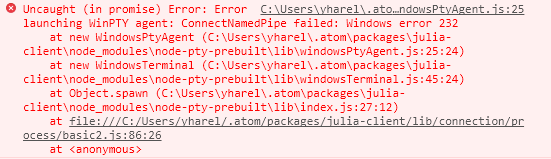 Following the discussion in #468 (The stack trace is similar but different), I verified that I can run
 .atom\packages\julia-client\node_modules\node-pty-prebuilt\build\Release\winpty-agent.exe from the command prompt, which I can.
However, after setting the style option from REPL-based to console, running run(`winpty-agent.exe`) in the Julia console fails ("no such file or directory").

https://github.com/rprichard/winpty/issues/142 and https://github.com/zeit/hyper/issues/2832 seem related. No clue what's going on here...
It's kinda expected that run(`winpty-agent.exe`) fails because the starting dir of Julia isn't ~\.atom\packages\julia-client\node_modules\node-pty-prebuilt\build\Release.
I am having this issue as well. I just downloaded Atom for the first for the specific use of Julia with it. I downloaded the uber-juno package and I let it do its thing but I cannot use the REPL console. I tried using legacy and it allows me to input something into it but then it just gives me an error saying UndefVarError: active_repl not defined. Again, I am new to Atom so I'm not sure about navigating Atom or its files. Some help would be much appreciated.

Is this closed? I'm still waiting for a response. Looking for some help
Kinda depends on what errors you're getting. The UndefVarError: active_repl not defined thing should be fixed by now, but also shouldn't have broken anything anyways.
Can you open switch back to the REPL-based Juno console, open the Atom dev tools (with Ctrl-Shift-I or Cmd-Shift-I) and give me any error output in the console there?
Hello! I got exacly the same error, where the Julia terminal is stuck at "press enter to start julia" message. I'm using Juno through Atom. All packages are updated to the latest version. Here are the errors in the dev console:


As per this comment the problem seems to only arise with certain AntiVirus solutions.
As soon as the upstream issue is fixed Juno should work fine, afaict. For the time being you could try disabling your antivirus software or creating an exception for the winpty-agent.exe.
Someone on Gitter just confirmed that excluding C:\Users\you\.atom\packages\julia-client\node_modules\node-pty-prebuilt\build\Release\winpty-agent.exe from McAffee's real time scan resolves the error, so please try that and report back whether it works.
Hi, I had the same issue and I fixed it by switching the Console Options - Style from REPL to Legacy in the the settings. Hope this helps.
