

 JuliaData
Print column names for columns omitted similar to R tibble
- let's assume that the max number of columns to be listed is N=30. N is different from the limit of printing those columns with values.
- if the number of column names is greater than N, it will be sufficient to print the first N columns and print the 3 last columns just to make sure the range of columns covered can be verified without printing all.
- we can make N maybe variable (can be changed by user) but not greater than certain maxN?

Hi @ppalmes !
Can you please provide an example? I think I did not understand.

@ronisbr Let me give a specification that is a bit simpler and I think better.
When you omit columns collect the names of the columns that you have omitted. Then get the screen width and calculate how much space you have left after printing the omitted column and row count. Then print the vector containing the omitted columns, but cropping it in the middle so that it still fits the screen width (so you retain starting and end columns).
What I mean (roughly, as some details might need to be worked out).
Current display:
julia> DataFrame(rand(100, 100), :auto)
100×100 DataFrame
 Row │ x1         x2         x3         x4        x5         x6        x7           x8         ⋯
     │ Float64    Float64    Float64    Float64   Float64    Float64   Float64      Float64    ⋯
─────┼──────────────────────────────────────────────────────────────────────────────────────────
   1 │ 0.581289   0.529527   0.541915   0.34413   0.306274   0.448513  0.537019     0.671052   ⋯
  ⋮  │     ⋮          ⋮          ⋮         ⋮          ⋮         ⋮           ⋮          ⋮       ⋱
 100 │ 0.296366   0.810638   0.721117   0.801977  0.108178   0.263525  0.567461     0.869857
                                                                  92 columns and 98 rows omitted
display after the change would be something like:
julia> DataFrame(rand(100, 100), :auto)
100×100 DataFrame
 Row │ x1         x2         x3         x4        x5         x6        x7           x8         ⋯
     │ Float64    Float64    Float64    Float64   Float64    Float64   Float64      Float64    ⋯
─────┼──────────────────────────────────────────────────────────────────────────────────────────
   1 │ 0.581289   0.529527   0.541915   0.34413   0.306274   0.448513  0.537019     0.671052   ⋯
  ⋮  │     ⋮          ⋮          ⋮         ⋮          ⋮         ⋮           ⋮          ⋮       ⋱
 100 │ 0.296366   0.810638   0.721117   0.801977  0.108178   0.263525  0.567461     0.869857
omitted 98 rows and 92 columns: x9, x10, x11, x12, x13, x14, x15, ⋯, x96, x97, x98, x99, x100
(I would leave up to you to decide on the details, but this is the type output that would be natural to generate)

yeah, in the same way you print large rows where you include the first few elements in the beginning ... and few at the end to give an idea of the range of elements covered.
also, the omitted column names can be printed as long as they are not so many to swamp the display. this will help in making sure results with expected column names can be easily verified to be there during transformations even without their values printed.
also, the omitted column names can be printed as long as they are not so many to swamp the display.
cropping to display width will ensure this
can we cover this issue for both rows and columns. for example, i don’t want to see so many rows printed as the default. can i pass in the argument or global environment LINES and COLUMNS so that if i want a square kind of display, i will indicate print only max of 10 rows and 10 columns. this will crop the middle elements but still will cover the few head and few tail elements for both rows and columns. of course the env variables will always be overridden by the length and width of display.
by the way, dataframe display is the nicest display among dataframe implementations and really help in analyzing tabular data. it is very elegant and clean.
also, the omitted column names can be printed as long as they are not so many to swamp the display.
cropping to display width will ensure this
i’m referring to print the omitted column names as a list of names so that we can still know what are these column names omitted.
can you please post an example of target display you would like to have on DataFrame(rand(100, 100), :auto) as I am not fully clear what you mean. Thank you!
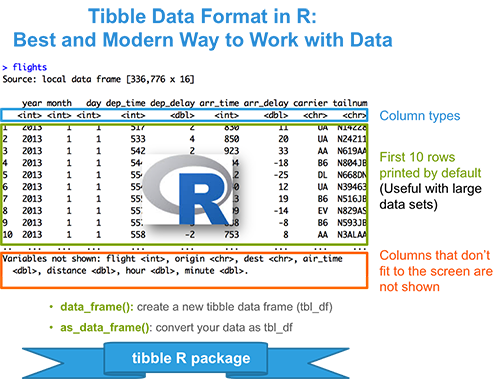
you will see in the bottom, it lists the column names cropped and also prints the first N rows. what i want as a variation is to crop the columns and rows but print the values of the first few and last few columns and rows as well as print the names of columns cropped.
as i am not in my computer right now, i just linked the photo from this: http://www.sthda.com/english/wiki/tibble-data-format-in-r-best-and-modern-way-to-work-with-your-data which in a way captures partly the output i described.
print the values of the first few and last few columns
This would be hugely inefficient unfortunately. We already discussed this and last columns will not be printed currently. What we can do is what I proposed - to print omitted columns at the bottom.
maybe cache the last 3 rows/cols? if it’s an iterator, i thought they can be lazily loaded and cached? if it’s very slow, then at least the list of names of columns cropped can be listed to at least give an idea what are these columns.
Cropping columns in the middle is something that will take a great amount of work in PrettyTables. It can be done, but it is not trivial. We discussed and get PrettyTables prepared to replace HTML and LaTeX printing here has higher priority.
But I promise it will be done eventually :)