

 JoshuaWise
Error loading syntax file "Packages/JavaScript/JavaScript.sublime-syntax"


Same
error: Error loading syntax file "Packages/JavaScript/JavaScript.sublime-syntax": Unable to read Packages/JavaScript/JavaScript.sublime-syntax Error loading scope:source.js: Unable to find syntax file for scope source.js in Packages/HTML/HTML.sublime-syntax

This is because this plugin automatically disables the default JavaScript syntax, with no option to turn the behavior off. Not sure who came up with this asinine idea...

This is because this plugin automatically disables the default JavaScript syntax, with no option to turn the behavior off. Not sure who came up with this asinine idea...
Not sure if this has changed in more recent versions of Sublime Text, but at least when this package was developed Sublime Text couldn't handle having two syntaxes with the same scope name (source.js). Also, giving JavaScript Ultimate a different scope name is unacceptable because many other packages act on the source.js scope to provide additional functionality to JavaScript code.
If you have any better solution to these problems, or if these restrictions have been lifted in more recent versions of Sublime Text, I would love to know.

As far as I can remember with Sublime 2 and 3, I've never had this problem. Both the default Python syntax and my PythonImproved syntax have happily coexisted side-by-side with the source.python scope. I can have files with both syntaxes open at the same time, and switch from one to the other with no issues. For a long time both were .tmLanguage files, now the default has changed to .sublime-syntax. I have both versions of PI in the same directory, and nothing breaks.
I suspect you may have accidentally run into some other type of error previously and mistakenly interpreted it as Sublime not liking two syntaxes sharing the same scope. I've never come across the same problem myself with Python, JavaScript, R, Perl, C, C++, HTML, or Ruby (there may be others) when I've had multiple syntaxes installed for the same language. This goes for both ST2 and ST3, although I've been primarily using ST3 for over 3 years now, maybe longer.
BTW, sorry for the "asinine" comment up there, that was a bit out of line. I was just frustrated at the time. :rage1:

@JoshuaWise Same error mentioned in this ticket. Build 3126.
Well, now it's OK, after uninstalling and installing again.
Thank you for your work.
Same as @jonataswalker.. after installing I get the syntax file error no matter how many times I restart, and it persists after removing this package as well. Tried the solution from http://superuser.com/questions/1089786/sublime-text-3-automatically-adds-javascript-to-ignored-packages but that didn't work.

@Vaelek Did you remove "JavaScript" from the "ignored_packages" list in your user settings?
@JoshuaWise I did. Eventually I just renamed my data folder and started fresh. Installed this package before anything else. Restarted ST3 multiple times and continued to get the error. Closed all js files and restarted once more and then it went away. Was able to cleanly uninstall as well after manually removing the ignored package again.
I think "closing all JS files" was the key. In the README it says "Before uninstalling JavaScript Ultimate, be sure close all open JavaScript/JSON files". Perhaps people need to do the same for installing it too.
UPDATE: As of right now, if you see this error when installing JavaScript Ultimate, it's probably okay. If everything seems to work fine after closing the error popup, then there's nothing to worry about. I'm working on trying to figure out why the error message is appearing.

Can't believe this package is causing so much trouble even after installing. Who the heck reads the README file before uninstalling something? That's not how it should work. If you create mess with your package, you HAVE TO clean the mess when uninstalling it. And no, when I reopen Sublime I always have the JS error. And NO, NO it's not "probably okay" and no, there no "nothing to worry about".
Anyway, to solve the problem, I followed as MattDMo suggested here : https://superuser.com/questions/1089786/sublime-text-3-automatically-adds-javascript-to-ignored-packages but it did not work. So after re-installing Javascript Ultimate, I closed all files opened within ST3 and uninstalled. Seems to work now.

@JoshuaWise There's really no need to disable the original JavaScript package. If you just remove that, everything should be just fine. Maybe add some instructions on setting the default? It's what I've seen other alternate syntax file packages do.


I have uninstalled JavaScript ES6 package and everything was OK liek a shot in a second !!

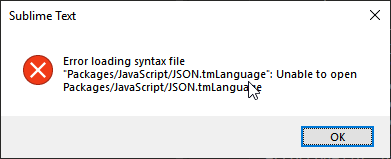


 Still getting on build 4107.
reinstallation doesn't fix the issue
Still getting on build 4107.
reinstallation doesn't fix the issue