

 JoshClose
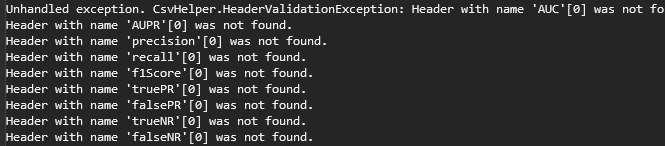
Cant find documentation on how to fix "Unhandled exception. CsvHelper.HeaderValidationException: Header with name 'AUC'[0] was not found."
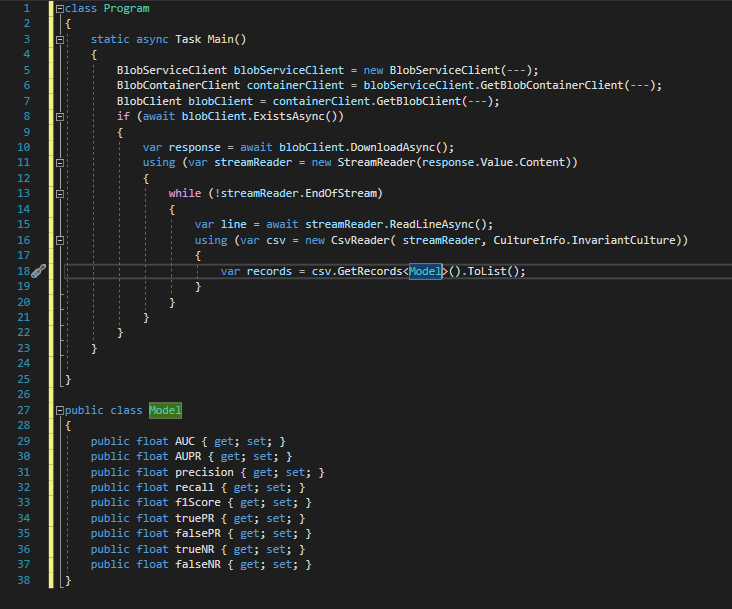
This is my program class that retrieves a csv file from Azure storage and parses it using csvhelper. My header class is also included to define the variable types.
This is the content of the csv file in Azure. Headers and data separated by commas.

This is the error I am getting on terminal
I couldn't find any documentation for this newest version of csvhelper to fix this issue. I am not sure if it is a problem with the delimiter not being detected (and if so, how do I set it in this new version?) @JoshClose

I believe you need to remove
while(!streamReader.EndOfStream()) {
    var line = streamReader.ReadLineAsync();
CsvReader is trying to read the stream, but you have already read the first line with var line =. CsvReader then has to read the second line which doesn't have the header in it. Therefore you are getting the exception.

I think this is related to CSV file format. I have exactly the same issue. When I try to open UTF-8 everything works fine. But if I try to open exactly the same file formatted in UTF-8-BOM, it fails since we have extra characters on the beginning of the file. You can check formatting using Notepad++ under Encoding.
