

 JohnnyRS
Captcha Alarm not going off
I can't get my captcha alarm to work and it's really slowed me down. I've tried clearing my cache/cookies, reinstalling, and turning the alarm off and back on and nothing is working.

Was the alarm working before? I changed a few things trying to detect captcha with the last update. I am not able to test it on my system.

Yes it worked before. It stopped working after I cleared my cache and cookies when I cleaned up my system.
On Wed, Oct 6, 2021, 8:07 AM JohnnyRS @.***> wrote:
Was the alarm working before? I changed a few things trying to detect captcha with the last update. I am not able to test it on my system.
— You are receiving this because you authored the thread. Reply to this email directly, view it on GitHub https://github.com/JohnnyRS/PandaCrazy-Max/issues/49#issuecomment-936460152, or unsubscribe https://github.com/notifications/unsubscribe-auth/AV53GIMKB4JVUH7XBJ2Y2TLUFRQ2TANCNFSM5FMWCLYQ . Triage notifications on the go with GitHub Mobile for iOS https://apps.apple.com/app/apple-store/id1477376905?ct=notification-email&mt=8&pt=524675 or Android https://play.google.com/store/apps/details?id=com.github.android&referrer=utm_campaign%3Dnotification-email%26utm_medium%3Demail%26utm_source%3Dgithub.
yeah, no sound or popup so we have no idea when we have one, unless you are working on a batch and know there are more available you would never know.

Well if it worked before the new update I will revert the changes I made to the captcha detection to the previous update. I got a report that it wasn't working so I changed it. Also if someone that gets captchas can show me a screenshot of what is shown on the page with a captcha it could help me make the detection better. Thanks.
as in on the page we put our captcha in or what kind of information do you need? I am more than willing to help you out with this, I just am not sure what screenshot would be needed. (plus there aren't many batches up that are worth it right now, so it is harder to get those captchas to come in)
Right now it checks to see if the url it gets back from a panda doesn't have assignment_id= at the end and it doesn't get an error message than it assumes it probably is a captcha. What might be better is to have it look for a unique text on the page so it knows for sure. Lot of the screenshots of mturk captchas are from years ago so I want to see a screenshot of the text that tells the user to fill in the captcha because it might haven changed now.
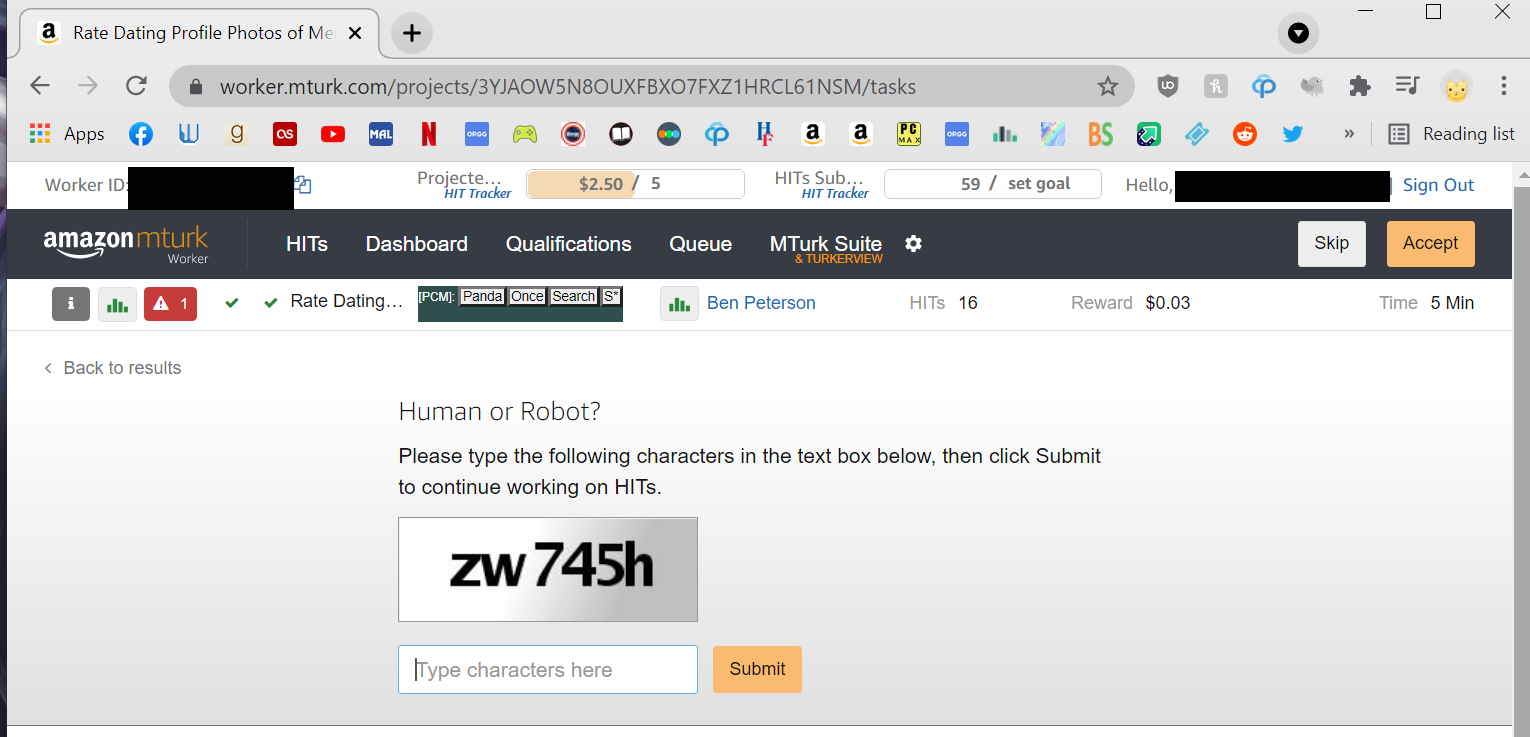
Thanks. That's what I wanted. I'll see if I can get it to work in the next update.
I updated the extension with a fix for the captchas and it looks like it's already live on chrome store. Should update next time you start up chrome. Hope it works.
Thank you so much! Not only does the alarm go off now, I can do captchas in Panda Crazy now too. I really appreciate it <3