

 JohnCoates
A fix for the black screen appearing after installing the screen saver
General troubleshooting tips
Before logging an issue please check that:
- [x] You have the latest version installed (There may be a beta version that fixes your issue), see here for the latest releases and bug fixes: https://github.com/JohnCoates/Aerial/releases
- [x] Your issue isn't already mentioned in our issues. You may find a workaround there or a similar request already made.
- [x] Your problem isn't mentioned in the troubleshooting page.
If none of this fixes your issue, tell us about the problem you are experiencing or the feature you'd like to request.
Required information
In order to help us sort your issue, we ask that you provide the following information:
- [x] Mac model: MacBook Pro (15-inch, 2019)
- [x] macOS version: macOS Mojave v10.14.6
- [x] Monitor setup: dual
If appropriate, please enable Debug mode and Log to disk in Advanced tab and replicate your bug, then attach the AerialLog.txt file (You can access this file through the Advanced tab).
Description of issue / Feature request
After installing through homebrew (brew cask install aerial) and selecting Aerial as my screen saver, initiating the screen saver would display a black screen that wouldn't respond to any input.
I added the Little Snitch rules from the instructions in Documentation/Troubleshooting.md, but it still wouldn't work.
How to Fix
I was able to fix the issue by adding some additional Little Snitch rules:
-
Allow connections to Domains
phobos.apple.com.edgesuite.net: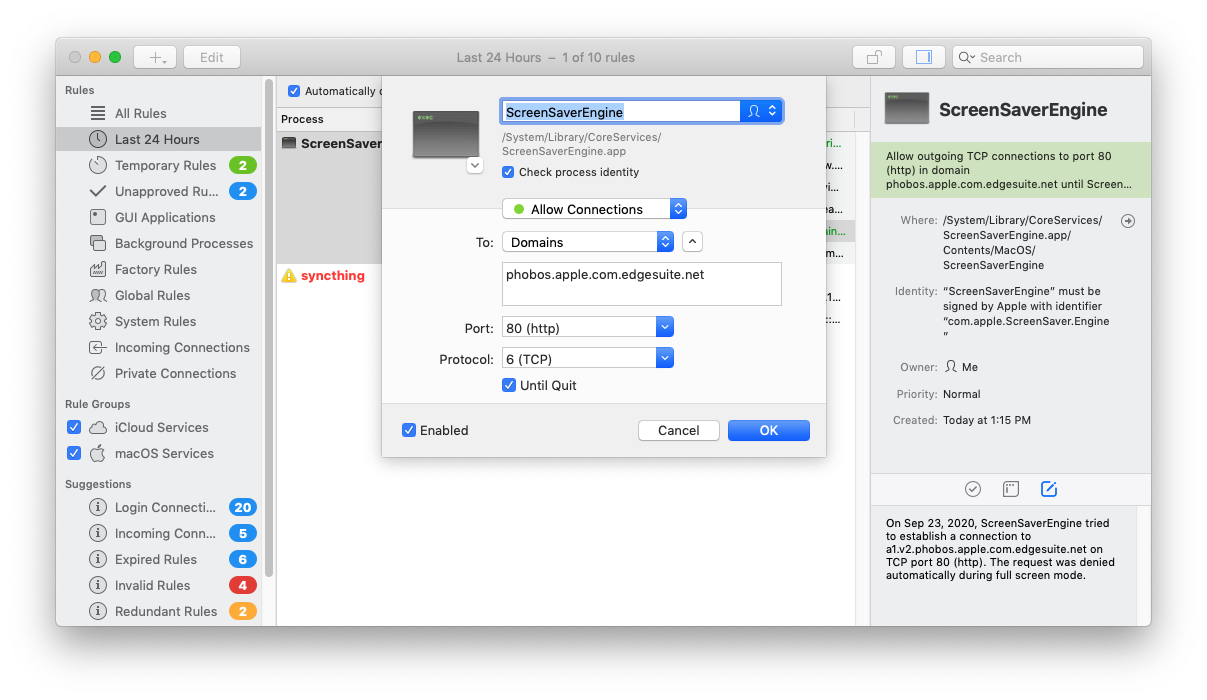
-
Allow connections to Hostnames
aerialscreensaver.github.io: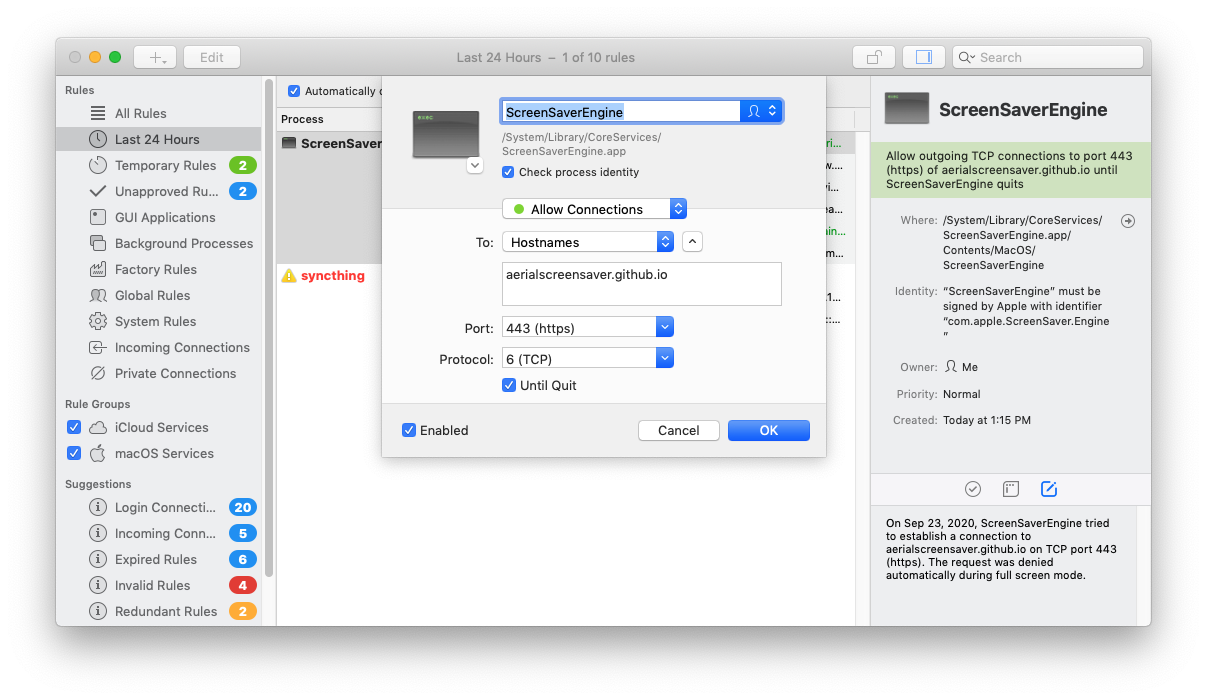
Here is an export of all of my Little Snitch rules for Aerial -- hopefully it's helpful to someone:
{
  "description" : "Allow aerial to connect to the domains and hostnames required to function. https:\/\/aerialscreensaver.github.io",
  "name" : "Aerial Screen Saver",
  "rules" : [
    {
      "action" : "allow",
      "creationDate" : 1600881316.8692021,
      "modificationDate" : 1600881513.057385,
      "owner" : "me",
      "ports" : "443",
      "process" : "\/System\/Library\/CoreServices\/ScreenSaverEngine.app\/Contents\/MacOS\/ScreenSaverEngine",
      "protocol" : "tcp",
      "remote-hosts" : "aerialscreensaver.github.io"
    },
    {
      "action" : "allow",
      "creationDate" : 1600879120.775104,
      "modificationDate" : 1600881031.6545439,
      "owner" : "me",
      "ports" : "443",
      "process" : "\/System\/Library\/CoreServices\/ScreenSaverEngine.app\/Contents\/MacOS\/ScreenSaverEngine",
      "protocol" : "tcp",
      "remote-hosts" : "raw.githubusercontent.com"
    },
    {
      "action" : "allow",
      "creationDate" : 1600881096.2918119,
      "modificationDate" : 1600881096.2918119,
      "owner" : "me",
      "ports" : "443",
      "process" : "\/System\/Library\/CoreServices\/ScreenSaverEngine.app\/Contents\/MacOS\/ScreenSaverEngine",
      "protocol" : "tcp",
      "remote-hosts" : "s.yimg.com"
    },
    {
      "action" : "allow",
      "creationDate" : 1600881070.4285159,
      "modificationDate" : 1600881070.4285159,
      "owner" : "me",
      "ports" : "443",
      "process" : "\/System\/Library\/CoreServices\/ScreenSaverEngine.app\/Contents\/MacOS\/ScreenSaverEngine",
      "protocol" : "tcp",
      "remote-hosts" : "weather-ydn-yql.media.yahoo.com"
    },
    {
      "action" : "allow",
      "creationDate" : 1600881330.4018869,
      "modificationDate" : 1600881510.1968679,
      "owner" : "me",
      "ports" : "80",
      "process" : "\/System\/Library\/CoreServices\/ScreenSaverEngine.app\/Contents\/MacOS\/ScreenSaverEngine",
      "protocol" : "tcp",
      "remote-domains" : "phobos.apple.com.edgesuite.net"
    },
    {
      "action" : "allow",
      "creationDate" : 1600881421.4784031,
      "modificationDate" : 1600881421.4784031,
      "owner" : "me",
      "ports" : "443",
      "process" : "\/System\/Library\/CoreServices\/ScreenSaverEngine.app\/Contents\/MacOS\/ScreenSaverEngine",
      "protocol" : "tcp",
      "remote-domains" : "phobos.apple.com.edgesuite.net"
    }
  ]
}
You can also import this file, just remove the .txt extension after downloading:
Aerial Screen Saver.lsrules.txt
This seems like it could be helpful for the issues: #1083 and #1102

Hey there ! This is super interesting, thanks a WHOLE lot !
I'm a tad bit surprised by phobos.apple.com.edgesuite.net but it's possibly a redirect happening on Apple servers (it's usually sylvan.apple.com but not on edgesuite). I'Il update the documentation and everything tomorrow with your lsrules files too.
Many many thanks for this update!

In addition to the ScreenSaverEngine rule, I had to add the same ruleset for LegacyScreenSaver.appex to have it work properly. FYI, I'm running 10.15.7 and Little Snitch 4.5.2. The easiest way to workaround this locked black screen when using both Aerial and Little Snitch is to configure Little Snitch to Silent Mode and Allow Connections just before launching Aerial for the first time so that it creates the rules automatically. Once videos are downloaded, switch back to Alert Mode (if this is your default configuration).
