
activate-power-mode
 activate-power-mode copied to clipboard
 JoelBesada
Overheating MacbookPro
Hi there
Just a little thing to mention, This is a great plugin, But it seems ti raise the temps of the macbook pro to around 77C
Something to look at?

Are you 100% sure this is due to this plugin? We've had no other issues reported on this. How much CPU and RAM do you have? Is this a Macbook Air? What other applications were you running simultaneously? Does Atom alone cause overheating?

Sounds like a reasonable feature for power mode. Consider merging for all clients.

@nathanchapman hey there Here are some specs, Its the macbook pro
Its got 8gb of ram, 2.6ghz i5
i have a few but atoms using significant power when i have this feature on. I did turn off this feature and the mac cooled rapidly
Sam
I'm experiencing the exact same issue here, 100% sure it's this plugin... Other than that I really like this thing... It's completely useless awesome stuff 👍


+1 Mid 2015 MBP 2.5G i7 16GB RAM, AMD R9 M370X 2G, ~100% CPU usage on an Atom Helper process even when idle with active-power-mode on

Same thing here. MBP Mid 2014 OSX 10.11.4 Atom 1.7.3 activate-power-mode 0.5.2
As soon as I toggle power mode on and type one character both Atom helper processes, which are running, jump to a CPU usage between 30-40% for a short time. If I don't type the usage drops down to 0.0x%. Typing new characters raises the CPU usage again.

Consider this another confirmation. Enabling power mode will get the fans running hard in a few seconds and they don't stop until a few seconds after I disable the power mode or the plugin altogether. Activity Monitor reports at least about 20% as the CPU usage by one of the Atom Helper processes.
- Atom 1.7.3
- activate-power-mode 0.5.2
- OS X El Capitan (10.11.4)
- MacBook Pro (Retina, 15-inch, Mid 2014)
- 2.2 GHz Intel Core i7
- Intel Iris Pro 1536 MB
Just some observations that I've made from glancing at the code:
- The
@particlesobject could be changed to an array. When the maximum number of particles changes, the particles array could be adjusted accordingly. This would prevent unused particles from sitting around in memory when reducing the maximum number of particles. Admittedly, this isn't too much of a problem for typical values in the settings. Arrays are subclasses of objects, so everything else should still work the same. - With the default settings, the loop in
drawParticlesrenders at most 30,000 particles per second. For each particle that it renders, the rendering context has to render a completely new image. And each image is the size of the editor element. With WebGL, you would only need to render at most 60 images per second, wouldn't have to create new particle objects or hash the key for each frame, and be able to make more realistic looking particles. The GPU could churn through this like a tank through a wall of pillows with its (the GPU's) massive parallel computing capabilities. - Is there not a way to draw particles at each cursor in a multi-cursor scenario?

I have the same problem with rampant fan usage, otherwise it's a fun add-on. If/Once the resource hogging is fixed, I'll reinstall.

I have the same issue on Ubuntu! After a short time it uses 100% of the CPU

I had 3 Atom windows open and disabling this package really changed my CPU load!


Do not fix. I depend on this to warm my desk, as my team turns the AC on way too low.
Hahahhahahhahahha :D Geoffery Miller [email protected] (időpont: 2016. jún. 1., Sze, 17:04) ezt írta:
Do not fix. I depend on this to warm my desk, as my team turns the AC on way too low.
— You are receiving this because you commented. Reply to this email directly, view it on GitHub https://github.com/JoelBesada/activate-power-mode/issues/124#issuecomment-223021718, or mute the thread https://github.com/notifications/unsubscribe/AKscKuJE7X_VVA_jKz6dN7uTfZt0mSwpks5qHZ9kgaJpZM4IGMk6 .
This thread has been around long enough and it's deserving of some XKCD:
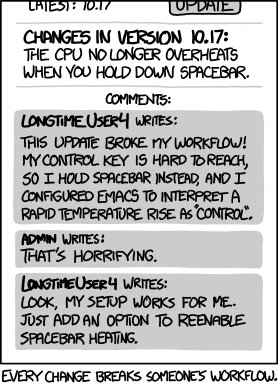
https://xkcd.com/1172/

@tylercrompton shrug this package is awesome. I thought it was for fun. Apologies. In seriousness, if someone takes the time to fix cpu use problems that's awesome too. Thanks for your efforts in trying to investigate it.
I actually have an osx laptop as well, but can't seem to confirm the high cpu usage causing overheating myself - although I've disabled the screen shaking effect, I only use the particles. Don't know if that's helpful.


An update from my side. Not sure why or how, but I tried reinstalling this package and now it is working perfectly for me.
Perhaps I have uninstalled a package that may have been causing some sort of conflict/issue, or perhaps it's the latest atom version update.
os: OS X El Capitan 10.11.5
atom: 1.8.0
plugins ├── [email protected] ├── [email protected] ├── [email protected] ├── [email protected] ├── [email protected] ├── [email protected] ├── [email protected] ├── [email protected] ├── [email protected] ├── [email protected] ├── [email protected] ├── [email protected] ├── [email protected] ├── [email protected] ├── [email protected] ├── [email protected] ├── [email protected] ├── [email protected] ├── [email protected] ├── [email protected] ├── [email protected] ├── [email protected] ├── [email protected] ├── [email protected] ├── [email protected] ├── [email protected] ├── [email protected] ├── [email protected] ├── [email protected] ├── [email protected] ├── [email protected] ├── [email protected] ├── [email protected] ├── [email protected] ├── [email protected] ├── [email protected] ├── [email protected] ├── [email protected] ├── [email protected] ├── [email protected] ├── [email protected] ├── [email protected] ├── [email protected] ├── [email protected] ├── [email protected] ├── [email protected] └── [email protected]
It may be worth an effort by someone experiencing the issue to one by one remove packages that are not in the above list and see if the issue is resolved.

is this still happening?
I not able to get that 100% cpu usage on my ubuntu, at most 24~26%
@tylercrompton Hi, I'm interested on your suggestions, mainly the WebGL, could you provide an example (snippet) of your idea? Would be very helpful.

I have this same issue still. Atom Helper stays at a high ~20-30% CPU usage indefinitely it seems with the add on enabled. While typing I see 100% CPU loads. I have not changed any settings from the defaults.
Early 2015 MacBook Pro 2.7Ghz I5, 8GB RAM.


@lexcast, I'd love to provide an example, but I've already forgotten much of what I've learned about WebGL. I know enough to know what needs to be done but not enough to know how it is done. I'd have to dig through my computer graphics textbook to recall what to do. I'm not sure when I'd be able to find the time to do so.


I have the same issue on my surface pro 4, the fans get louder and there's 5-10% cpu increase in atom in task manager.


With the latest versions of atom and this package the issue persist? or at least were there improvements with those 100% cpus?
Same problem for me. mbp 15inch retina first gen. In my case my mbp would freeze/crash while the fan is still spinning trying to cool down the cpu/gpu/logic board. Disabling this plugin made a noticeable improvement. Just a heads up for anyone else running a mbp retina, sustained overheat can lead damage to the logicboard.
