
Dreambooth-Stable-Diffusion
 Dreambooth-Stable-Diffusion copied to clipboard
 JoePenna
training gets "Killed" ? not sure why
I followed the steps in the video Aitrepreneur made and I keep coming across this error

Not sure what is happening


FIX FOUND: In Jupyter Lab, open a new tab, open a terminal and type "ps aux" to find the PID for relauncher and webui, kill both process and restart the training.
on the youtube there is a thread that are discussing this. https://www.youtube.com/watch?v=7m__xadX0z0&lc=UgzHSfUz5CihSyO8nzN4AaABAg.9gVbwSnCOg19gW16WBw0RG

 After a couple of steps it still get killed
you guys have even amount of pics? I had 64 on vast yesterday and trained till 2000 steps no issues

Same here... Worked before, stopped working. Now I have started from the beginning and now I get this:
Epoch 0: 0%| | 1/2020 [00:03<1:44:35, 3.11s/it, loss=0.0379, v_num=0, train/lHere comes the checkpoint... Killed
Yes: Even amount of images (0 to 19 = 20 pictures)

Hey! I had the same problem several times, and this could just be a coincidence, but when using 2xGPUs and setting --gpus 1 it runs all the way to the end.

Same here... Worked before, stopped working. Now I have started from the beginning and now I get this:
Epoch 0: 0%| | 1/2020 [00:03<1:44:35, 3.11s/it, loss=0.0379, v_num=0, train/lHere comes the checkpoint... Killed
Yes: Even amount of images (0 to 19 = 20 pictures)
Try the first solution that I posted, the image of the YouTube comment
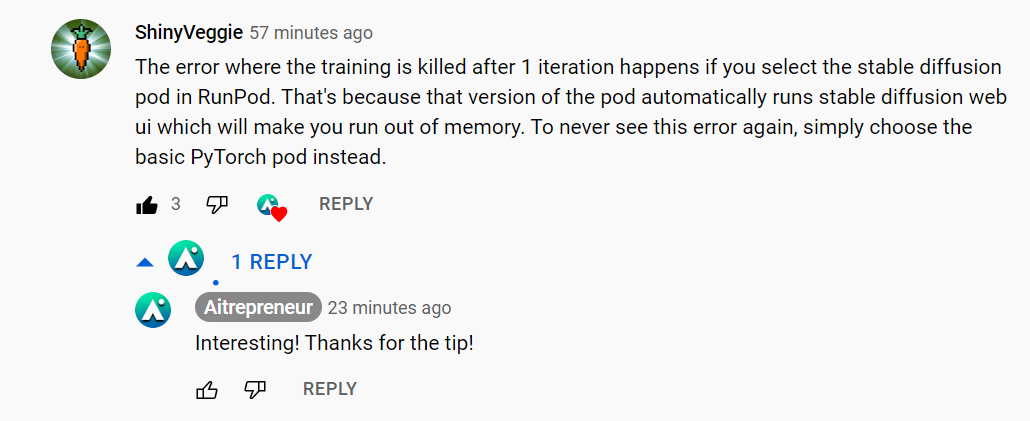
ok, someone commented on Aitrepreneur latest video
I did this and the issue persists with an A5000 on RunPod

ok, someone commented on Aitrepreneur latest video
I did this and the issue persists with an A5000 on RunPod
Sorry to hear that, it worked for me. Have you tried the first solution where you kill the programs?
I did try to kill the processes as well. It ended up working when I tried using a community pod with an RTX 3900 gpu 😃
Some extra info on this, as this is happening for me too.
Before running, check nvidia-smi in terminal, memory should be 1MiB / xxxxMiB, if its higher, you have to kill something (ps aux and kill pid).
But even then, i do get OOM kills. It is not after one iteration, its sometimes after a 100, sometimes after 200. This is very annoying as checkpointing right now is every 500. I am not sure what to do about this. It seems pretty random, on some runs I get no issues, on others i cant seem to get through. It seems related to the actual gpu you use, and then random luck.
EDIT: I seem to be having a lot more luck with the RTX 3090 and not so much with the A5000.

If running via runpod, run a PyTorch instance instead of a stable diffusion one. I stopped getting killed processes after that. Tested on 3090 and A5000.

Yea, i always run pytorch instead of sd and i still have issues on the a5000, it seems its just random.
Same experience as wizatom on both community and secure A5000 in the last few days.

Someone can write the sentence to kill please on Terminal please ? Thank you in advance.

@Larcebeau , this command worked for me. You can run it in a jupyter cell, no need to open a separate terminal:
!ps aux | grep 'webui\|relauncher' | head -3 | awk '{print $2}' | xargs kill -9
What it does:
ps aux # list processes
grep 'webui\|relauncher' # find the processes corresponding to webui and relauncher
head -3 # grab the first 3 lines (1 relauncher process and 2 webui processes). This may not be necessary
awk '{print $2}' # read the second column, which has the process ID
xargs kill -9 # pass the resulting pids to kill which will kill the processes.
When you run ps aux (or !ps aux in jupyter) afterwards, you should see no processes for webui or relauncher.

For anyone running into this for which the above doesn't help, this can be caused by a number of things, but the most likely is due to the machine running out of RAM -- not VRAM, but traditional main RAM. (Pretty sure the out-of-VRAM error is quite different.) The above suggestions will indeed free up a good bit of RAM (probably VRAM too) which can/will help. But if you still have the problem try renting a machine with more RAM. (Or, if running locally, increasing swap space or upgrading your hardware.)

For me the issue on RunPod was that when you start a pod, by default, it's set to 0 GPUs. If you click through it mindlessly, you will encounter this issue. You must select 1x GPU when starting.
