

 Jigsaw-Code
Initialization step is not working
Describe the bug Initialization step is not working
Screenshots


Client System (please complete the following information):
- Outline Client Version [Linux 1.8.1]
- Your Operating System: [Manjaro Linux 22]


It is better to use the AppImage version to use the application, so that you don't have any conflict with loading the Command Line Terminal to launch it. for more information please email us ( we are representative of Outline in IRAN ) : [email protected]

Hi @wanyay @persian85 , sorry about the inconvenience. From the error message, it is because we failed to lock the temporary installation folder using chattr -R -i /tmp/xxxxx, error message is chattr operation not supported while reading flags on /tmp/xxxxx. Could you please double confirm that this command is working on your machine and the paths in /tmp/ are not symbolic links?

@jyyi1 Sorry for the late reply, I have checked the chattr command is not working my machine.
Could you please share me if you have a quick solution for it.?
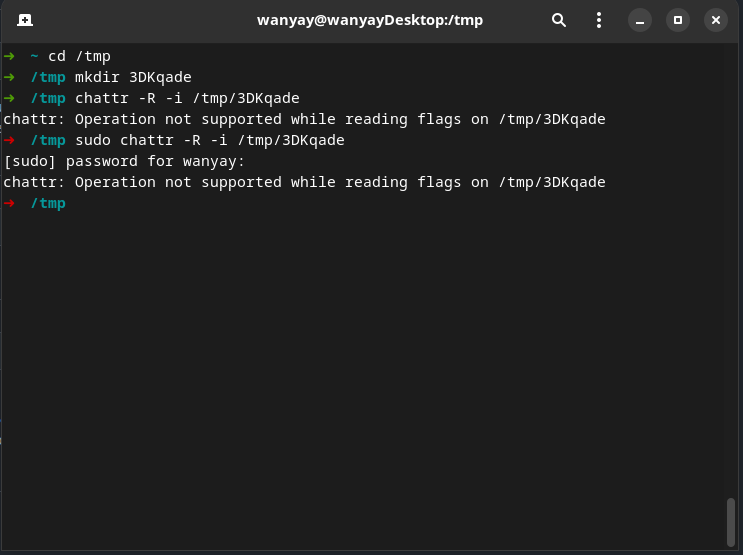
@wanyay Maybe because your /tmp/ folder is a symbolic link? Anyway, here is a workaround:
- download the contents in "https://github.com/Jigsaw-Code/outline-client/tree/linux-v1.8.1/tools/outline_proxy_controller/dist" and
cdinto the folder - Make sure
install_linux_service.shandOutlineProxyControllerare executable (chmod +x) - Run
sudo ./install_linux_service.sh <your-linux-username>, for example, if you linux username iswyan, please runsudo ./install_linux_service.sh wyan - After the installation script runs successfully, please launch Outline and try to connect
I had the same problem because my /tmp was mounted on tmpfs. Removed mount point from /etc/fstab and initialization processed completed just fine.

I had the same problem because my /tmp was mounted on tmpfs. Removed mount point from /etc/fstab and initialization processed completed just fine.
Could you help with it? How to remove mount point?

In Manjaro(might be in all Arch-based systems) /tmp is by default mounted on tmpfs. In fstab : tmpfs /tmp tmpfs defaults,noatime,mode=1777 0 0.
This might be the problem.
Btw, @jyyi1, your https://github.com/Jigsaw-Code/outline-client/issues/1484#issuecomment-1358019993 workaround works perfectly on Manjaro 22.

Please... how can you assume the /tmp is on a normal disk (not on tmpfs) ?! Fedora, a VERY famous linux distribution mounts /tmp on tmpfs by default. I would say it is really common that /tmp is in memory but not physical disk.
Why not just use the current working directory, which is more likely on a physical disk?

Hi @xqyww123 sorry about the inconvenience, there are some security reasons why we have to use chattr. Also we only officially support Ubuntu (or some Debian based distro) for now, we will update our website to clearly deliver this message.
We are also working on a standalone command line tool for Linux, that doesn't require any installations, and it will also support more distro's as well.
@jyyi1 I have installed outline_proxy_controller successfully on my machine as described in this comment https://github.com/Jigsaw-Code/outline-client/issues/1484#issuecomment-1358019993 but when running the outline client from the AppImage file I still have the same problem.
I see there is a new service outline_proxy_controller.service added to my system and the service is running when I check with systemctl status but are we sure that the outline app image executable file is using this service ?
Or may be because I run the outline client the wrong way ?

Hi @jonathanpa , yes Outline client will communicate with outline_proxy_controller.service through Unix socket /var/run/outline_controller. Please make sure your current account is able to rw this socket. Also, please check whether outline_proxy_controller.service is running normally by this command journalctl -u outline_proxy_controller.
@wanyay Maybe because your
/tmp/folder is a symbolic link? Anyway, here is a workaround:1. download the contents in "https://github.com/Jigsaw-Code/outline-client/tree/linux-v1.8.1/tools/outline_proxy_controller/dist" and `cd` into the folder 2. Make sure `install_linux_service.sh` and `OutlineProxyController` are executable (`chmod +x`) 3. Run `sudo ./install_linux_service.sh <your-linux-username>`, for example, if you linux username is `wanyay`, please run `sudo ./install_linux_service.sh wanyay` 4. After the installation script runs successfully, please launch Outline and try to connect
It's not working on my Fedora 37 installation.
I get these errors
./install_linux_service.sh: line 8: syntax error near unexpected token
newline' ./install_linux_service.sh: line 8:'

@zeretrelle I'm not sure about this error because line 8 of ./install_linux_service.sh is a comment line. Please double check the line ending (make sure they are linux line endings instead of Windows line endings), also please make sure you can execute the bash scripts in your system.
-
Download 3 files from https://github.com/Jigsaw-Code/outline-client/tree/linux-v1.8.1/tools/outline_proxy_controller/dist
-
Make files OutlieProxyController and install_linux_service.sh executable with chmod +x
-
Run sudo ./outline_linux_service.sh {linux_username}
-
Then go to $HOME/.config/Outline and create Empty File with name “connection_store“
-
After that cd /var/run and run sudo chown {linux_username}:outlinevpn outline_controller
-
Try to connect

- Download 3 files from https://github.com/Jigsaw-Code/outline-client/tree/linux-v1.8.1/tools/outline_proxy_controller/dist
- Make files OutlieProxyController and install_linux_service.sh executable with chmod +x
- Run sudo ./outline_linux_service.sh {linux_username}
- Then go to $HOME/.config/Outline and create Empty File with name “connection_store“
- After that cd /var/run and run sudo chown {linux_username}:outlinevpn outline_controller
- Try to connect
thanks a lot!!! that works for me

- Run sudo ./outline_linux_service.sh {linux_username}
There is no such file. There is install_linux_service.sh .

- Run sudo ./outline_linux_service.sh {linux_username}
There is no such file. There is install_linux_service.sh .
Yes, this is the correct script name.