

 JetBrains
Namespace does not correspond to file location
It seems that R# applies the same rules for any project in a Unity solution:

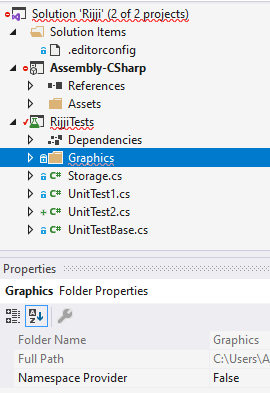
Why does it set Namespace Provider = false for other types of projects ? bug ?

I think this is related to #1930. ReSharper thinks this is a Unity related project, such as from a .asmdef. In that case, the project files are generated such that there are no files in the root, only a single folder, which shouldn't be included in the namespace suggestions. Traditionally, you can't add a project to a solution manually (such as a standalone test project like this) as it gets regenerated by Unity and any additions or changes are lost. How do you have this extra project?

I added using File/Add/Existing project or whatever it's called in VS.
And yes, I agree that while not supported by Rider, it is supported by VSTU though, it'll keep loaded projects even after SLN has been regenerated by Unity.
Have the same problem and looking for a fix.
I use a custom solution approach: the solution file is placed somewhere outside of the Unity project, and the csproj file is placed in the Assets/.../Project.csproj (note that there are a few of such projects). This project is then added to the solution as a regular one.
The problem is that Rider turns off Namespace provider for all folders no matter what. Is there any workaround?
