

 JetBrains
Resizing window leads to threading issue
I have the following test code to demonstrate the issue. Running on macOS 10.14.6 with compose 0.3.0 / kotlin 1.4.30
@ExperimentalTime
fun launchTimer(period: Duration, block: suspend CoroutineScope.() -> Unit): Job {
    return GlobalScope.launch(Dispatchers.Main) {
        while (isActive) {
            delay(period)
            if (isActive)
                block(this)
        }
    }
}

var displayTimer: Job? = null
var start: Long = System.currentTimeMillis()

@ExperimentalTime
@Composable
fun TestResize() {

    val started = remember { mutableStateOf(false) }
    val duration = remember { mutableStateOf("N/A")}

    Column {
        if (!started.value) {
            Button(onClick = {
                started.value = true
                start = System.currentTimeMillis()
                displayTimer = launchTimer(250.milliseconds) {
                    val now = System.currentTimeMillis()
                    duration.value = "${now - start}"
                }
            }) {
                Text("Click to start")
            }
        }
        else
        {
            Text(duration.value)
            Button(onClick = {}) { Text("Test button...")}
        }
    }
}
This small test displays a button to start a timer. After the timer is started, it simply displays the time elapsed since timer was started (in ms) and a dummy button that further demonstrates the issue.
If you resize the window (the number of time the window needs to be resized to trigger the issue is random which seems to point to a race condition sort of bug), then the main UI thread stops refreshing entirely.
This screenshot even captures the button animation stopped in its tracks... The UI is not refreshing anymore
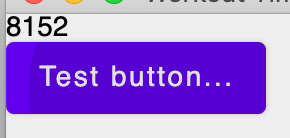
Although a random issue, it is actually very easy to reproduce...

Working on another project, I recorded the behavior in action. Clicking on the button does nothing and it requires resizing the window to make anything happen. You can see the animation running as the window is resized...
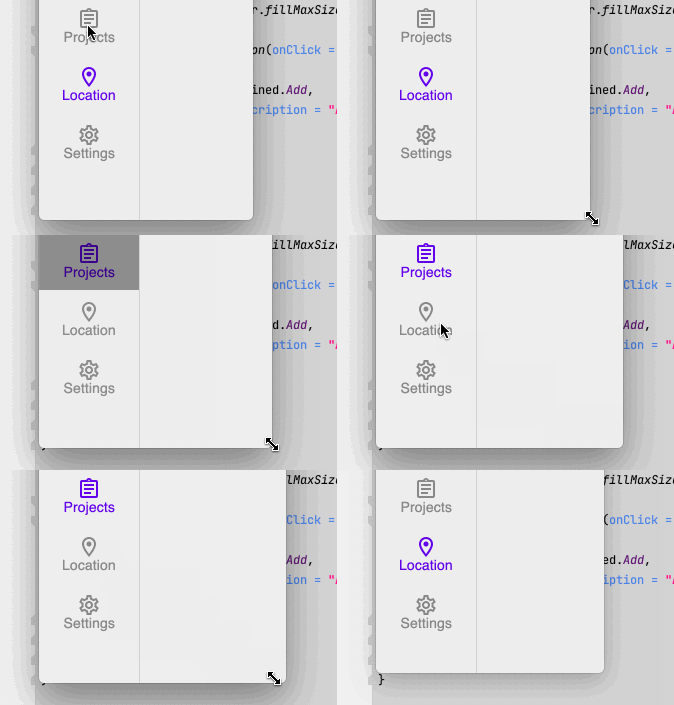
We encountered this problem before and thought that we had fixed it.
I was able to reproduce this error again on this example (but only in 2 of 60 runs :) ).
Our OpenGL renderer have some issues which we should fix when we implement Metal renderer.
We are already implementing it and it looks very promising. This issue will most likely be resolved.


@igordmn is it feasible to fix in OpenGL renderer as well?
I think it is hard, because OpenGL implementation on macOs has many issues.
OpenGL on macOs is deprecated, maybe we will keep it only for debug purposes?
FWIW: I was able to reproduce a nearly identical behavior (completely different code) on Linux. This happened after an exception was thrown while DesktopOwners.onFrame was on the stack. I might speculate that the exception caused the thread/coroutine which was driving the fames to be killed, and then subsequent updates only occur when the window is resized which triggers a repaint as driven from a different source.

I might speculate that the exception caused the thread/coroutine which was driving the fames to be killed
I think you are right, it is because of that. But if we don't kill the coroutine then we can spam the console output with exceptions (there will be an exception every 16ms if we show an animation). And the state of the window will be inconsistent.
User can close the window though and open it again.
I do not have any indication that an exception is raised and this is what triggers the problem in my case. If there is an exception, it is definitely not in my code. Is there something I can add to display when such an event occurs? Or a breakpoint I can put in the code somewhere (in the compose code)?
Is the issue exist in 0.4.0-build175? We switched to Metal renderer in this version.
Hmm, what value will be printed in this snippet?
import androidx.compose.desktop.LocalAppWindow
import androidx.compose.desktop.Window

fun main() {
    Window {
        println(LocalAppWindow.current.window.renderApi)
    }
}
If it is Metal then somewhere we have a different bug.
It says "METAL" if I copy/paste your code
That being said:
a) I am using the new experimental Window API (androidx.compose.ui.window.Window)
b) it is definitely less frequent and harder to reproduce, but I saw it several times this morning while working on some new features
No there are none unfortunately. I was really hoping to see something too...
Still the first reproducer should trigger the issue, or there is a new one?
Please check the following ticket on YouTrack for follow-ups to this issue. GitHub issues will be closed in the coming weeks.
