

 JetBrains
Canvas image goes beyond the canvas
If I set the size of the canvas to be smaller than the size of what I am drawing (canvas 50x25, square 100x50), then the image on the canvas does not appear (as it should be), but goes beyond the canvas
fun main() = Window {
	MaterialTheme {
		Column(
			modifier = Modifier
				.fillMaxSize(),
			horizontalAlignment = Alignment.CenterHorizontally,
			verticalArrangement = Arrangement.Center
		) {
			buildCircle()
		}
	}
}

@Composable
fun buildCircle() {
	Canvas(
		modifier = Modifier
			.background(Color.Black)
			.size(50f.dp, 25f.dp)
	) {
		drawRect(
			color = Color.Blue,
			topLeft = Offset(0f, 0f),
			size = Size(100f, 50f)
		)
	}
}
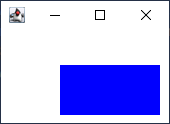

Is the behavior the same on Android? Typically, if you want clipping, you need to turn that on explicitly.

The behavior is the same on Android.
Most of the components don't clip child components by default.
You need to explicitly set clipping with 'clipToBounds':
Canvas(
    modifier = Modifier
        .background(Color.Black)
        .size(5f.dp, 5f.dp)
        .clipToBounds()
)
@jimgoog, what do you think, should we apply clipToBounds() to Canvas by default?
It is applied to verticalScroll/horizontalScroll/LazyList/Image/Surface.

clipToBounds() works It also seems to me that .clipToBounds() should be used by default, because by default nothing should go beyond the canvas.
Please check the following ticket on YouTrack for follow-ups to this issue. GitHub issues will be closed in the coming weeks.
