

 JetBrains
Button text disappears when rotated depending on button width
Was messing around with rotation a bit ago and noticed that buttons seem to have a very weird rendering issue when rotated.
Depending on the width of the button, when rotated the text will flicker in and out of rendering. For very short strings (<= 5 characters or so), this appears to be a non-existent problem. However beyond that, the longer it gets the more it begins to flicker. Confusingly, if it reaches somewhere over 50-60 characters, it begins to stop flickering as much. It seems at the very least it will try to remain visible when at 90-degree angles, until it reaches longer lengths where the relationship feels like it starts to invert.
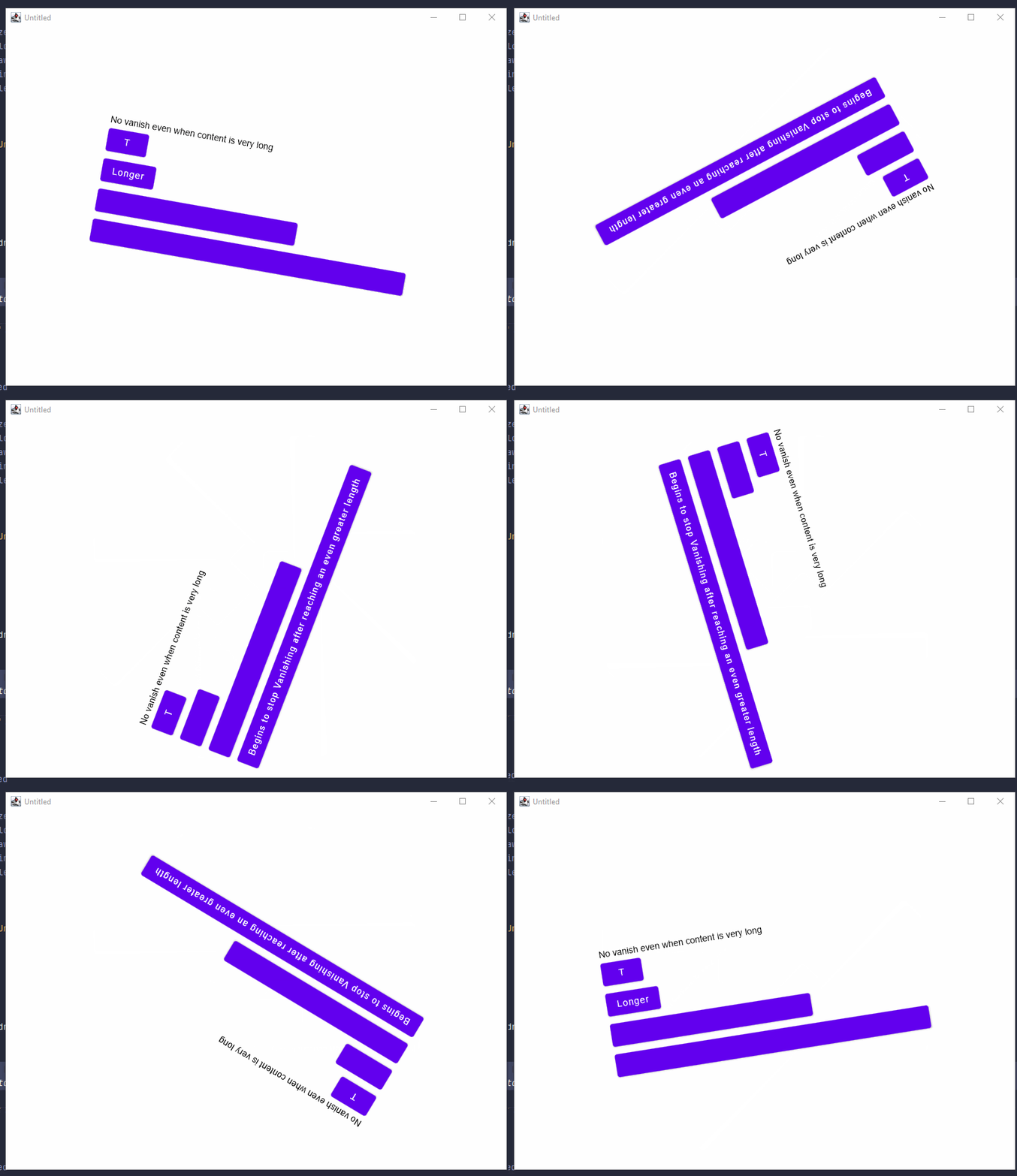
The following program is able to demonstrate the problem:
import androidx.compose.foundation.layout.*
import androidx.compose.material.Button
import androidx.compose.material.Surface
import androidx.compose.material.Text
import androidx.compose.runtime.LaunchedEffect
import androidx.compose.runtime.mutableStateOf
import androidx.compose.runtime.remember
import androidx.compose.ui.Modifier
import androidx.compose.ui.draw.rotate
import androidx.compose.ui.window.singleWindowApplication
import kotlinx.coroutines.delay

fun main() = singleWindowApplication {
    val rotation = remember { mutableStateOf(0f) }
    LaunchedEffect(Unit) {
        while (true) {
            rotation.value++
            delay(10)
        }
    }
    Surface(Modifier.rotate(rotation.value)) {
        Column(verticalArrangement = Arrangement.Center, modifier = Modifier.fillMaxHeight()) {
            Row(horizontalArrangement = Arrangement.Center, modifier = Modifier.fillMaxWidth()) {
                Column {
                    Text("No vanish even when content is very long")
                    Button(onClick = {}) {
                        Text("T")
                    }
                    Button(onClick = {}) {
                        Text("Longer")
                    }
                    Button(onClick = {}) {
                        Text("Vanishes after reaching a given length")
                    }
                    Button(onClick = {}) {
                        Text("Begins to stop Vanishing after reaching an even greater length")
                    }
                }
            }
        }
    }
}
I have not currently tested if this issue affects any other components, but at the very least it does not seem to affect text objects on their own.


I ran this on Windows 10 and the JDK used was Java 15. I believe it affected it regardless of JDK though (got a similar result when I was messing with it on Java 11 too from what I recall).
Could you try adding
System.setProperty("skiko.renderApi", "SOFTWARE_FAST")
to the beginning of your main function?
Let's check if it is a hardware/driver related issue.
Setting it up this way seems to cause the issue to disappear:
fun main() {
    System.setProperty("skiko.renderApi", "SOFTWARE_FAST")

    singleWindowApplication {
        val rotation = remember { mutableStateOf(0f) }
        LaunchedEffect(Unit) {
            while (true) {
                rotation.value++
                delay(10)
            }
        }
        Surface(Modifier.rotate(rotation.value)) {
            Column(verticalArrangement = Arrangement.Center, modifier = Modifier.fillMaxHeight()) {
                Row(horizontalArrangement = Arrangement.Center, modifier = Modifier.fillMaxWidth()) {
                    Column {
                        Text("No vanish even when content is very long")
                        Button(onClick = {}) {
                            Text("T")
                        }
                        Button(onClick = {}) {
                            Text("Longer")
                        }
                        Button(onClick = {}) {
                            Text("Vanishes after reaching a given length")
                        }
                        Button(onClick = {}) {
                            Text("Begins to stop Vanishing after reaching an even greater length")
                        }
                    }
                }
            }
        }
    }
}
I guess if it's a hardware issue, my current GPU is an AMD RX580, and CPU is an i7-6700k if that's at all relevant. I tried to update my drivers just in case it was a driver issue but it appears I'm already up to date.
Yes, looks like it. Most probably a driver issue. Could you also try with
System.setProperty("skiko.renderApi", "OPENGL")
?
Please check the following ticket on YouTrack for follow-ups to this issue. GitHub issues will be closed in the coming weeks.
