

 Jemt
Jemt
Encapsulate styles and JS components
Fit.UI can run both as a global instance and as a module, but CSS is always loaded globally which may result in conflicts if a page consists of components built with different versions of Fit.UI.
Possible solutions to investigate:
- Scoped CSS (no legacy browsers - deprecated)
- Shadow DOM / Web Components (no legacy browsers, including IE and Edge as of 2019)
- Class Namespace (e.g.
<div class="FitUiControl_{BuildGeneratedValue}">..</div>) (all browsers supported).
The namespace solution is fairly easy to implement, but will make it difficult to override styles, which can be considered both good and bad. But since we cannot ensure true encapsulation without Shadow DOM, there's really no point in fighting it, and we might as well support it properly. So perhaps this is better:
<div class="FitUiControl Scope{BuildGeneratedValue}">..</div>
The compiled stylesheet will then have rules such as
div.FitUiControl.Scope{BuildGeneratedValue} { ... }

Build script should probably just replace the following capture groups:
(.FitUiControl).
(.FitUiControl) (notice whitespace at the end)
(.FitUiControl):
(.FitUiControl)[
(.FitUiControl){
(.FitUiControl)\n
with
.FitUiControl.Scope{BuildGeneratedValue}
EDIT: There are selectors that won't be caught, such as: .FitUiControlLoadingIndicator, .FitDragDropDraggableHandle div.FitUiControlDropDown div.FitUiControlDropDownItems, ... and many more.
We probably need to insert a variable into the stylesheets. But make sure it works without compiling! It's really useful to be able to load stylesheets dynamically when debugging, which is currently being used in the built-in Debug project. Example:
.FitUiControl.Scope/*${BuildGeneratedValue}*/
Obviously the surrounding /* and */ should be replaced along with ${..}.
Alternatively we could add a prefix in front of every selector so that e.g.
.FitUiControl is replaced by
.ScopeXYZ .FitUiControl
although that would require all components to be wrapped in a "scope container".
The approach with prefixing CSS selectors can be achieved using postcss and postcss-prefix-selector. We could ship fit-ui (the NPM package) with a "deploy" script that not only installs the dist files to a specified target folder, but also allows us to define a scope to which CSS is applied.
Using postcss-prefix-selector to prefix CSS selectors
(e.g. .FitUiControl * => .MyAppScope .FitUiControl *):
node_modules/postcss-cli/bin/postcss --config path/to/folder input.css > output.css
Notice that --config does NOT take a path to a config file, but to a folder containing a config file. The configuration file postcss.config.js must exist:
module.exports =
{
    plugins: [
        require('postcss-prefix-selector')({
            prefix: ".MyAppNamespace"/*,
            exclude: [],
            transform: function(prefix, selector, prefixedSelector)
            {
                return prefixedSelector;
            }*/
        })
    ]
}
We need to decide whether the programmer using Fit.UI is responsible for wrapping controls and components in a scope container (e.g. <div class="MyAppNamespace"> ... </div>), or whether Fit.UI should wrap every single control and component in an extra container with the CSS scope.
However, adding a CSS scope will not be sufficient. Fit.UI contains the following components that requires refactoring to achieve encapsulation:
DatePicker
The DatePicker's calendar widget/dialog is added to the root of <body> so to use the approach with prefixing CSS selectors, we need to make jQuery UI wrap the calendar widget in a container and apply the name of the scope:
<div class="MyAppScope"> Calendar widget goes here.. </div>
This is fairly easy to achieve with the following change:
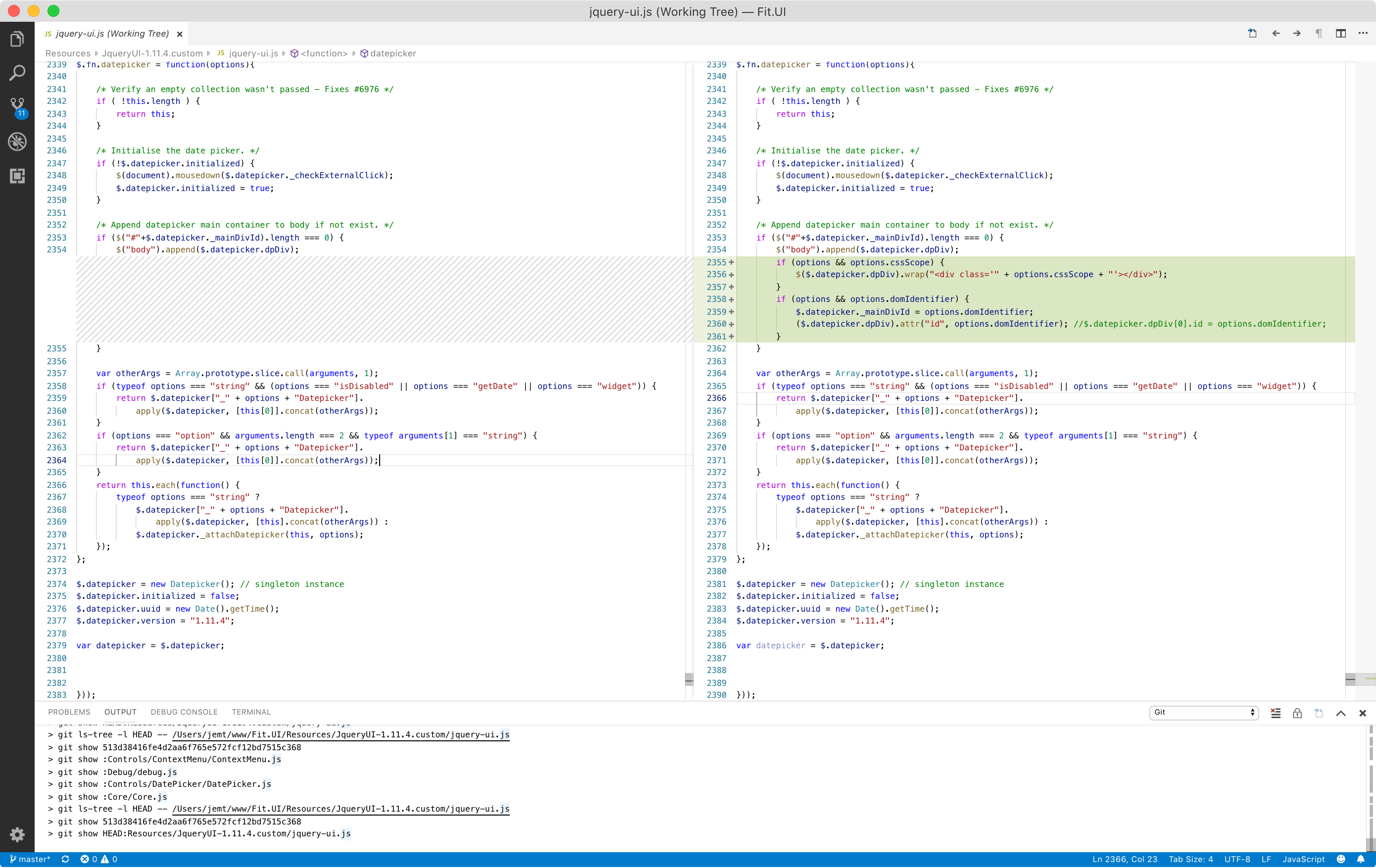
Now all we need is to tell calendar widget to use the CSS scope and apply a unique ID property to the calendar widget, to avoid conflicts with calendar widgets from other instances of jQuery UI:
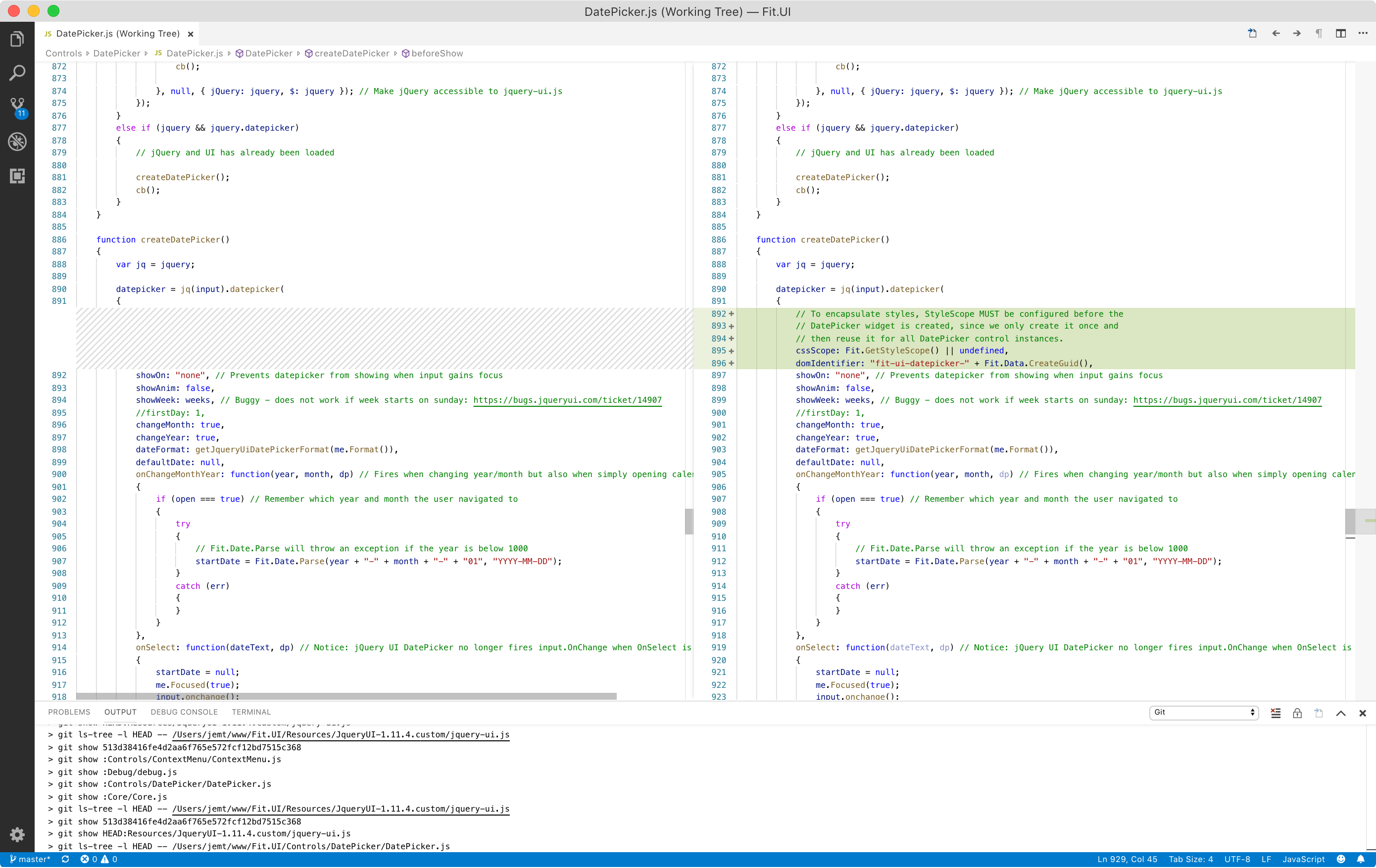
Notice that the code above assumes we have a function called Fit.GetStyleScope() - obviously we need to be able to set its value using e.g. Fit.SetStyleScope(..). The Deploy script mentioned above should output the code needed for easy copy/paste.
Possible implementation of GetStyleScope and SetStyleScope in Core.js:
Fit.SetStyleScope = function(scopeName)
{
	Fit.Validation.ExpectString(scopeName === null ? "" : scopeName);

	if (scopeName === null || scopeName === "")
		delete Fit._internal.StyleScope;
	else
		Fit._internal.StyleScope = scopeName;
}
Fit.GetStyleScope = function()
{
	return Fit._internal.StyleScope || null;
}
ContextMenu
The ContextMenu is also added to the root of <body>, so it too must be wrapped in a container with the given CSS scope, just like DatePicker's calendar widget (described above). Probably something like the following additions in ContextMenu.js:
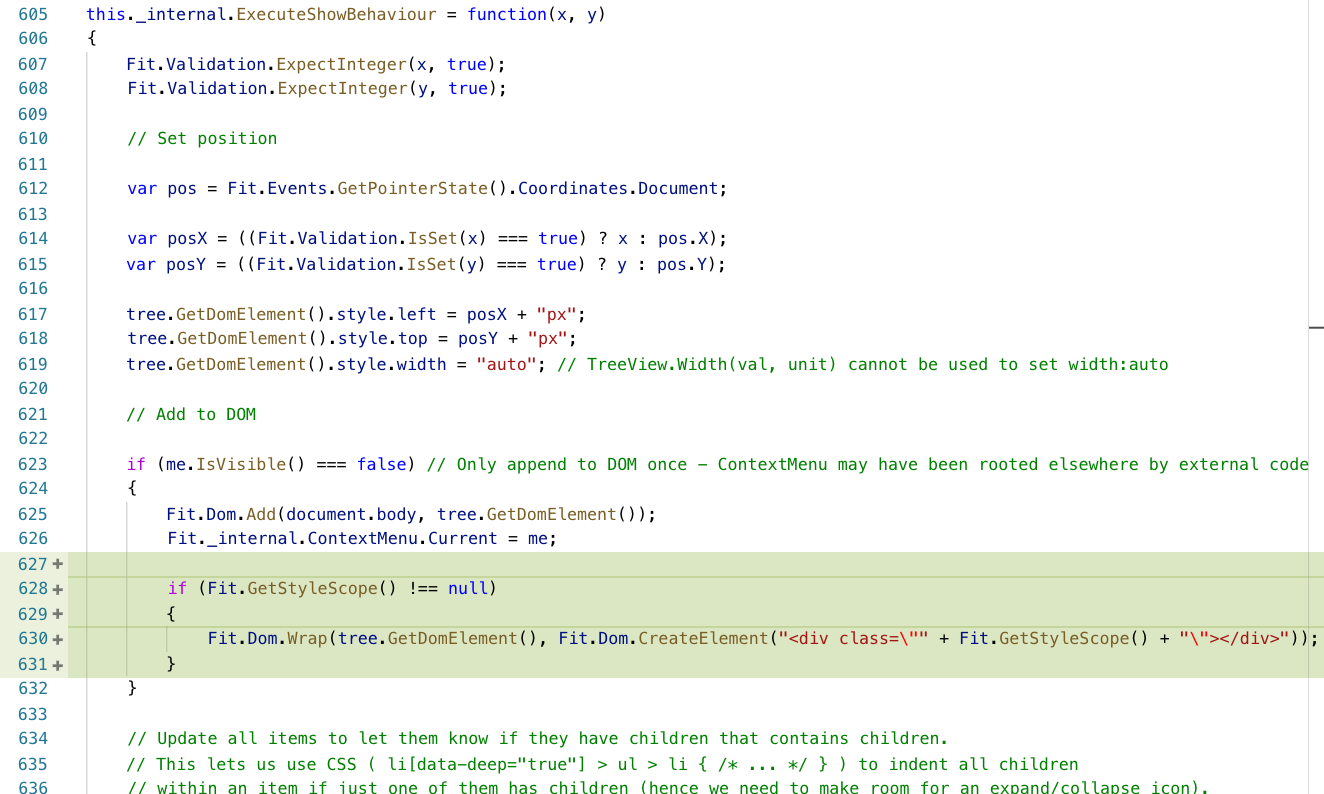
And
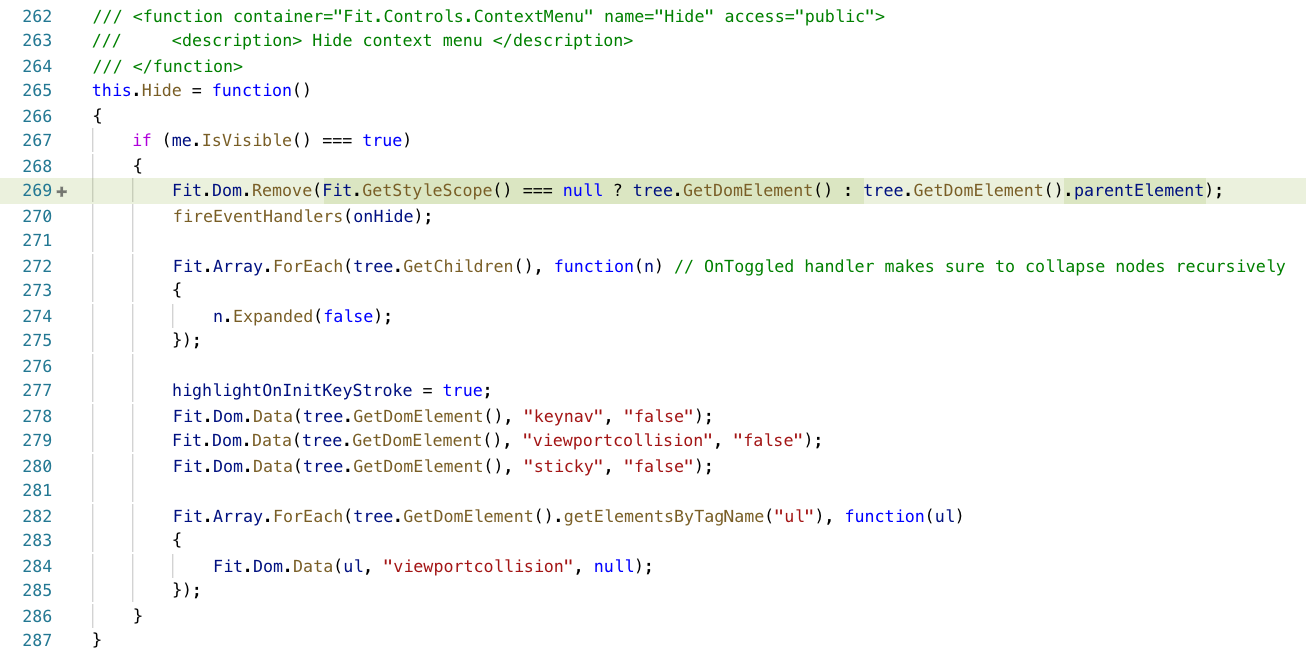
Dialog
Just like ContextMenu and the Calendar widget, instances of Dialog is added to the root of <body>, so it too must be wrapped in a container with the given CSS scope.
Input (HTML editor)
Now, here is the real challange!
CKEditor has a link dialog that is rendered to the root of <body>, and just like our Calendar widget and ContextMenu, this must be wrapped in a container with the given CSS scope.
BUT, with CKEditor we have far bigger problems than CSS scoping. CKEditor seriously pollutes the global scope and it will not be possible to run multiple different versions of CKEditor or have them properly encapsulated. Our only option to obtain true isolation, is to render the HTML editor inside an iFrame. The editable area is already an iFrame by the way. So either we should have a look at that approach, or consider switching to another editor. CKEditor 5 (more recent version requiring modern browsers (no version of IE supported!)) seems to also pollute the global scope by default, but that might not be the case for the UMD module. NOTICE: Rendering the editor in an iFrame may cause problems with the link dialog - it may require the editor to have a certain size to fit, although we might be able to tweak that with CSS. ALSO NOTICE: Adding e.g. 50 instances of CKEditor will be VERY slow if contained in an iFrame since they will all have to load (although probably cached) and execute the entire CKEditor script.
One more thing
While the changes mentioned above will prevent a bundled instance of Fit.UI from polluting the global namespace and interfere with existing content, it will not prevent existing content from interfering with Fit.UI. Poorly designed CSS (e.g. reset stylesheets) could easily affect Fit.UI.

Bundling Fit.UI with an application (e.g. using browserify) AND scoping CSS (e.g. using postcss and postcss-prefix-selector) will increase the specificity of a CSS rule that causes problems with CKEditor.
Core/Styles.css
.FitUiControl, .FitUiControl *
{
	box-sizing: border-box;
}
If scoped with a prefix, it becomes:
.MyAppNamespace .FitUiControl, .MyAppNamespace .FitUiControl *
{
	box-sizing: border-box;
}
The box-sizing model is now changed for CKEditor. To prevent this, make sure to restore the box-sizing model like shown below (to be added to Input.css).
/* Undo Fit.UI's box-sizing for HTML editor (DesignMode).
   Fit.UI applies box-sizing:border-box to every contained element in
   a control, but unfortunately this breaks dimensions in CKEditor.
   Actually this is only a problem if Fit.UI is e.g. bundled with an
   application, and Fit.UI's CSS is prefixed with a namespace.
   Example: .FitUiControl { .. }  =>   .AppNamespace .FitUiControl { .. }
   This increases specificity for the rule that applies border-sizing,
   hence causing problems in CKEditor. The CSS below reverts the
   box-sizing behaviour to content-box required by CKEditor. */
div.FitUiControlInput[data-designmode="true"] .cke_reset_all,
div.FitUiControlInput[data-designmode="true"] .cke_reset_all *,
div.FitUiControlInput[data-designmode="true"] .cke_reset_all a,
div.FitUiControlInput[data-designmode="true"] .cke_reset_all textarea
{
	box-sizing: content-box;
}
Naturally this will never become a problem if we decide to encapsulate CKEditor in an iFrame. In that case the fix will not be needed.