

 JasonZigelbaum
Playback stops randomly
I've had this happen a few times to me to do (and several times over the past few days), but basically sound will stop playing. When this happens, I'm still DJ'ing and it still looks like (in the room) that the track is playing. In spotify, I do not see the current track playing (and is sometimes accompanied with the blue banner at the top saying the track can't play, sometimes not). Pressing the re-sync button does not fix this. Stopping/starting DJ'ing again sometimes fixes it, but not always. Closing the web page and Spotify then relaunching everything seems to fix it everytime.

Thanks for letting me know. To help debug this: What browser / OS are you on?

Chrome version 58.0.3029.81, Windows 7, Spotify version 1.0.53.758.gde3fc4b2
One thing I've noticed: after the most recent time of this happening, I was still unable to get playback to work correctly even after re-launching Spotify and Chrome/JQBX. I then tried closing the web page entirely, and re-launching Spotify again; playback control was still screwed up (the song played, but I couldn't skip forward or anything else). I then tried hard killing Spotify (through task manager) and noticed that the SpotifyWebHelper.exe was still running. I killed that, and everything started working again as far as JQBX being able to control and playback songs correctly through Spotify. So, looks like SpotifyWebHelper may be getting into a bad state some how.
Would like to join in to add that I have the exact same problem. Chrome version 74.0.3729.169, Spotify version 1.1.8.439.g8502297d

Can either one of you take as screenshot of your chrome console when this happens? I'm wondering if it's an issue w/ the Spotify Web Player that I should log w/ Spotify or if it might be something else (like your session being timed out or something).
On Fri, Jun 7, 2019 at 3:55 PM kenderbard [email protected] wrote:
Would like to join in to add that I have the exact same problem. Chrome version 74.0.3729.169, Spotify version 1.1.8.439.g8502297d
— You are receiving this because you commented. Reply to this email directly, view it on GitHub https://github.com/JasonZigelbaum/jqbx-issues/issues/23?email_source=notifications&email_token=AAGIOSIB5C4RTSNZHAMQGTTPZLRPBA5CNFSM4DJ7MPY2YY3PNVWWK3TUL52HS4DFVREXG43VMVBW63LNMVXHJKTDN5WW2ZLOORPWSZGODXHF5QY#issuecomment-500063939, or mute the thread https://github.com/notifications/unsubscribe-auth/AAGIOSNMAIU2RRA5Z7XJ3ZLPZLRPBANCNFSM4DJ7MPYQ .
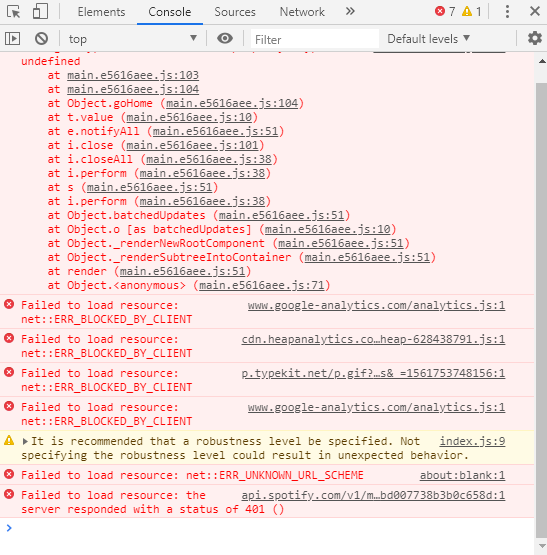
Thanks- yeah that looks like a failure to refresh access tokens. I'll look into it this week see if I can come up w/ a more robust solution.
On Fri, Jun 28, 2019 at 5:33 PM kenderbard [email protected] wrote:
[image: error] https://user-images.githubusercontent.com/1069777/60372517-d2c3c680-99ca-11e9-926e-3ef8ffdc7653.png
— You are receiving this because you commented. Reply to this email directly, view it on GitHub https://github.com/JasonZigelbaum/jqbx-issues/issues/23?email_source=notifications&email_token=AAGIOSI2RURVBOFPZNIUXFLP4Z7SJA5CNFSM4DJ7MPY2YY3PNVWWK3TUL52HS4DFVREXG43VMVBW63LNMVXHJKTDN5WW2ZLOORPWSZGODY3G5MA#issuecomment-506883760, or mute the thread https://github.com/notifications/unsubscribe-auth/AAGIOSK5263UQN5MPTZVC2TP4Z7SJANCNFSM4DJ7MPYQ .
Hi, just to say I'm pretty sure I'm experiencing the same problem. I hear sound for the first ~10 seconds of each song, but then it cuts out. Spotify and JQBX seem to think everything is normal, but there is no sound at all.
Chrome Version 72.0.3626.121 (Official Build) (64-bit). Unsure where to find version of my spotify app on ubuntu.

Is the clock on your computer accurate? Can you double check that it's set to auto. There have been some issues in the past where an incorrect time setting can lead to strange things like that happening.
On Tue, Jan 7, 2020 at 5:38 AM Tom Nicholas [email protected] wrote:
Hi, just to say I'm pretty sure I'm experiencing the same problem. I hear sound for the first ~10 seconds of each song, but then it cuts out. Spotify and JQBX seem to think everything is normal, but there is no sound at all.
Chrome Version 72.0.3626.121 (Official Build) (64-bit). Unsure where to find version of my spotify app on ubuntu.
— You are receiving this because you commented. Reply to this email directly, view it on GitHub https://github.com/JasonZigelbaum/jqbx-issues/issues/23?email_source=notifications&email_token=AAGIOSJDD4BETGNQR7BTR7DQ4RLTRA5CNFSM4DJ7MPY2YY3PNVWWK3TUL52HS4DFVREXG43VMVBW63LNMVXHJKTDN5WW2ZLOORPWSZGOEIIOJPA#issuecomment-571532476, or unsubscribe https://github.com/notifications/unsubscribe-auth/AAGIOSLHLOKPZ2E2TBZXTCTQ4RLTRANCNFSM4DJ7MPYQ .
Can you double check that it's set to auto.
It is.
But re-reading the issue more carefully I don't think I'm having exactly the same issue as cidTheSlut, because my spotify will happily carry on playing the song (and if on spotify I click "This Computer" in the devices available it will start airing sound).
Can you try changing your device within the JQBX app instead? You can do this by clicking the icon on the top right (it should look like a computer or a web browser icon). And then select the device you want to hear audio out of. Once you select the correct one, it should stick to that device from that point forward.
On Tue, Jan 7, 2020 at 11:15 AM Tom Nicholas [email protected] wrote:
Can you double check that it's set to auto.
It is.
But re-reading the issue more carefully I don't think I'm having exactly the same issue as cidTheSlut, because my spotify will happily carry on playing the song (and if on spotify I click "This Computer" in the devices available it will start airing sound).
— You are receiving this because you commented. Reply to this email directly, view it on GitHub https://github.com/JasonZigelbaum/jqbx-issues/issues/23?email_source=notifications&email_token=AAGIOSNQ5C5DSM6DB52IJKLQ4STDJA5CNFSM4DJ7MPY2YY3PNVWWK3TUL52HS4DFVREXG43VMVBW63LNMVXHJKTDN5WW2ZLOORPWSZGOEIJMXDI#issuecomment-571657101, or unsubscribe https://github.com/notifications/unsubscribe-auth/AAGIOSMDJ6SIHIIOATXD6QLQ4STDJANCNFSM4DJ7MPYQ .