
TabAttack
 TabAttack copied to clipboard
 JannesMeyer
Tool Bar Icon Barely Visible
I use TabAttack with a dark theme- Oceanic, and the tool bar icon is hardly visible on the dark background. screen:

So I would like to suggest a new option in extension options to use an alternative icon (brighter) which would be better visible on dark themes.
If this extension is not abandoned (I hope that it is not as I find TabAttack very useful) I might suggest some more enhancements.

Good suggestion! Actually, I've always wished for an API to read the current theme's tint color, but alas it's not possible yet. (Firefox has browser.theme.getCurrent() but that method is not implemented in Chrome)
So the only option seems to be to expose a color picker that sets the color for the extension button, which the user needs to adjust to match the theme. It's the best that can be done with the current API I'm afraid.
By the way, TabAttack is not abandoned but development has been dormant for a while. Thanks for your nice words. Please share your other ideas if you like!

It does seem to be possible to check whether the system-wide dark mode is enabled. Therefore I could expose two color pickers (one for light mode, one for dark mode). However, this wouldn't be useful with custom themes that happen to be dark...
Unfortunately, there seems to be a Chrome bug that affects the change event, though.
@JannesMeyer
Thanks for your immediate response!
By the way, TabAttack is not abandoned but development has been dormant for a while.
This is a great news! I discovered your extension by chance and I liked it immediately. I have used several similar extensions which can either copy tabs as Markdown or save sessions to different formats but TabAttack combines both features- Copy and Export/Import plus it has a nice editor.
So the only option seems to be to expose a color picker that sets the color for the extension button, which the user needs to adjust to match the theme. It's the best that can be done with the current API I'm afraid.
I still think that a simpler solution might be a drop-down menu in Options where the user would be able to choose between two (or several) icons, just like Color scheme drop-down menu (here I should mention that I am very pleased that the extension comes with a good selection of colour schemes, I like many of the dark ones and I am currently using Vibrant Ink). I suppose that a default brighter icon would look fine on most dark themes. If it is not too much of an effort you might provide a couple of darker icons and a couple of brighter icons the user could choose to use according to their installed themes and visual preferences.
There are extensions which allow the user to choose between different tool bar icons, for example:
screen:
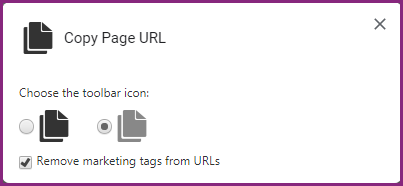
screen:
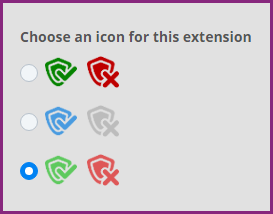
I suppose that even a single alternative brighter icon would look fine (or at least would be visible) on most dark themes,
Please share your other ideas if you like!
I have drafted down some ideas for several possible improvements and I hope that tomorrow I will have time to open some new issues. Of course I do not expect all my ideas to be implemented, just consider which of them you find useful and not very hard for implementation.
Regards