

 JFormDesigner
Button labels appear vertically off-center on Windows
On Windows, but not on MacOS or Linux, FlatLAF button labels appear vertically off-center (too far down within the button rectangle):
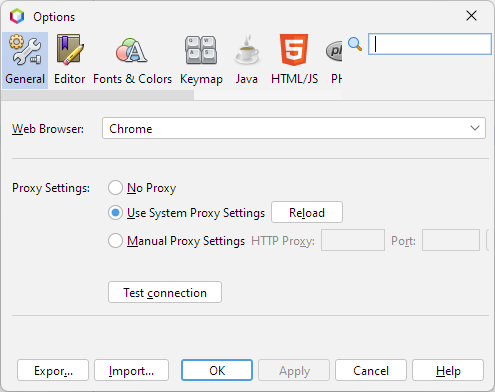
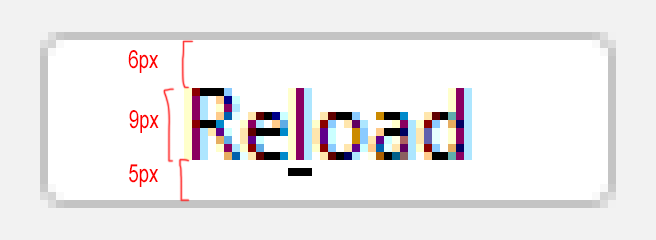
The problem is that the default font on Windows (Segoe UI 12, or previously Tahoma 11) has an odd-numbered cap height, while FlatLAF buttons are an even number of pixels tall. So there is no possible perfectly centered position for the label:
In the standard Windows LAF from Swing, this is solved by overriding BasicButtonUI.getPreferredSize to always return an odd-numbered size. Doing the same on FlatLAF makes the labels appear vertically centered:
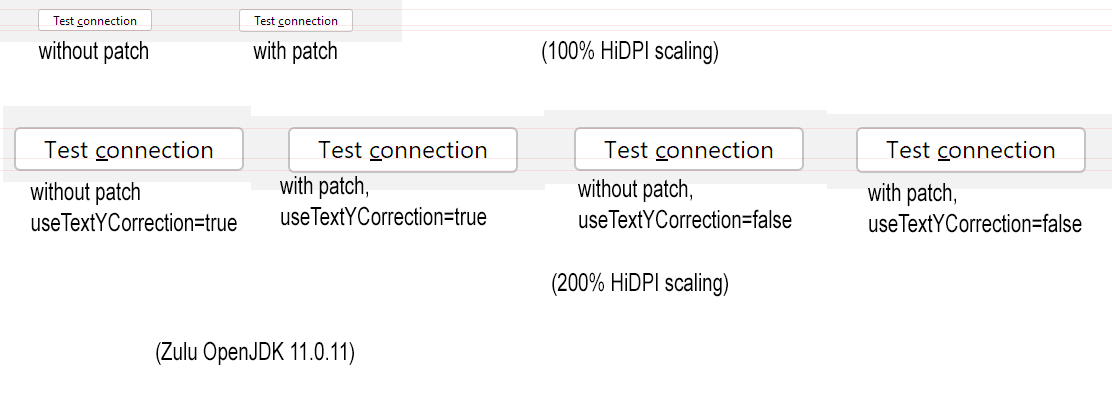
In NetBeans, I did this via a workaround, but it should be easier to implement directly in FlatLAF.
I'm unsure whether the previous flatlaf.useTextYCorrection adjustment is still needed once the buttons are resized this way. On 200% HiDPI scaling, I could not see a difference when useTextYCorrection was turned on or off. Perhaps useTextYCorrection was only needed on an earlier Java version?
(Note that the FontMetrics.getAscent() method is a red herring when working on this. It never did what it was supposed to do, and could never be fixed for backwards compatibility reasons. And it returns an int rather than a float in any case, which is too coarse for HiDPI screens. To get the actual ascent of a given font, I usually do font.createGlyphVector(frc, "H").getVisualBounds().getHeight() .)
