

 JFormDesigner
Placeholder in TextArea
Hey,
I was wondering whether it was a conscious decision to not offer a placeholder for JTextArea. I've seen you are using the default logic from Java via reflection to draw a clipped String. I am assuming you didn't implement this because it would require reimplementing the drawing and clipping a bit? Would you be accepting this as a PR if I was to try it with line wrapping AND clipping?
Alternatively a non wrapping version might already be better than nothing.

I was wondering whether it was a conscious decision to not offer a placeholder for
JTextArea.
no, simply did not need it... 😉
I've seen you are using the default logic from Java via reflection to draw a clipped
String. I am assuming you didn't implement this because it would require reimplementing the drawing and clipping a bit?
yes, why reinvent/reimplement something that the JRE provides.
Would you be accepting this as a PR if I was to try it with line wrapping AND clipping?
Sure.
There is already some code in FlatLaf that splits a string and paints multiple lines:
https://github.com/JFormDesigner/FlatLaf/blob/d10bcfc72fda6156ab104e1c52835eeef4282b2c/flatlaf-core/src/main/java/com/formdev/flatlaf/ui/FlatToolTipUI.java#L121-L132
Maybe extract this to new method
FlatUIUtils.drawMultiLineString( JComponent c, Graphics g, String text, int x, int y, int width, boolean clipLines )
and use it for TextArea placeholder too ?

I am about as useless as they come with Git (used CVS from about 1988 until SVN, just switched to GIT about a month ago).
I took how JTextField drew its placeholder and implemented it in JTextArea. It is not multiline. If you want the code I can send it back although I dont have a clue how to do a pr or otherwise.

It's fine, I'll try what Charly suggested, but currently I don't have time ^^' Might get to do it on the weekend, who knows :)
Do you want a new property or reuse JTextField.placeholderText? Also, the code you suggested to use won't work, since we don't want to split at \n, but when the TextArea is out of horizontal space for a line AND at \n. Calling JavaCompatibility.getClippedString also doesn't make sense, since it adds the ellipsis. Is there a way to easily reproduce the normal drawing logic of the JTextArea without copying it's code or manipulating it's properties (text and foreground)?
Hope I didn't missunderstand anything ^^
This is what it currently looks like :sweat:
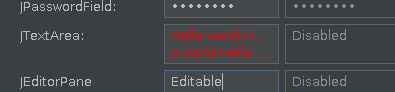
Do you want a new property or reuse
JTextField.placeholderText?
Reuse JTextField.placeholderText.
... without copying it's code or manipulating it's properties ...
Since the license of OpenJDK is GPL, it is not allowed to copy code from OpenJDK to FlatLaf (Apache license).
You could create a second JTextArea and use that for rendering the placeholder text...