

 Itaybre
Allow Manual input of values

This issue has been automatically marked as stale because it has not had recent activity. It will be closed if no further activity occurs. Thank you for your contributions.
![stale[bot] avatar](https://avatars.githubusercontent.com/in/1724?v=4 "Published by a pub.dev verified publisher")
-
Is the code unable to handle negative values somewhere? Either in the model, the sliders or the text fields? For the capture card that I use (same chipset as https://ciko.io/posts/cheap_usb_hdmi/) I see that the minimum value for the brightness is
0while the maximum is127. I assume the actual minimum brightness should be-128as described in the article because the image still looks too bright, even at brightness0. -
I'd prefer if this would would always display the minimum and maximum values. On my camera the ranges were
0-127(Brightness) and0-255(Contrast & Saturation). I first had to move the slider to the extremes to be able to see the supported range, so I could enter raw values.

Were the 2 issues from my previous post resolved, too, or should I move my message above into a separate issues?
@JayFoxRox right now you can see the range in the manual mode:
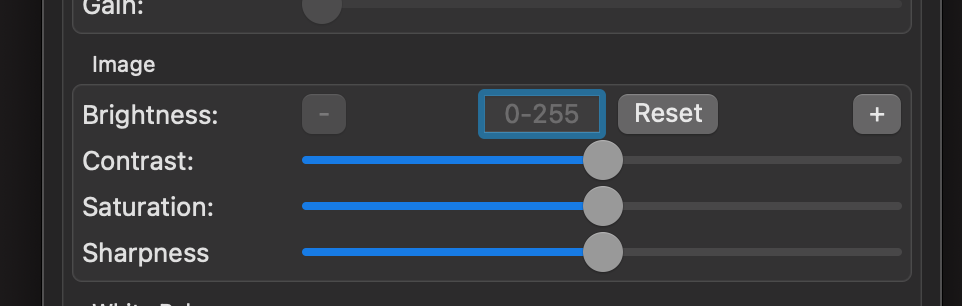
Negative values should work fine, but since my cameras only use positive values, it is hard to test. We should see odd behavior with negative values if they are not supported, not just 0 value