

 It4innovations
Get data to produce graph of how resources were used
Is it already possible to get all information to produce a graph like this?
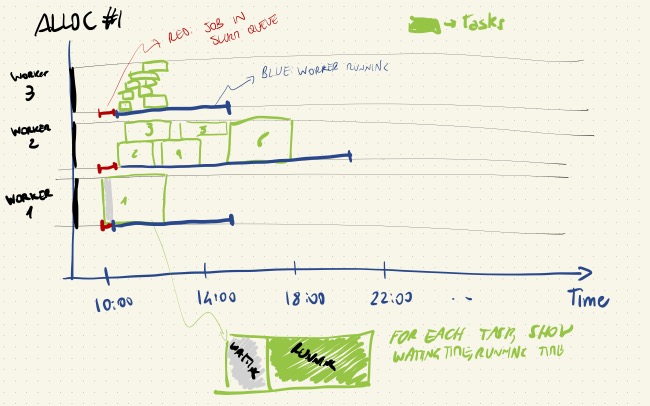
Note: I'm not asking to have a command to generate the graph, but if (and how) all information can be extracted; I can generate the graph myself).
In particular, this would need the following points:
- get all workers generated by a given alloc, and know
- time in the SLURM/PBS queue
- time when the worker started running
- time when it finished
- for each task, get:
- by which worker they were executed, and with which starting and ending time
- how many CPUs they used (or even better, which CPUs)
I could find some of this information, but not all of it (e.g. given a task, which worker run it - I can find the SLURM node hostname but I didn't see the job ID).
Is this information available, and how can it be extracted? (This is useful both for debugging reasons, but also to e.g. show the usage of a given machine and the benefits given by hq over not using it

Hi,
We are now implementing our dashboard. It will take some time to have production ready output, but we already have all information in the server as an event log, so we can export all events in (e.g.) JSON. This can be done relatively easily.
In the current version: Worker can be paired with SLURM/PBS allocation through "Manager Job ID", it can be shown via "hq worker list". It will contain an ID assigned by SLURM/PBS. (In our terminology, "manager" is PBS/SLURM).
A worker where a task was computed can be shown via, "hq job <ID> --tasks". How many CPU was used is in "Resources" row.
Information when exactly a task was started and which CPUs were used is logged in the server but there is no output in CLI, but it can be quite easily done.
