

 Imagick
Imagick on Windows and PDF with images in CMYK
Hello! My app versions is: Windows NT SERVER 10.0 build 14393 (Windows Server 2016) i586 PHP Version: 7.2.15 Compiler: MSVC15 (Visual C++ 2017) Architecture: x86 (I was trying also on PHP5.6)
imagick module version: 3.4.3 imagick classes: Imagick, ImagickDraw, ImagickPixel, ImagickPixelIterator, ImagickKernel Imagick compiled with ImageMagick version: ImageMagick 7.0.7-11 Q16 x86 2017-11-23 Imagick using ImageMagick library version: ImageMagick 7.0.7-11 Q16 x86 2017-11-23 ImageMagick release date: 2017-11-23 (I was trying also on several previuos imagick releases) By the way, I used the latest version available on this page
GhostScript: x86 gs9.26 (I was trying on several previous versions)
My php script:
        $im = new imagick();
	$im->readImage( '002.pdf[0]' );
 	$im->setType(Imagick::IMGTYPE_TRUECOLOR);
 	$im->setImageColorspace(imagick::COLORSPACE_SRGB);
 	$im->setImageFormat('tiff');
	$im->writeImage('thumb.tiff');
	$im->clear();
	$im->destroy();
I was trying also:
$im->transformImageColorspace(imagick::COLORSPACE_SRGB);
$im->setImageColorspace(imagick::COLORSPACE_SRGB);
$im->transformImageColorspace(13);
$im->setImageColorspace(13);
$im->transformImageColorspace('13');
$im->setImageColorspace('13');
$im->transformImageColorspace(imagick::COLORSPACE_CMYK);
$im->setImageColorspace(imagick::COLORSPACE_CMYK);
$im->transformImageColorspace(12);
$im->setImageColorspace(12);
and etc........ In all this cases, if image with CMYK colorspace, attached to source-PDF , all images what generated with:
$im->writeImage('thumb.tiff');
become black and white (in some cases grayscale, in other cases RGB, but black and white anyway). If I do conversion to jpg, png or anything else, its no matters... export always b/w images.
If in PDF is no images with CMYK colorspace, conversion is work as should be. Colors are preserved and look normal. If I convert from other images(psd, tiff, png.....), conversion is work as should be too. Colors are preserved and look normal.
If I use command promt options with ImageMagick and with the same gs9.26, PDF converted normal, with preserved colors...
Thank you )))

Calling imagick::setimagecolorspace like that is probably wrong.
Sets the image colorspace. This method should be used when creating new images. To change the colorspace of an existing image, you should use Imagick::transformImageColorspace().
If that doesn't fix it, I'd need an example pdf to investigate.

Yep....
I was trying also:
.......
$im->transformImageColorspace(imagick::COLORSPACE_SRGB);
$im->transformImageColorspace(imagick::COLORSPACE_CMYK);
.......
pdf: http://maints.photomir.dn.ua/imagic/002.pdf and any else pdf that containe image with CMYK
Here another three year old issue with same "symptoms": https://stackoverflow.com/questions/35026630/pdf-thumbnail-always-generated-as-grayscale-using-imagick
I can see a black and white thumbnail if I just convert it. But this:
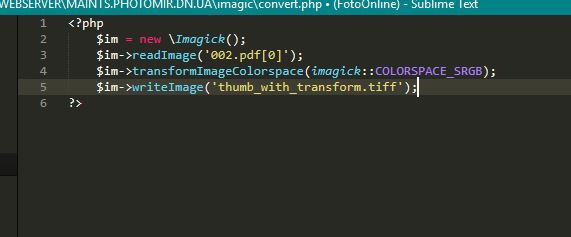
$im = new \Imagick();
$im->readImage('002.pdf[0]');
$im->transformImageColorspace(imagick::COLORSPACE_SRGB);
$im->writeImage('thumb_with_transform.tiff');
produces an image....that looks correct but Github don't support, so here's a screenshot of that image:

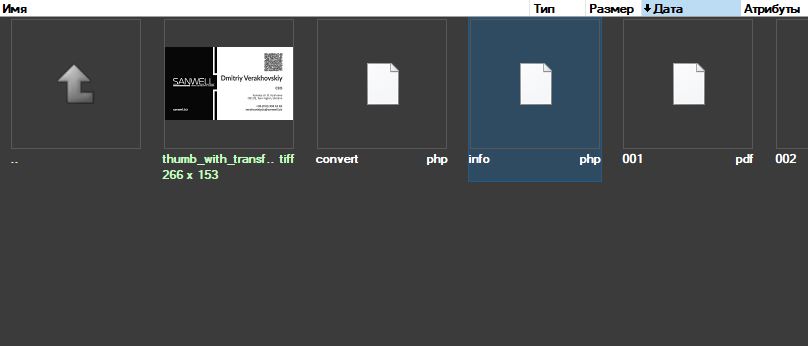
I use your code:
 and here the same output:
I use another pdf, without CMYK image, and here we are...
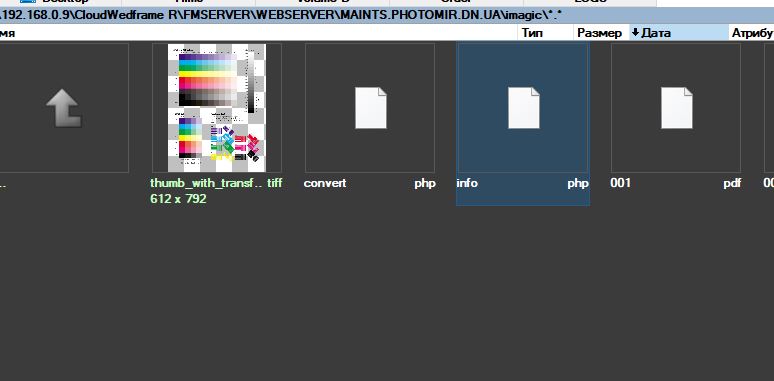
Its not deja-vu... its the same problem that cant be heal herself...
 I think the real problem somewhere here...
I think its imagick Windows builds have some bug...
I think the real problem somewhere here...
I think its imagick Windows builds have some bug...
Did you ever try to use IM directly? You can use a command like
convert 002.pdf[1] test-out.jpg
imagick uses ImageMagick which uses ghostscript for processing PDFs. In the past I have had issues which in fact were issues in one of the underlying libraries.

Yes.. In this way(with windows CLI), convert work correctly without any aditional options... Just like in your example:
convert 002.pdf[1] test-out.jpg
I think its imagick Windows builds have some bug...
I'd suggest opening an issue on the ImageMagick github https://github.com/ImageMagick/ImageMagick
Imagick itself is a thin wrapper around ImageMagick, and doesn't affect the image look.
ImageMagick for windows, with CLI, work just fine! What about issue I must open there? This issue happened ONLY with Imagick binnaries for PHP on windows! Thats point..... JUST try it and you will see....
Top-tip: using multiple exclamation marks sounds like you're shouting.
JUST try it and you will see....
I'm not saying I don't believe you, I'm saying even if it's true there's nothing I can do about it in Imagick, it would need to be fixed in the ImageMagick library itself.
sounds like you're shouting
Sorry... just try to put accents.
there's nothing I can do about it in Imagick, it would need to be fixed in the ImageMagick library itself
I`m sure here: https://github.com/ImageMagick/ImageMagick i will see the same answear, but vice versa.
Of cause, you can close this issue, i`m not will be make noise and resent )))) but simple logic tells me that if the first-thing works and the second-thing does not, then the reason for this I should be sought in the second-thing.
simple logic tells me that if the first-thing works and the second-thing does no
You've missed that it's not the same thing.
For various reasons, the ImageMagick guys have chosen to make the 'Wand API' in ImageMagick, which is the thing Imagick talks to, behave slightly differently from the command line, which is what you're comparing it to.
At least some of these difference are that the Wand API will do precisely what you tell it to do, whereas the command line tools make some assumptions about what you wanted to happen, and will set some options by themselves.
So in some cases you need to set other options in Imagick that you don't need to set in the command line.
Well..... I have some "news" about this issue. I read many manuals, about how to install php extension imagick on windows. And in all of them was no one word about delegates.xml file, which plays an important role in the ImageMagick itself. But it was only after I copied this file from ImageMagick folder to a PHP folder(with other Imagick dll`s), the conversion was performed correctly regardless of pdf content.
BTW... I`m faced with same issue and on some linux hosts servers... Is it possible, as there, to add this file may somehow affect on the work of imagick?
And in all of them was no one word about delegates.xml file
Do you want to write some words then?
Open a pull request for the readme of this project with something about it's importance and I'll merge it.
Hmm... I think its too early to talk about pull request.
Firstly, it is not clear where this file should come from? I need to suggest with readme to install ImageMagick and copy this file from IM folder(like I did it), or is it better to add this file to one of the distributions: Imagick or the Underlying ImageMagick library ?
Secondly, it is also not clear that with a Linux-like servers? As I said above, I ran into the same problem with some hosters whose servers are running under linux and I am not sure yet, for the same reason, is this happening or not? If for the same, then where on the Linux server should this file be located and in which particular section of the readme should I pay attention to it?