
ImGui.NET
 ImGui.NET copied to clipboard
 ImGuiNET
DllNotFound exception while attempt to start on linux
I'm having issue while attempt to run imgui.net on linux:
Unhandled exception. System.DllNotFoundException: Unable to load shared library 'cimgui' or one of its dependencies. In order to help diagnose loading problems, consider setting the LD_DEBUG environment variable: libcimgui: cannot open shared object file: No such file or directory
   at ImGuiNET.ImGuiNative.igCreateContext(ImFontAtlas* shared_font_atlas)
   at ImGuiNET.ImGui.CreateContext()
   at Silk.NET.OpenGL.Extensions.ImGui.ImGuiController.Init(GL gl, IView view, IInputContext input)
   at Silk.NET.OpenGL.Extensions.ImGui.ImGuiController..ctor(GL gl, IView view, IInputContext input, Nullable`1 imGuiFontConfig, Action onConfigureIO)
   at Silk.NET.OpenGL.Extensions.ImGui.ImGuiController..ctor(GL gl, IView view, IInputContext input)
   at Program.<>c__DisplayClass0_0.<<Main>$>b__0() in /home/vera/Documents/Projects/silk-imgui/Program.cs:line 29
   at Silk.NET.Windowing.Internals.ViewImplementationBase.Initialize()
   at Silk.NET.Windowing.WindowExtensions.Run(IView view)
   at Program.<Main>$(String[] args) in /home/vera/Documents/Projects/silk-imgui/Program.cs:line 76
I'm using Silk.net for OpenGL backend, isn't silk.net problem because OpenGL window opens, but while creating imgui context just crashes.
Additional notes:
Distributor ID: Ubuntu
Description:    Linux Lite 4.6
Release:        18.04
Codename:       bionic
.NET: net6.0
Using regular silk.net example as follow: Silk.Net - OpenGL Demos: Program.cs
I had made extra step trying to append LD_LIBRARY_PATH to all folders in bin/debug/net6.0/runtimes but still same error.


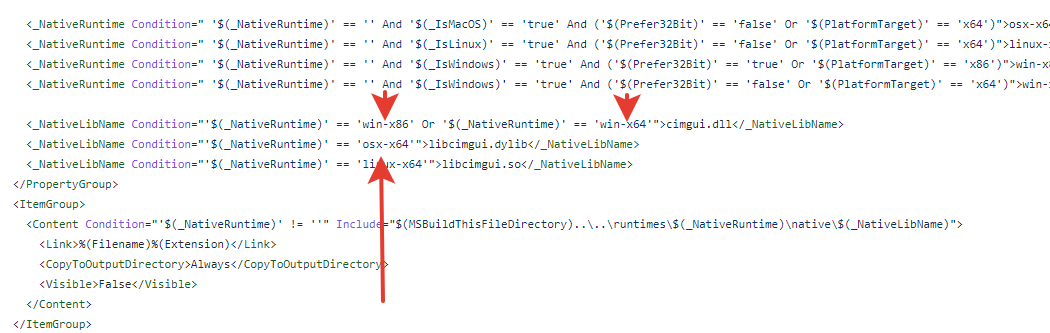 I suppose in my case something is related to this thing in
Im currently getting this issue too, im on Arch Linux interestingly it only happens on mono, not core

If you're using something other than .NET Core, you may need to manually include the native binary in your app. There is some config in the NuGet package to try and make those work, but it's been finnicky in the past.
Having the same problem on Mac OS with arm64 @sampletext32 There's no ready-made native binary for macOS arm64, you'll have to build that yourself.
I had made extra step trying to append LD_LIBRARY_PATH to all folders in bin/debug/net6.0/runtimes but still same error.
The only normal possibility here is that you just don't have libcimgui.so on your library path, so I would double check all of the things in your environment, and try different variants (e.g. copy the library somewhere else, put that on the LD_LIBRARY_PATH, etc.) Double check nothing is overriding your library path once you launch. As the error mentions, setting LD_DEBUG can be helpful because it lists out which paths were checked.

I added all libraries to library path, and still get same exception. Including setting LD_DEBUG. The ImGUI.Net itself don't even load .so file.
Adding that I experience this issue as well on Intel macOS seemingly on .NET Core as well!

macOS issue is probably fixed in this PRs - https://github.com/mellinoe/ImGui.NET/pull/318 & https://github.com/mellinoe/ImGui.NET/pull/347 but not yet released on NuGet
After this fix, runtime will be able to locate libcimgui.dylib.
As manual workaround you can move file from net6.0/runtimes/osx-universal/native/libcimgui.dylib to net6.0/runtimes/osx-x64/native/libcimgui.dylib in your build target directory.
Update: @nathan130200 you may try to copy net6.0/runtimes/linux-x64/native/libcimgui.so to net6.0/libcimgui.so and execute app, it should help to start app if libcimgui.so works for you linux version.
