

 IQSS
IQSS
Metadata fields inheritance and dataset templates
Hi Harvard team,
We've run into a behaviour in Dataverse around metadata fields and templates, and are wondering if it's part of the intended functionality. I also posted this in the Google group (https://groups.google.com/forum/#!topic/dataverse-community/IBl08D_myN0).
The steps to reproduce are:
- A user creates a sub-dataverse, which has inherited the dataset templates from the parent dataverse. These can be seen in 'Edit' > 'Dataset Templates'.
- The user navigates to 'General Information' in the sub-dataverse, unchecks 'Use metadata fields from Scholars Portal/Harvard Dataverse', checks another metadata field that isn't included in the parent (e.g. Geospatial), and then saves.
- The user navigates back to the dataset templates, and none of the parent templates appear anymore.
- If the user goes back to step 2 and re-checks 'Use metadata fields from..', the dataset templates appear again.
In our case, the main issue here is that our user can't set different metadata fields as required that are not in the parent, while also using pre-defined dataset templates from the parent dataverse (in this case, these templates define different CC licenses).
Tested in SP Dataverse (4.10.1) and Harvard (4.15.1).

Hi @kaitlinnewson, the idea behind what you are seeing was that if a user selects different fields / blocks in a child, it was a a challenge to reconcile with a template that was made for those other fields / blocks.
In the specific use case you mention, if all they change is what is required, you should still see the templates from the parents. I just tested on demo and I changed what was required and still saw them; when I added the geospatial block, I could no longer use them.
One workaround is to "copy" the template before you add the block. Then you have that copy, even after adding the block. Do note, since it's a copy, it won't change if the template in the parent dataverse changes.

Hi @scolapasta and @kaitlinnewson
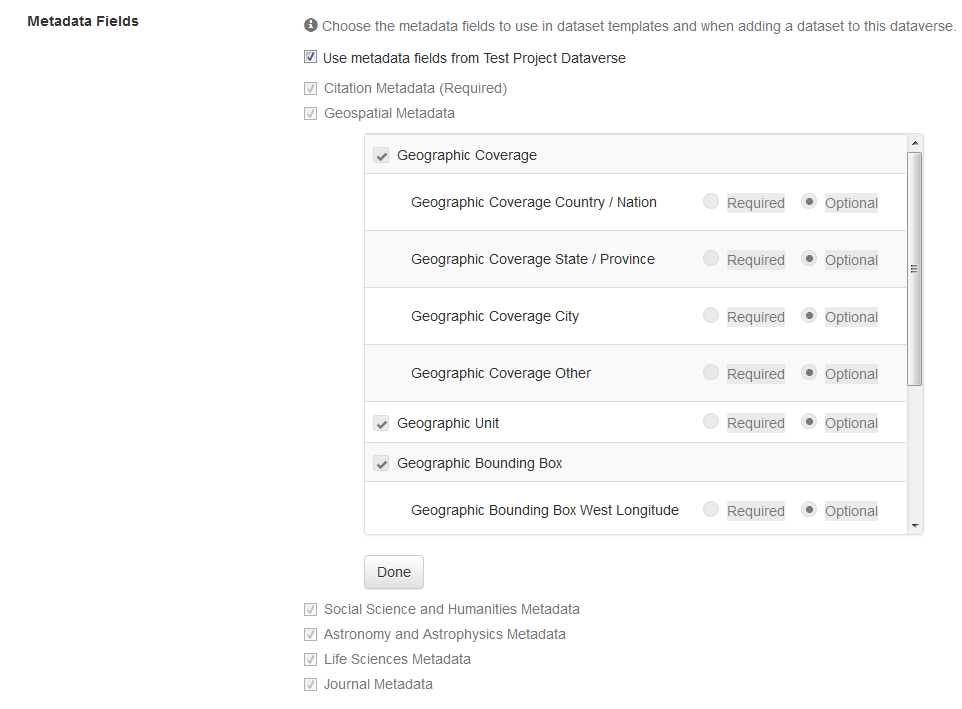
My main goal is to change a few fields from optional to required while still retaining the templates. It sounds like @scolapasta was able to do that but when I try on the SP demo dataverse or on a real UBC dataverse, I can only make changes to required/optional by deselecting "Use metadata fields from Test Project Dataverse" first, and once I do that the templates are gone. I've attached a screenshot showing that I can view fields but not edit them.
Thanks! Sally
