
jellyfin-plugin-home-sections
 jellyfin-plugin-home-sections copied to clipboard
 IAmParadox27
Add server provided home sections to your Jellyfin instance
Home Screen Sections (Modular Home)
A Jellyfin Plugin


Development Update - 20th August 2025
Hey all! Things are changing with my plugins are more and more people start to use them and report issues. In order to make it easier for me to manage I'm splitting bugs and features into different areas. For feature requests please head over to https://features.iamparadox.dev/ where you'll be able to signin with GitHub and make a feature request. For bugs please report them on the relevant GitHub repo and they will be added to the project board when I've seen them. I've found myself struggling to know when issues are made and such recently so I'm also planning to create a system that will monitor a particular view for new issues that come up and send me a notification which should hopefully allow me to keep more up to date and act faster on various issues.
As with a lot of devs, I am very momentum based in my personal life coding and there are often times when these projects may appear dormant, I assure you now that I don't plan to let these projects go stale for a long time, there just might be times where there isn't an update or response for a couple weeks, but I'll try to keep that better than it has been. With all new releases to Jellyfin I will be updating as soon as possible, I have already made a start on 10.11.0 and will release an update to my plugins hopefully not long after that version is officially released!
Introduction
Home Screen Sections (commonly referred to as Modular Home) is a Jellyfin plugin which allows users to update their web client's home screen to be a bit more dynamic and more "Netflixy".
Sections Included
A lot of the sections included are the base sections that would appear in a vanilla instance of Jellyfin. This has been done because using Modular Home hasn't been integrated to work side by side with the vanilla home screen and instead wholesale replaces it. Since a lot of the sections are useful and contain everything you'd want in a home screen they've been included for convenience.
NOTE: Its worth noting that the sections that have been created are one's that I myself use for my own instance, if there is a section that's missing check the "Adding your own sections" heading below for info on how you can create your own.
These vanilla sections are listed here:
- My Media
- Same as vanilla Jellyfin
- Continue Watching
- Same as vanilla Jellyfin
- Next Up
- Same as vanilla Jellyfin
- Recently Added Movies/TV Shows
- Same as vanilla Jellyfin
- Live TV
- Mostly the same as vanilla Jellyfin. Current State is untested since updating to 10.10.3 so may find that there are issues
The sections that are new for this plugin (and most likely the reason you would use this plugin in the first place) are outlined here:
-
Latest Movies/TV Shows
- These are movies/shows that have recently aired (or released) rather than when they were added to your library.
-
Because You Watched
- Very similar to Netflix's "because you watched" section, a maximum of 5 of these will appear when the section is enabled
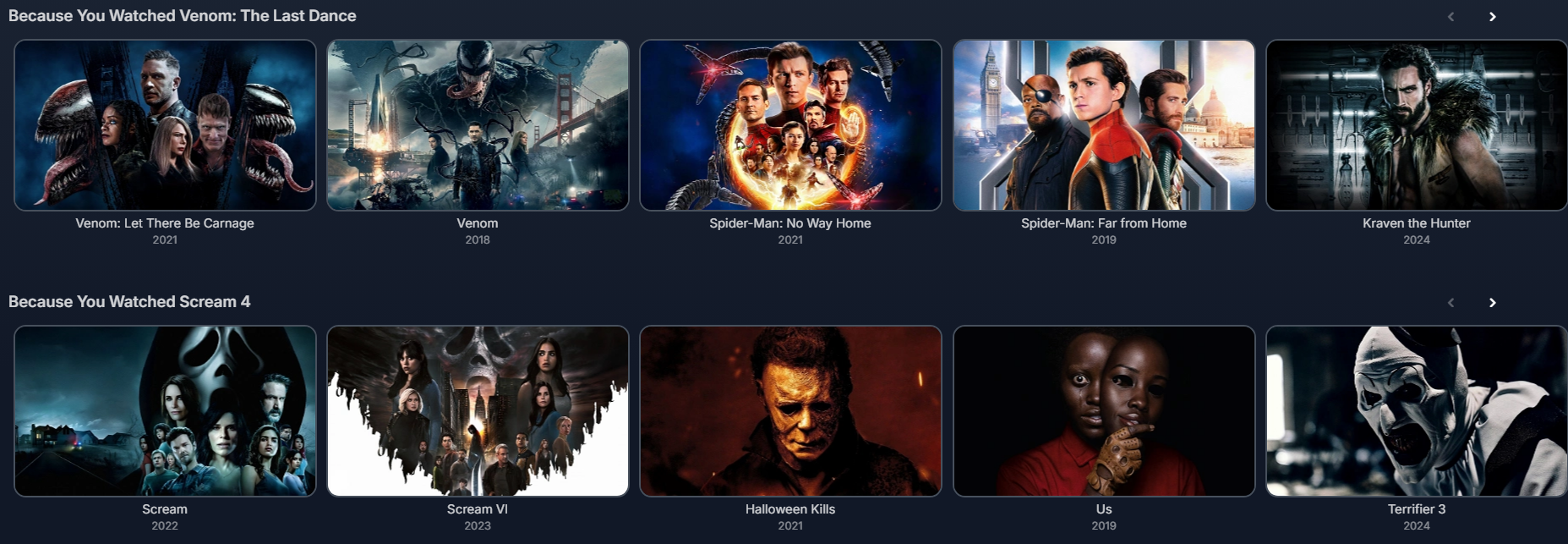
- Very similar to Netflix's "because you watched" section, a maximum of 5 of these will appear when the section is enabled
-
Watch Again
- Again similar to Netflix's feature of the same name, this will request Movies in a Collection and TV Shows that have been watched to their completion and will provide the user an option to watch the show/movie collection again. The listed entry will be the first movie to be released in that collection (done by Premiere Date) or the first episode in the series

- Again similar to Netflix's feature of the same name, this will request Movies in a Collection and TV Shows that have been watched to their completion and will provide the user an option to watch the show/movie collection again. The listed entry will be the first movie to be released in that collection (done by Premiere Date) or the first episode in the series
-
My List
- Again similar to Netflix's feature. This requires a bit more setup than the others to get working. It looks for a playlist called "My List" and retrieves the entries in that playlist.

- Again similar to Netflix's feature. This requires a bit more setup than the others to get working. It looks for a playlist called "My List" and retrieves the entries in that playlist.
Installation
Prerequisites
- This plugin is based on Jellyfin Version
10.10.7 - The following plugins are required to also be installed, please following their installation guides:
- File Transformation (https://github.com/IAmParadox27/jellyfin-plugin-file-transformation) at least v2.2.1.0
- Plugin Pages (https://github.com/IAmParadox27/jellyfin-plugin-pages) at least v2.2.2.0
Installation
- Add
https://www.iamparadox.dev/jellyfin/plugins/manifest.jsonto your plugin repositories. - Install
Home Screen Sectionsfrom the Catalogue. - Restart Jellyfin.
- On the user's homepage, open the hamburger menu and you should see a link for settings to "Modular Home". Click this.
- At the top there is a button to enable support and it will retrieve all sections that are available on your instance. Select all that apply.
- Save the settings. Please note currently the user is not provided any feedback when the settings are saved.
- Force refresh your webpage (or app) and you should see your new sections instead of the original ones.
Upcoming Features/Known Issues
If you find an issue with any of the sections or usage of the plugin, please open an issue on GitHub.
FAQ
I've updated Jellyfin to latest version but I can't see the plugin available in the catalogue
The likelihood is the plugin hasn't been updated for that version of Jellyfin and the plugins are strictly 1 version compatible. Please wait until an update has been pushed. If you can see the version number in the release assets then please make an issue, but if its not in the assets, please wait. I know Jellyfin has updated, I'll update when I can.
I've installed the plugins and don't get any options or changes. How do I fix?
This is common, particularly on a fresh install. The first thing you should try is the following
- Launch your browsers developer tools
- Open the Network tab across the top bar
- Check the Disable cache checkbox
- Refresh the page while the dev tools are still open
How can I tell if its worked?
The easiest way to confirm whether the user is using the modular home settings is to check whether the movie posters are portrait or landscape. Due to how the cards are delivered from the backend all cards are forced to be landscape
Contribution
Adding your own sections
This is great an' all but I want a section that doesn't exist here. Can I make one?
Yep! Home Screen Sections exposes HTTP endpoints which can be used to register sections.
Due to issues with Jellyfin's plugins being loaded into different load contexts this cannot be referenced directly.
Instead you can use reflection to invoke the plugin directly to register your section.
- Prepare your payload
{
    "id": "00000000-0000-0000-0000-000000000000", // Guid
    "displayText": "", // What text should be displayed by default for your section
    "limit": 1, // The number of times this section can appear up to
    "route": "", // The route that should be linked on the section header, if applicable
    "additionalData": "", // Any accompanying data you want sent to your results handler
	"resultsAssembly": GetType().Assembly.FullName, // Example value is a string from C# that should be resolved before adding to json
	"resultsClass": "", // The name of the class that should be invoked from the above assembly
	"resultsMethod": "" // The name of the function that should be invoked from the above class
}
- Send your payload to the home screen sections assembly
Assembly? homeScreenSectionsAssembly =
	AssemblyLoadContext.All.SelectMany(x => x.Assemblies).FirstOrDefault(x =>
		x.FullName?.Contains(".HomeScreenSections") ?? false);

if (homeScreenSectionsAssembly != null)
{
	Type? pluginInterfaceType = homeScreenSectionsAssembly.GetType("Jellyfin.Plugin.HomeScreenSections.PluginInterface");

	if (pluginInterfaceType != null)
	{
		pluginInterfaceType.GetMethod("RegisterSection")?.Invoke(null, new object?[] { payload });
	}
}
When your section results method is invoked you will receive an object representing the following json format (it will try to serialize it to the type you specify in the signature)
{
  "UserId": "", // The GUID of the user that is requesting the section
  "AdditionalData": "" // The additional data you sent in the registration
}
You must make sure that your section results method returns a QueryResult<BaseItemDto>.
Pull Requests
I'm open to any and all pull requests that expand the functionality of this plugin, while keeping within the scope of what its outlined to do.
Metadata
Owner
 IAmParadox27
Metadata
Add server provided home sections to your Jellyfin instance