
label-studio
 label-studio copied to clipboard
 HumanSignal
NER and Relation Extraction mutually exclusive
For a project, I need to carry out sentence labelling. I have a large number of entities and relations, some of which are only related to certain entity types. I was wondering if it would be possible to make relations appear and disappear based on the selected entity, or to insert a drop-down menu so that only those relations linked to a certain type of entity can be viewed.
Thank you.

Looks like this feature is not yet supported and it sounds like a good feature request, we will discuss it with the team.

Hi, I am working on NER to tag text in .txt files. I am facing one issue while uploading the file, it is always showing an options which breaks the text in the file into multiple task (even for a single file). It is always asking to chose one option either Treat As CSV or Treat as Time-Series. Once I chose Treat As CSV option, it shows multiple tasks for a single file text. The issue is that the calculation of start and end showing different for every line of text in a single file instead of treating the whole text as one task. Is there any solution for this issue? Thanks!

Hi @makseq , I tried that too, it is only showing the file name in the labelling interface. For e.g. \data\file_name.txt\ not the text inside it.
Now you should change your labeling config from <Text value="text"> to <Text valueType="url" value="text">.

My application scenario is event extraction. An article will have events in different paragraphs, and then mark the corresponding event entities in those paragraphs. I have a lot of ideas that can realize this process, but I find that the existing tags cannot be satisfied unless I modify the front-end code and add corresponding components. I don't know if you have plans for such a feature or not, see if you can provide some help.
Right now you can achieve this view:
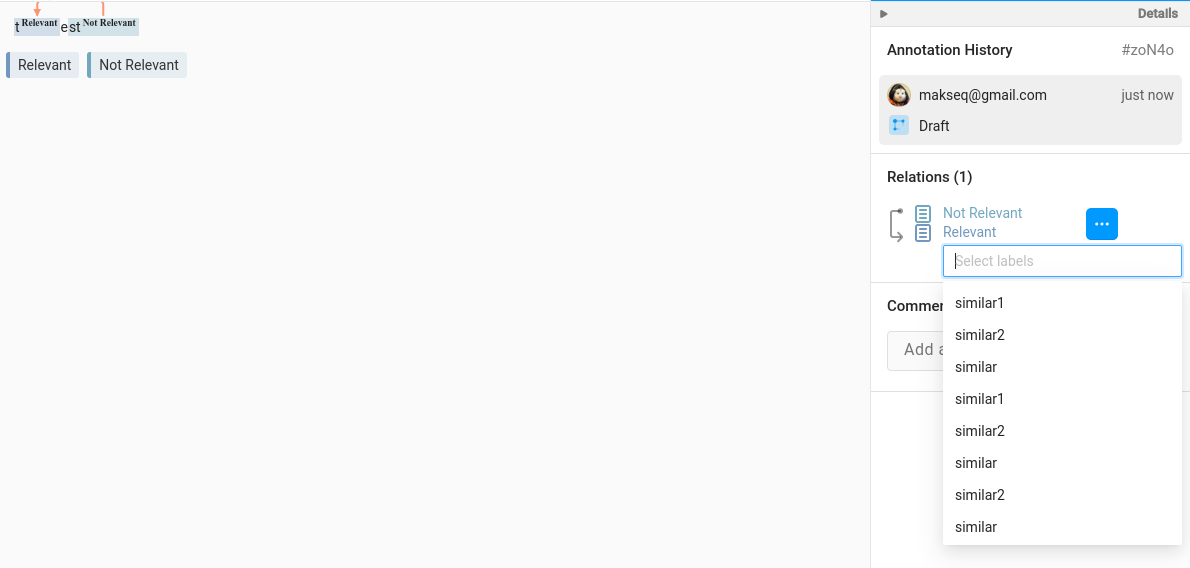
with this labeling config:
<View>
  <Relations>
    <Relation value="similar" />
    <Relation value="similar1" />
    <Relation value="similar2" />
    <Relation value="similar" />
    <Relation value="similar1" />
    <Relation value="similar2" /><Relation value="similar" />
    <Relation value="similar1" />
    <Relation value="similar2" /><Relation value="similar" />
    <Relation value="similar1" />
    <Relation value="similar2" /><Relation value="similar" />
    <Relation value="similar1" />
    <Relation value="similar2" /><Relation value="similar" />
    <Relation value="similar1" />
    <Relation value="similar2" /><Relation value="similar" />
    <Relation value="similar1" />
    <Relation value="similar2" /><Relation value="similar" />
    <Relation value="similar1" />
    <Relation value="similar2" /><Relation value="similar" />
    <Relation value="similar1" />
    <Relation value="similar2" /><Relation value="similar" />
    <Relation value="similar1" />
    <Relation value="similar2" /><Relation value="similar" />
    <Relation value="similar1" />
    <Relation value="similar2" /><Relation value="similar" />
    <Relation value="similar1" />
    <Relation value="similar2" /><Relation value="similar" />
    <Relation value="similar1" />
    <Relation value="similar2" /><Relation value="similar" />
    <Relation value="similar1" />
    <Relation value="similar2" />
  </Relations>

  <Text name="txt-1" value="$text" />
  <Labels name="lbl-1" toName="txt-1">
    <Label value="Relevant" />
    <Label value="Not Relevant" />
  </Labels>
</View>
@makseq In fact I can do something like this.
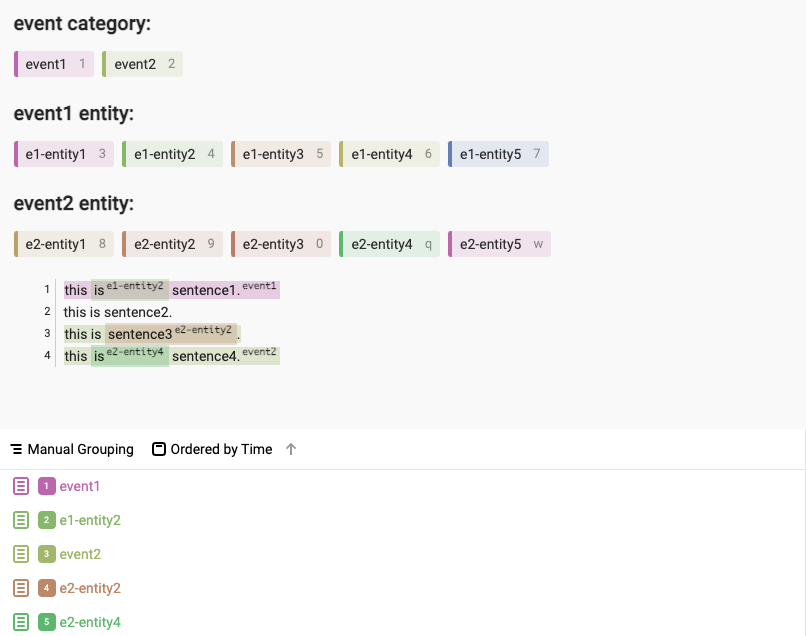
with following label config:
<View>

<Header value="event category:"/>
<Labels name="events" toName="text">
	<Label  value="event1" granularity="word"/>
	<Label  value="event2" hint="" granularity="word"/>
</Labels>
<Header value="event1 entity:"/>
<Labels name="event1" toName="text">
	<Label value="e1-entity1" granularity="word"/>
	<Label value="e1-entity2" granularity="word"/>
	<Label value="e1-entity3" granularity="word"/>
	<Label value="e1-entity4" granularity="word"/>
	<Label value="e1-entity5" granularity="word"/>
</Labels>

<Header value="event2 entity:"/>
<Labels name="event2" toName="text">
	<Label value="e2-entity1" granularity="word"/>
	<Label value="e2-entity2" granularity="word"/>
	<Label value="e2-entity3" granularity="word"/>
	<Label value="e2-entity4" granularity="word"/>
	<Label value="e2-entity5" granularity="word"/>
</Labels>
  <Text name="text" style="height: 300px; overflow: auto;" value="$text"/>
</View><!--{
	"data": {
		"text": "this is sentence1. \n this is sentence2. \n this is sentence3.\n this is sentence4."
	}
}-->
But doing so has some disadvantages:
- The entities of different events are all displayed. When there are too many events, the entities will also increase. From the perspective of user experience, it is best to select an event and only display the entities under the event.
- Even if you select a specific event (such as event1), you can still select entities under other events (such as the event1 event uses the entities under event2). Of course, these are basically user experience improvements. The current product functions are still very powerful, and it is indeed very powerful to be able to use various tags to freely combine.
I wonder if the attribute toName can be set to other text that has been set as a label in labels. like this
<View>
  <Labels name="l1" toName="txt-1">
    <Label name='lab1' value="Brand" />
    <Label name="lab2"  value="Product" />
  </Labels>
  <Labels name="l2" toName="lab1">
    <Label  value="lab1-e1" />
    <Label  value="lab1-e2" />
  </Labels>

  <Text name="txt-1" value="$text" />
</View>
@sloth2012 no, it's not supported. toName can be used only with source (object) tags like Text, Audio, Video, Image, etc.