
label-studio

label-studio copied to clipboard
 HumanSignal
Labeling Hebrew text causes words to mix
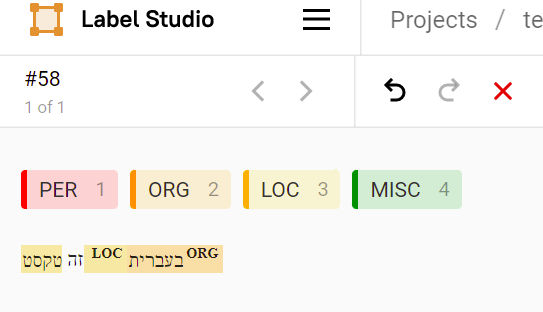
Describe the bug I am trying to label Hebrew text (RTL language). When labels are attached to the text, the words of the text are mixed and not shown in their original order.
To Reproduce Steps to reproduce the behavior:
- Create a project with attached dataset.json dataset.txt
- Choose NER template
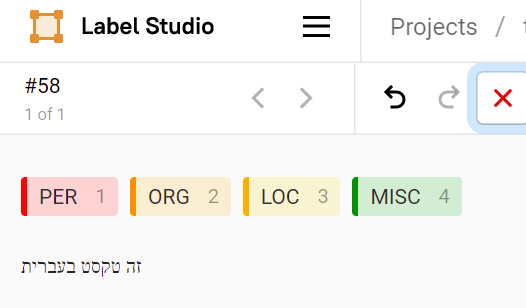
- Start labeling the single example within the dataset. Observe the initial order.
- Attach labels to words and see that the order of the original words is not preserved.
Expected behavior I would expect the order of the words in the example to be the same with and without labels. Moreover, I would like to view the example's text in RTL mode (from right to left).
Screenshots
Here we see the original (correct) order of words in the example:
After labeling two words, words and labels are mixed and not presented properly:
Environment (please complete the following information):
- OS: Windows 10
- Label Studio Version 1.4 Additional context Add any other context about the problem here.


