

 Huachao
Formatting json in requests
Would it be possible to embed the json editor for the content of the request when specifing Content-Type: application/json ?
something like this:


@Meir017 nice suggestion, I will consider a nice way to implement it and other cases like xml

@Meir017 @flanakin @dpfg do you think if the input json request body will be formatted when you type(the JSON maybe incomplete then) can meet your requirements, or do you need anything else?
Syntax highlighting would also be nice to have. When you edit markdown in vscode and put code snippet with specified syntax you get highlighting + indentation on typing. Would be wonderful to have the same.

@dpfg @Meir017 @flanakin I have supported the request body(JSON and XML only) automatically highlight like following:
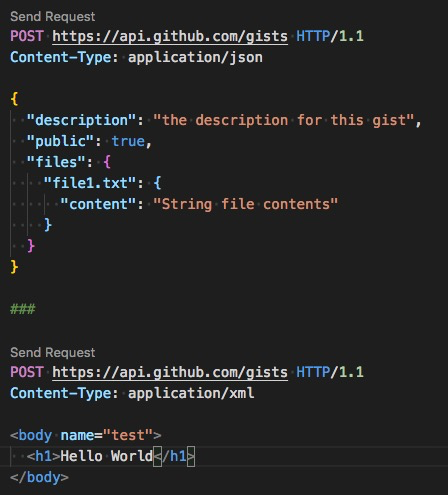
This looks amazing!
Is it possible to actually use a json editor just for the request body section?
this will provide better autocomplete, something like this:
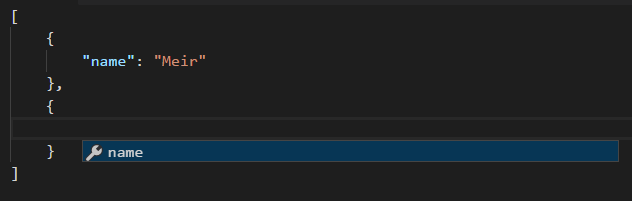
@Meir017 use json editor as request body section is a limitation of Microsoft/vscode#1751. So currently not possible, and I will try to use own ways to support auto format
@Meir017 @dpfg @flanakin @vivekchauhan you can try the json/xml request body highlight feature in latest version 0.17.0
@Huachao take a look at this - https://youtu.be/7Eh_l7jEcCo?t=24m6s the aspnet team is working on Razor support in vscode which means multiple languages in the same file
Hey thank you for this excellent extension really loving it.
Quick question bc I cannot figure how should i properly use it to get json formatting - maybe I have something misconfigured in my environment.
I like how everything works when I use .http file extension in regards to syntax highlighting. Here i get the "Send Request" action when I hover over a particular request. But this doesnt auto-format and ident the JSON body in the REQUESTS.
If i switch to .json file extension, now the json bodies of request are properly formatted, but I loose the "Send Request" action on hovering over the request.
So probably I am doing something stupid but I canot figure out how to merge the tow - can you please clarify what is the correct procedure to use this extension and enable pretty-formatting the request body. Also to note I use prettier in my project, I dont know if that makes a difference.
Either way thanks a lot for your hard work.

@gcloeval auto formatting request body is not supported yet, sorry for the inconvenience. I will consider this carefully.
for xml requests, if you use XML Tools extension you can select the text and run "Format as XML" . I don't know if something similar exists for json

