Unity3DRuntimeTransformGizmo
 Unity3DRuntimeTransformGizmo copied to clipboard
 HiddenMonk
HDRP 2019.3 Support

I dont know much about the new render pipelines, so I probably wont be doing it for now.

Well, I got it to work in URP with minimal changes, without touching any of the logic. So you are futurproof for that at least!
@TilmitderBrill which is that changes? Can you share in here? Thank you so much

@anhnguyenvn Changes in RuntimeGizmos
private void RenderPipelineManager_endCameraRendering(ScriptableRenderContext context, Camera camera)
        {
            OnPostRender();
        }

 		void OnEnable()
		{
            RenderPipelineManager.endCameraRendering += RenderPipelineManager_endCameraRendering;
            forceUpdatePivotCoroutine = StartCoroutine(ForceUpdatePivotPointAtEndOfFrame());
		}

		void OnDisable()
		{
			ClearTargets();
            RenderPipelineManager.endCameraRendering -= RenderPipelineManager_endCameraRendering;
            StopCoroutine(forceUpdatePivotCoroutine);
		}

		void OnPostRender()
		{
			if(mainTargetRoot == null || manuallyHandleGizmo) return;

			lineMaterial.SetPass(0);

			Color xColor = (nearAxis == Axis.X) ? (isTransforming) ? selectedColor : hoverColor : this.xColor;
			Color yColor = (nearAxis == Axis.Y) ? (isTransforming) ? selectedColor : hoverColor : this.yColor;
			Color zColor = (nearAxis == Axis.Z) ? (isTransforming) ? selectedColor : hoverColor : this.zColor;
			Color allColor = (nearAxis == Axis.Any) ? (isTransforming) ? selectedColor : hoverColor : this.allColor;

			//Note: The order of drawing the axis decides what gets drawn over what.

			TransformType moveOrScaleType = (transformType == TransformType.Scale || (isTransforming && translatingType == TransformType.Scale)) ? TransformType.Scale : TransformType.Move;
			DrawQuads(handleLines.z, GetColor(moveOrScaleType, this.zColor, zColor, hasTranslatingAxisPlane));
			DrawQuads(handleLines.x, GetColor(moveOrScaleType, this.xColor, xColor, hasTranslatingAxisPlane));
			DrawQuads(handleLines.y, GetColor(moveOrScaleType, this.yColor, yColor, hasTranslatingAxisPlane));

			DrawTriangles(handleTriangles.x, GetColor(TransformType.Move, this.xColor, xColor, hasTranslatingAxisPlane));
			DrawTriangles(handleTriangles.y, GetColor(TransformType.Move, this.yColor, yColor, hasTranslatingAxisPlane));
			DrawTriangles(handleTriangles.z, GetColor(TransformType.Move, this.zColor, zColor, hasTranslatingAxisPlane));

			DrawQuads(handlePlanes.z, GetColor(TransformType.Move, this.zColor, zColor, planesOpacity, !hasTranslatingAxisPlane));
			DrawQuads(handlePlanes.x, GetColor(TransformType.Move, this.xColor, xColor, planesOpacity, !hasTranslatingAxisPlane));
			DrawQuads(handlePlanes.y, GetColor(TransformType.Move, this.yColor, yColor, planesOpacity, !hasTranslatingAxisPlane));

			DrawQuads(handleSquares.x, GetColor(TransformType.Scale, this.xColor, xColor));
			DrawQuads(handleSquares.y, GetColor(TransformType.Scale, this.yColor, yColor));
			DrawQuads(handleSquares.z, GetColor(TransformType.Scale, this.zColor, zColor));
			DrawQuads(handleSquares.all, GetColor(TransformType.Scale, this.allColor, allColor));

			DrawQuads(circlesLines.all, GetColor(TransformType.Rotate, this.allColor, allColor));
			DrawQuads(circlesLines.x, GetColor(TransformType.Rotate, this.xColor, xColor));
			DrawQuads(circlesLines.y, GetColor(TransformType.Rotate, this.yColor, yColor));
			DrawQuads(circlesLines.z, GetColor(TransformType.Rotate, this.zColor, zColor));
		}
Basically only the "onPostRender" gets handled over the RenderPipelineManager
@TilmitderBrill where do you put the script you have? im trying to get this plugin to work with URP as well

I have this issue where the gizmos dont appear on the pivot of the object
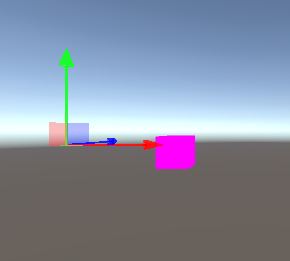 but when I check it on the Scene view, the gizmos are appearing on the pivot point of the object.

Im using Unity 2019.3.15f1 if anyone can help with this that'd be very much appreciated. Im using URP
I have this issue where the gizmos dont appear on the pivot of the object
Im using Unity 2019.3.15f1 if anyone can help with this that'd be very much appreciated. Im using URP
Just turn on post processing option in camera.

Hi Guys for me Using RenderPipelineManager.endCameraRendering was not working properly as it was only showing the gizmo in the Scene Window and not the Game window. I used instead : RenderPipelineManager.endFrameRendering and now everything works back to normal !


Just turn on post processing option in camera.
Setting this in Camera slightly off helps as well


For those who don't want to read all this and make the changes manually, I did everything here for URP (and HDRP too maybe, if changing shader LightMode): #36