
HeroicGamesLauncher
 HeroicGamesLauncher copied to clipboard
 Heroic-Games-Launcher
Steam deck - GOG Cloud Sync not working
Describe the bug
Hi, I'm trying to play Cyberpunk 2077 on my Steam Deck for a while (got the GOG version). But since Heroic 2.4.0 beta, I didn't manage to get cloud sync working.
Now, on 2.4.2, I have the following message : "Sync Saves: Unsupported". But on 2.4.0beta2 changelog, the screenshot was displaying Cloudsave for CP2077 (Appname 1423049311).
Have I done something wrong?
I already try to clear cache and refresh, completely uninstall Heroic, reset Heroic, without luck I have no issue with Hades (Epic) - EDIT : got the same message, but my latest save is here
Thank you for your help
Add logs
(14:46:20) INFO: [Legendary]: Running command: /app/bin/heroic/resources/app.asar.unpacked/build/bin/linux/legendary --version (14:46:20) INFO: [Legendary]: Legendary location: /app/bin/heroic/resources/app.asar.unpacked/build/bin/linux/legendary (14:46:20) INFO: [Gog]: GOGDL location: /app/bin/heroic/resources/app.asar.unpacked/build/bin/linux/gogdl (14:46:20) INFO: [Backend]:
Heroic Version: 2.4.2 Chopper
Legendary Version: 0.20.28 Dark Energy (hotfix #2)
OS: Freedesktop.org KERNEL: 5.13.0-valve15-1-neptune-02197-gf6ec7ad3762a ARCH: x64
CPU: AMD Custom APU 0405 @1.83 GOVERNOR: schedutil
RAM: Total: 14.49 GiB Available: 11.49 GiB
GRAPHICS: GPU0: Device 163f VRAM: 512MB DRIVER:
PROTOCOL: x11
(14:46:20) INFO: [Gog]: Getting data about the user
(14:46:20) INFO: [Gog]: Refreshing access_token
(14:46:21) WARNING: [Backend]: Failed to register protocol with OS.
(14:46:21) INFO: [Backend]: AreWeAntiCheatYet data downloaded
(14:46:21) INFO: [Gog]: Token refreshed successfully
(14:46:22) INFO: [Gog]: Saved user data to config
(14:46:22) INFO: [Frontend]: Refreshing Library
(14:46:22) INFO: [Legendary]: Refreshing library...
(14:46:22) INFO: [Legendary]: Refreshing Epic Games...
(14:46:22) INFO: [Gog]: Getting GOG library
(14:46:23) INFO: [Legendary]: Running command: /app/bin/heroic/resources/app.asar.unpacked/build/bin/linux/legendary list
(14:46:23) INFO: [Gog]: Number of library pages: 1
(14:46:24) INFO: [Backend]: Downloaded Winetricks
(14:46:24) INFO: [Legendary]: Updating game list
(14:46:24) INFO: [Legendary]: Game List Updated
(14:46:28) INFO: [Gog]: Saved games data
(14:46:29) INFO: [Legendary]: Checking for game updates.
(14:46:29) INFO: [Legendary]: Running command: /app/bin/heroic/resources/app.asar.unpacked/build/bin/linux/legendary list-installed --check-updates --tsv
(14:46:30) INFO: [Legendary]: Found 0 game(s) to update
(14:46:31) INFO: [Gog]: Found 0 game(s) to update
(14:46:42) INFO: [Gog]: Getting game metadata.
(14:46:42) INFO: [Gog]: Running command: /app/bin/heroic/resources/app.asar.unpacked/build/bin/linux/gogdl info 1423049311 --token
Steps to reproduce
- Go to 'Library'
- Click on 'Cyberpunk2077'
- Scroll down to 'Info'
- See error
Expected behavior
Be able to sync save for CP2077
Screenshots


System Information
- OS [e. g. "Ubuntu"]: SteamOS
- Heroic Version [e. g. 2.1.1]: 2.4.2
Additional information
No response

Try clearing heroic cache in settings and refreshing the library
Hades handles saves by itself. It detects currently logged in Epic account and pulls saves by itself

Thank you for your answer. It didn't work previously (as mentionned above), but after this, the "Save-Sync" tab appeared miraculously. But I cannot launch it anymore. I've tried Proton 7, experimental, latest GE, with or withour CP2077 *.exe as alternative *.exe
Do you have any idea? Thanks
CP2077 Logs
System Info:
Heroic Version: 2.4.2 Chopper
Legendary Version: 0.20.28 Dark Energy (hotfix #2)
OS: Freedesktop.org KERNEL: 5.13.0-valve15-1-neptune-02197-gf6ec7ad3762a ARCH: x64
CPU: AMD Custom APU 0405 @2.06 GOVERNOR: schedutil
RAM: Total: 14.49 GiB Available: 10.6 GiB
GRAPHICS: GPU0: Device 163f VRAM: 512MB DRIVER:
PROTOCOL: x11
Game Settings: { "autoInstallDxvk": false, "autoInstallVkd3d": false, "preferSystemLibs": false, "autoSyncSaves": false, "maxSharpness": 2, "language": "", "nvidiaPrime": false, "enviromentOptions": [], "wrapperOptions": [], "savesPath": "", "showFps": false, "targetExe": "", "useGameMode": false, "winePrefix": "/home/deck/.wine", "wineVersion": { "bin": "/home/deck/.local/share/Steam/steamapps/common/Proton 7.0/proton", "name": "Proton - Proton 7.0", "type": "proton" }, "useSteamRuntime": false, "eacRuntime": false, "battlEyeRuntime": false, "gogSaves": [ { "name": "saves", "location": "/home/deck" } ] }
Game launched at: Sat Sep 03 2022 15:28:56 GMT+0200 (heure d’été d’Europe centrale)
Launch Command: STEAM_COMPAT_CLIENT_INSTALL_PATH=/home/deck/.var/app/com.heroicgameslauncher.hgl/.steam/steam STEAM_COMPAT_DATA_PATH=/home/deck/.wine PROTON_NO_ESYNC=1 PROTON_NO_FSYNC=1 STEAM_COMPAT_APP_ID=0 SteamAppId=0 SteamGameId="heroic-Cyberpunk 2077" PROTON_LOG_DIR=/home/deck/.var/app/com.heroicgameslauncher.hgl /app/bin/heroic/resources/app.asar.unpacked/build/bin/linux/gogdl launch "/home/deck/Games/Heroic/Cyberpunk 2077" 1423049311 --no-wine --wrapper "'/home/deck/.local/share/Steam/steamapps/common/Proton 7.0/proton' run" --os windows
Game Log: wineserver: using server-side synchronization. wine: RLIMIT_NICE is <= 20, unable to use setpriority safely WARNING: radv is not a conformant Vulkan implementation, testing use only. WARNING: radv is not a conformant Vulkan implementation, testing use only. wine: configuration in L"/home/deck/.wine/pfx" has been updated. [S_API] SteamAPI_Init(): SteamAPI_IsSteamRunning() did not locate a running instance of Steam. [S_API FAIL] SteamAPI_Init() failed WARNING: radv is not a conformant Vulkan implementation, testing use only. WARNING: radv is not a conformant Vulkan implementation, testing use only. WARNING: radv is not a conformant Vulkan implementation, testing use only. WARNING: radv is not a conformant Vulkan implementation, testing use only. WARNING: radv is not a conformant Vulkan implementation, testing use only. WARNING: radv is not a conformant Vulkan implementation, testing use only. WARNING: radv is not a conformant Vulkan implementation, testing use only. WARNING: radv is not a conformant Vulkan implementation, testing use only. WARNING: radv is not a conformant Vulkan implementation, testing use only. WARNING: radv is not a conformant Vulkan implementation, testing use only. wine: Unhandled exception 0x80000003 in thread 1b0 at address 0000000140462D4E (thread 01b0), starting debugger... 0x0000000140462d4e cyberpunk2077+0x462d4e: int $3 Modules: Module Address Debug info Name (93 modules) PE 0000000000790000-0000000000a18000 Deferred icuin PE 0000000000a20000-0000000000bf4000 Deferred icuuc PE 0000000000c00000-0000000000c03000 Deferred icudt PE 0000000000c10000-00000000018fe000 Deferred galaxy64 PE 0000000001900000-000000000197d000 Deferred bink2w64 PE 0000000001980000-0000000001b79000 Deferred physx3common_x64 PE 0000000001b80000-0000000001c0f000 Deferred physx3characterkinematic_x64 PE 0000000001c10000-0000000001c9c000 Deferred pxfoundation_x64 PE 0000000001ca0000-0000000001d45000 Deferred physx3cooking_x64 PE 0000000001d50000-0000000001fd1000 Deferred physx3_x64 PE 0000000001fe0000-0000000001ffb000 Deferred redlexer_native PE 0000000002010000-000000000203d000 Deferred amd_ags_x64 PE 0000000002040000-0000000002173000 Deferred oo2ext_7_win64 PE 00000000763d0000-00000000763d7000 Deferred gameservicesgog PE 0000000077cd0000-0000000077e15000 Deferred gfsdk_aftermath_lib.x64 PE 000000007b000000-000000007b0d9000 Deferred kernelbase PE 000000007b600000-000000007b812000 Export kernel32 PE 0000000140000000-00000001452da000 Export cyberpunk2077 PE 0000000170000000-00000001700a1000 Export ntdll PE 0000000180000000-000000018006b000 Deferred libcurl PE 00000001c4ee0000-00000001c4f10000 Deferred winspool PE 00000001c69e0000-00000001c72fc000 Deferred shell32 PE 00000001c8b40000-00000001c8b60000 Deferred msacm32 PE 00000001c8db0000-00000001c8e47000 Deferred msvcrt PE 00000001cd860000-00000001cd868000 Deferred api-ms-win-crt-utility-l1-1-0 PE 00000001d97a0000-00000001d97a7000 Deferred api-ms-win-core-fibers-l1-1-1 PE 00000001dd3f0000-00000001dd4bd000 Deferred crypt32 PE 00000001e7610000-00000001e7617000 Deferred normaliz PE 00000001ec2b0000-00000001ec2d6000 Deferred ws2_32 PE 00000001f51e0000-00000001f51f0000 Deferred hid PE 0000000201cf0000-0000000201d0f000 Deferred secur32 PE 0000000205950000-0000000205958000 Deferred api-ms-win-appmodel-runtime-l1-1-2 PE 0000000215450000-0000000215457000 Deferred api-ms-win-security-systemfunctions-l1-1-0 PE 0000000215e60000-0000000215f23000 Deferred msvcr120 PE 000000021a380000-000000021a392000 Deferred xinput9_1_0 PE 000000021a7e0000-000000021a855000 Deferred setupapi PE 0000000226310000-0000000226317000 Deferred api-ms-win-core-string-l1-1-0 PE 0000000231ae0000-0000000231b62000 Deferred rpcrt4 PE 0000000236370000-000000023639e000 Deferred winepulse PE 000000023d820000-000000023da6e000 Deferred user32 PE 0000000240030000-000000024005d000 Deferred iphlpapi PE 0000000241850000-0000000241857000 Deferred api-ms-win-crt-environment-l1-1-0 PE 00000002419a0000-00000002419e0000 Deferred wbemprox PE 000000024f470000-000000024f48f000 Deferred mpr PE 0000000262250000-0000000262259000 Deferred api-ms-win-crt-runtime-l1-1-0 PE 000000026b4c0000-000000026b53a000 Deferred gdi32 PE 000000026ed50000-000000026ed5c000 Deferred vcruntime140 PE 00000002739c0000-0000000273af7000 Deferred oleaut32 PE 0000000274a50000-0000000274a5d000 Deferred kerberos PE 000000028ba60000-000000028ba67000 Deferred api-ms-win-crt-time-l1-1-0 PE 000000028dfa0000-000000028dfac000 Deferred nsi PE 000000029cfc0000-000000029cfd6000 Deferred dnsapi PE 000000029ea80000-000000029ea87000 Deferred api-ms-win-core-datetime-l1-1-1 PE 00000002a4090000-00000002a409e000 Deferred wtsapi32 PE 00000002bb750000-00000002bb894000 Deferred comctl32 PE 00000002bcfe0000-00000002bcfed000 Deferred mswsock PE 00000002d4d40000-00000002d4d57000 Deferred bcrypt PE 00000002e3540000-00000002e3591000 Deferred shlwapi PE 00000002e8f10000-00000002e902a000 Deferred ole32 PE 00000002edf00000-00000002ee0f7000 Deferred dxgi PE 00000002f1fa0000-00000002f1fae000 Deferred version PE 00000002fa030000-00000002fa037000 Deferred api-ms-win-core-localization-obsolete-l1-2-0 PE 0000000308050000-000000030809b000 Deferred dinput8 PE 000000030a2c0000-000000030a2c9000 Deferred api-ms-win-crt-stdio-l1-1-0 PE 000000030c980000-000000030c988000 Deferred api-ms-win-core-synch-l1-2-0 PE 00000003126f0000-0000000312709000 Deferred shcore PE 0000000327020000-0000000327073000 Deferred combase PE 000000032a700000-000000032a72a000 Deferred sechost PE 0000000330260000-00000003302a0000 Deferred advapi32 PE 0000000336850000-000000033687b000 Deferred mmdevapi PE 000000033b9e0000-000000033b9ed000 Deferred powrprof PE 000000033ea00000-000000033ea09000 Deferred api-ms-win-crt-string-l1-1-0 PE 0000000344840000-0000000344848000 Deferred api-ms-win-crt-filesystem-l1-1-0 PE 0000000350a30000-0000000350a39000 Deferred api-ms-win-crt-convert-l1-1-0 PE 0000000351680000-0000000351688000 Deferred api-ms-win-core-localization-l1-2-1 PE 0000000355100000-0000000355107000 Deferred api-ms-win-crt-locale-l1-1-0 PE 0000000359050000-000000035933e000 Deferred d3d11 PE 000000035e4e0000-000000035e742000 Deferred d3d12 PE 0000000360a80000-0000000360a8a000 Deferred api-ms-win-crt-math-l1-1-0 PE 0000000360e10000-0000000360eef000 Deferred msvcp140 PE 0000000375610000-0000000375648000 Deferred win32u PE 00000003785e0000-00000003785ed000 Deferred vulkan-1 PE 00000003871c0000-00000003871e5000 Deferred concrt140 PE 000000038b5a0000-000000038b5f2000 Deferred wldap32 PE 000000039b510000-000000039b518000 Deferred api-ms-win-crt-heap-l1-1-0 PE 00000003a0440000-00000003a04c3000 Deferred wininet PE 00000003af670000-00000003af730000 Deferred ucrtbase PE 00000003afd00000-00000003afd1a000 Deferred imm32 PE 00000003b6dc0000-00000003b6de5000 Deferred winevulkan PE 00000003b8f00000-00000003b8fc1000 Deferred winmm PE 00000003be590000-00000003be773000 Deferred dbghelp PE 00007fa0323f0000-00007fa0323f3000 Deferred wineopenxr PE 00007fa0328e0000-00007fa0328e4000 Deferred winex11 Threads: process tid prio (all id:s are in hex) 00000020 steam.exe 00000024 0 00000154 0 0000019c 0 00000030 services.exe 00000034 0 00000038 0 00000044 0 00000080 0 000000a0 0 000000b4 0 000000cc 0 00000100 0 0000003c winedevice.exe 00000040 0 0000004c 0 00000050 0 00000054 0 000000d8 0 00000078 winedevice.exe 0000007c 0 00000084 0 00000088 0 0000008c 0 00000090 0 00000094 0 0000009c 0 000000ac 0 000000b0 0 000000a4 plugplay.exe 000000a8 0 000000b8 0 000000bc 0 000000c0 0 0000023c 0 00000244 0 000000c4 svchost.exe 000000c8 0 000000d0 0 000000d4 0 000000f8 rpcss.exe 000000fc 0 00000104 0 00000108 0 0000010c 0 00000110 0 00000178 0 00000158 explorer.exe 0000015c 0 00000168 0 00000170 0 00000184 tabtip.exe 00000188 0 0000018c 0 00000198 0 00000190 (D) Z:\home\deck\Games\Heroic\Cyberpunk 2077\bin\x64\Cyberpunk2077.exe 00000194 0 000001a8 0 000001ac 0 000001b0 0 <== 000001b4 0 000001b8 0 000001bc 0 000001c0 0 000001c4 0 000001d0 0 000001d8 0 000001dc 0 000001e0 0 000001e4 0 000001e8 0 000001ec 0 000001f0 0 000001f4 0 000001f8 0 000001fc 1 00000200 0 00000204 1 00000208 0 0000020c 0 00000210 0 00000214 0 00000218 0 0000021c 0 00000220 0 00000224 1 00000228 1 0000022c 0 00000230 0 00000234 1 00000238 1 00000240 0 00000248 15 0000024c 0 00000250 0 00000254 0 00000258 0 00000260 0 00000264 0 00000280 0 000001a0 REDEngineErrorReporter.exe 000001a4 0 000001c8 conhost.exe 000001cc 0 00000268 CrashReporter.exe 0000026c 0 00000278 0 0000027c 0 System information: Wine build: wine-7.0 Platform: x86_64 Version: Windows 10 Host system: Linux Host version: 5.13.0-valve15-1-neptune-02197-gf6ec7ad3762a WARNING: radv is not a conformant Vulkan implementation, testing use only. WARNING: radv is not a conformant Vulkan implementation, testing use only. Launch command: ['/home/deck/.local/share/Steam/steamapps/common/Proton 7.0/proton', 'run', '/home/deck/Games/Heroic/Cyberpunk 2077/bin/x64/Cyberpunk2077.exe']
I had a similar issue with 2077, under settings > Wine Extensions ensure Auto Install/Update DXVK and VKD3D on Prefix are checked.
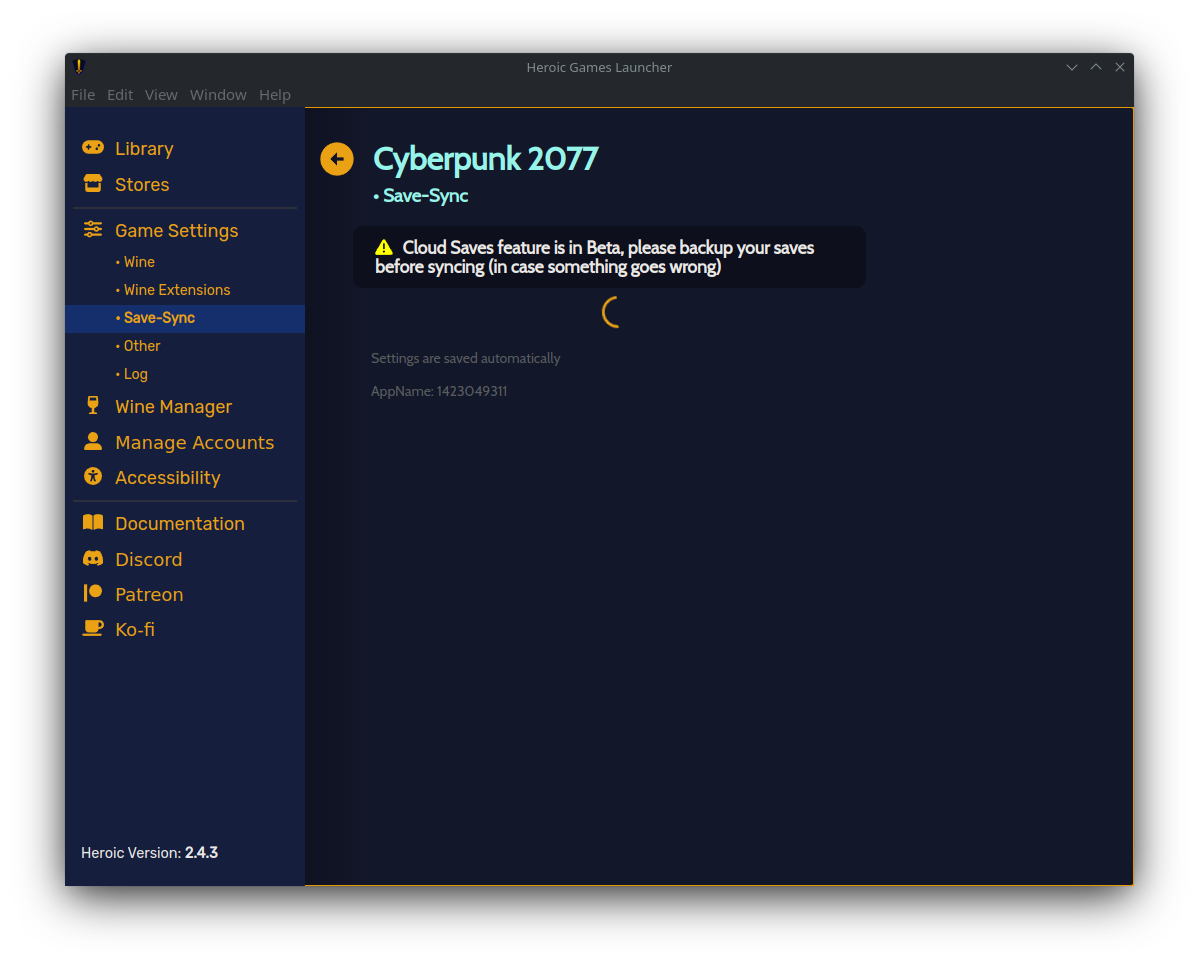
I'm also having save sync issues. Clearing cache and refreshing enabled the Save-Sync tab but it did now just spins indefinitely for me. This issue did not occur on my Steam Deck


I had a similar issue with 2077, under settings > Wine Extensions ensure Auto Install/Update DXVK and VKD3D on Prefix are checked.
I'm also having save sync issues. Clearing cache and refreshing enabled the Save-Sync tab but it did now just spins indefinitely for me. This issue did not occur on my Steam Deck
I'm having the indefinite spinning as well. Have you had any luck since posting?

I believe I've found a workaround for the GoG items when stuck spinning. It looks to have something to do with Wine prefixes or specifically Wine-GE-Proton7-27 . I ran heroic via terminal for more logging information.
I discovered it by installing Slay the Spire (Win version for sync) and trying to run it. I was using Wine-GE-Proton7-27 installed from Heroic as my default and when starting it, it would instantly close. Checking the heroic output in terminal yielded:
(16:05:59) INFO:    [Backend]:         Launching Slay the Spire (1950754973)
(16:05:59) INFO:    [Backend]:         Preventing display from sleep
(16:05:59) INFO:    [Legendary]:       Running command: /opt/Heroic/resources/app.asar.unpacked/build/bin/linux/legendary --version
(16:06:00) ERROR:   [Backend]:         Unable to create Wineprefix:  TypeError: Cannot read properties of undefined (reading 'toString')
(16:06:00) ERROR:   [Backend]:         TypeError: Cannot read properties of undefined (reading 'toString')
    at setupWineEnvVars (/opt/Heroic/resources/app.asar/build/launcher.js:184:70)
    at runWineCommand (/opt/Heroic/resources/app.asar/build/launcher.js:312:12)
(16:06:00) INFO:    [Backend]:         Stopping Display Power Saver Blocker
I installed Wine-GE-Proton7-28, saved it and went to the Save-Sync tab to test it again (Slay the Spire). It updated the wine prefix and then almost instantly updated and allowed Save-Sync options in Heroic. I then updated Cyberpunk2077 to 7-28 and launched it to force the prefix update. This allows it to use Save-Sync as well.

If it helps, I have the same problem with Cyberpunk 2077 (GOG). I haven't tried with other games.
I have a Vanilla configuration from "Heroic Games". Except for the language, all configurations are vanilla.
To stop the circle from spinning in the void, I had to install "WineGE-Proton" available in "Wine Manager".
My game still uses Proton Ge to play.
Installing WineGe seems to unlock the save menu.

We might have an issue with getting the path when using some proton version, proton-experimental sometimes works and sometimes does not. However, I investigated and could not find a problem on our end. Wine works just fine and some proton versions as well.

This might have something to do with the following conditional
Changing it to this seems to work:
      if (
        isConfigCloudSavesReady &&
        cloudSavesEnabledGames.includes(String(game.id)) &&
        installedInfo &&
        installedInfo?.platform !== 'linux'
      ) {
Additionally the game must run at least once under Wine (this might be a bug?). I'm also not sure why cloud_save_enabled is set in two different locations.
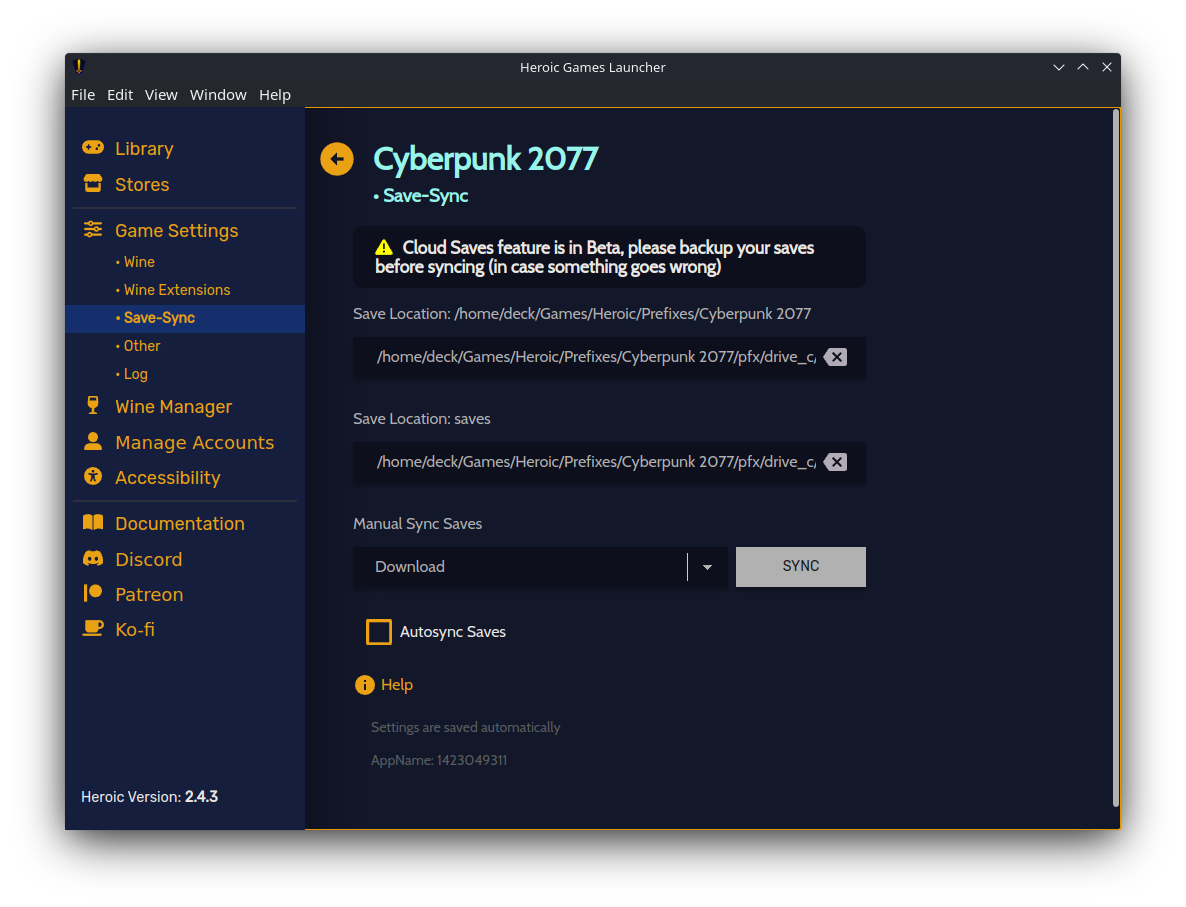
Whereas before it would load forever because isLoading is never set to false (might be good to think about having a screen that shows an error instead):
I'd appreciate any guidance on this and I can then open a PR. cc @imLinguin
PS: Thank you for creating Heroic Launcher, it's been awesome to use on Steam Deck :)

i'm getting this same error trying to run CP2077 from straight Steam.. I've never played it, just installed it (recently) and get,
wine: Unhandled exception 0x80000003 in thread 3d4 at address 0000000142C0324B (thread 03d4), starting debugger...
and game crash dialog
Doesn't matter the proton version, (tried 7.0-5, experimental, and GE's 7-30)
...I guess my point is, I don't know if it's heroic's launcher that's the problem specifically..

@victort is your issue related to cloud saves?, sounds like you are having an issue running the game, not related to this

For me, whenever I try to Sync "The Song of Saya" via GOG, nothing happens, saves simply fail to upload, even when forced. I had to manually adjust the folder, is there some sorta DB I can add to so I can fix the path?
