
HeroicGamesLauncher
 HeroicGamesLauncher copied to clipboard
 Heroic-Games-Launcher
[UI] [GoG Save-Sync] Save-sync settings do not appear sometimes
Describe the bug
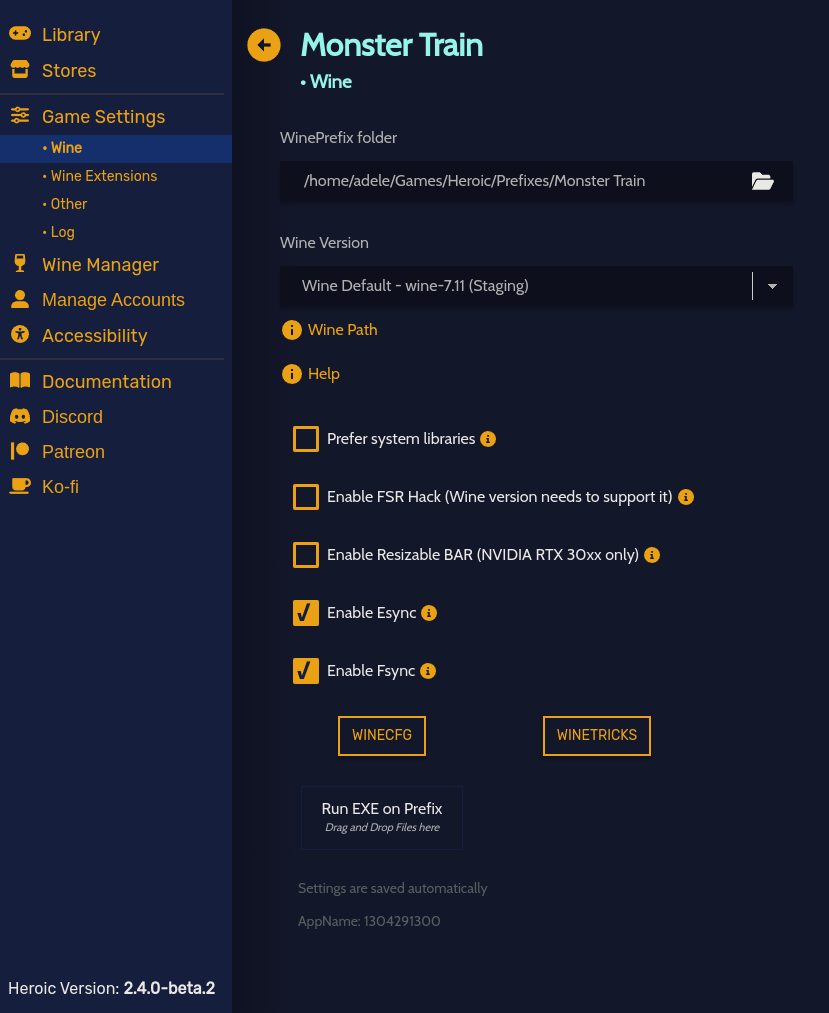
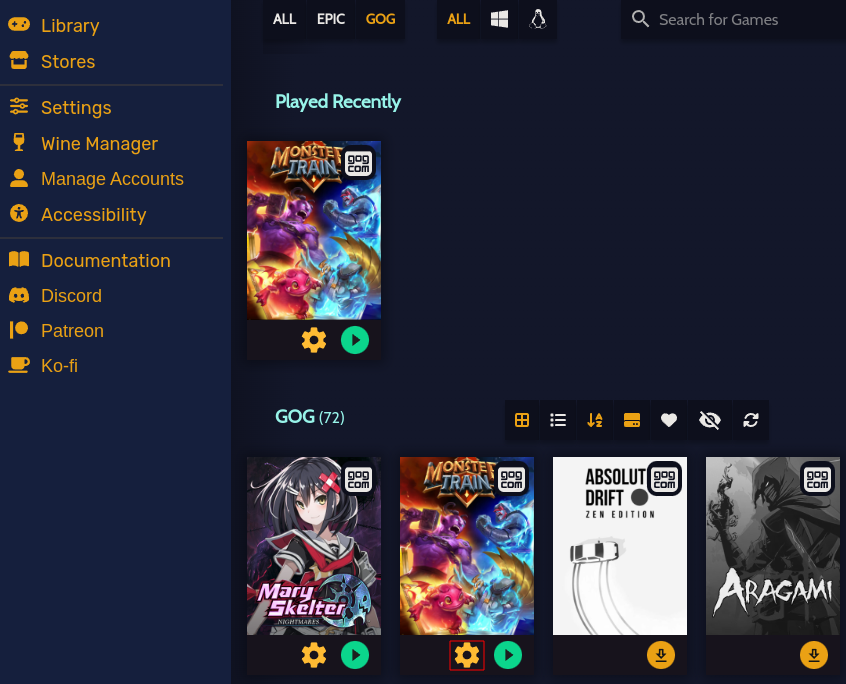
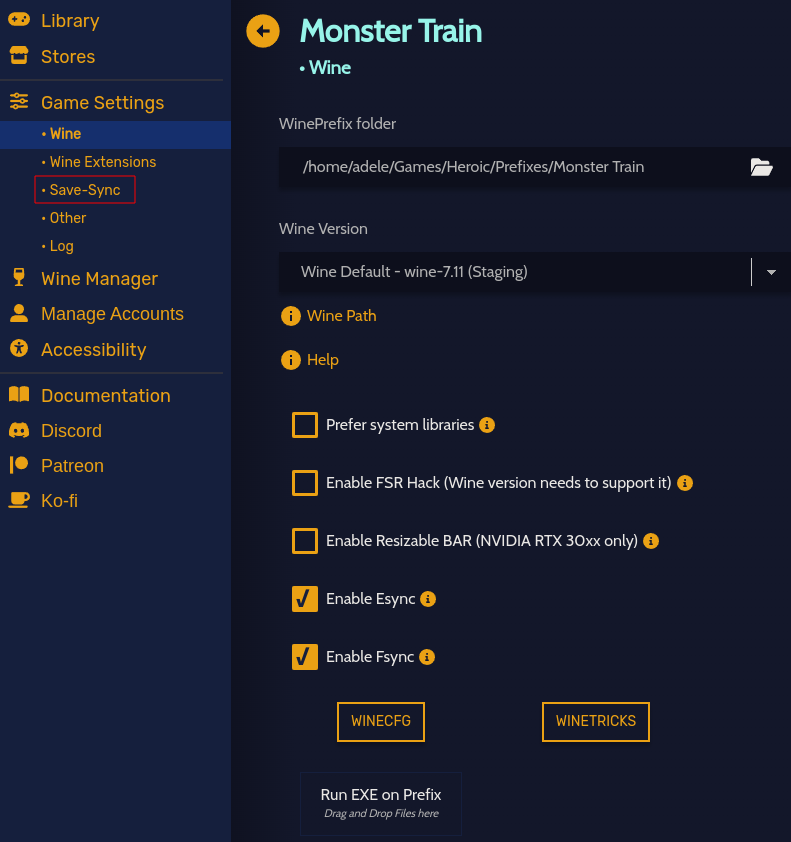
Save-Sync settings do not appear when clicking the settings button on a recently played title.
Add logs
(00:09:31) INFO:    [Legendary]:       Running command: /opt/Heroic/resources/app.asar.unpacked/build/bin/linux/legendary --version
(00:09:31) INFO:    [Legendary]:       Legendary location: /opt/Heroic/resources/app.asar.unpacked/build/bin/linux/legendary
(00:09:31) INFO:    [Gog]:             GOGDL location: /opt/Heroic/resources/app.asar.unpacked/build/bin/linux/gogdl
(00:09:31) INFO:    [Backend]:

Heroic Version: 2.4.0-beta.2 Caesar Clown
Legendary Version:  0.20.27 Dark Energy (hotfix)
OS: Arch KERNEL: 5.18.7-arch1-1 ARCH: x64
CPU: AMD Ryzen 9 3900X 12-Core Processor @3.8 GOVERNOR: schedutil
RAM: Total: 62.72 GiB Available: 37.08 GiB
GRAPHICS: GPU0: NVIDIA GeForce RTX 2080 Ti VRAM: 11264MB DRIVER: 515.48.07
PROTOCOL: x11

(00:09:31) INFO:    [Gog]:             Getting data about the user
(00:09:31) INFO:    [Gog]:             Refreshing access_token
(00:09:31) WARNING: [Backend]:         Failed to register protocol with OS.
(00:09:32) INFO:    [Backend]:         AreWeAntiCheatYet data downloaded
(00:09:32) INFO:    [Gog]:             Token refreshed successfully
(00:09:32) INFO:    [Frontend]:        Refreshing Library
(00:09:32) INFO:    [Legendary]:       Refreshing library...
(00:09:32) INFO:    [Legendary]:       Refreshing Epic Games...
(00:09:32) INFO:    [Gog]:             Getting GOG library
(00:09:32) INFO:    [Gog]:             Saved user data to config
(00:09:32) INFO:    [Legendary]:       Running command: /opt/Heroic/resources/app.asar.unpacked/build/bin/linux/legendary list
(00:09:33) INFO:    [Gog]:             Number of library pages: 1
(00:09:33) INFO:    [Gog]:             Saved games data
(00:09:33) INFO:    [Legendary]:       Updating game list
(00:09:33) INFO:    [Legendary]:       Game List Updated
(00:09:33) INFO:    [Legendary]:       Checking for game updates.
(00:09:33) INFO:    [Legendary]:       Running command: /opt/Heroic/resources/app.asar.unpacked/build/bin/linux/legendary list-installed --check-updates --tsv
(00:09:34) INFO:    [Legendary]:       Found 0 game(s) to update
(00:09:34) INFO:    [Backend]:         Downloaded Winetricks
(00:09:35) INFO:    [Gog]:             Found 0 game(s) to update
(00:10:39) INFO:    [Legendary]:       Running command: /opt/Heroic/resources/app.asar.unpacked/build/bin/linux/legendary --version
(00:10:39) INFO:    [Gog]:             Running command: /opt/Heroic/resources/app.asar.unpacked/build/bin/linux/gogdl --version
(00:10:46) INFO:    [Legendary]:       Running command: /opt/Heroic/resources/app.asar.unpacked/build/bin/linux/legendary --version
(00:10:46) INFO:    [Gog]:             Running command: /opt/Heroic/resources/app.asar.unpacked/build/bin/linux/gogdl --version
(00:10:51) INFO:    [Gog]:             Getting game metadata.
(00:10:51) INFO:    [Gog]:             Running command: /opt/Heroic/resources/app.asar.unpacked/build/bin/linux/gogdl info 1304291300 --token <redacted> --lang=en-US --os windows
(00:10:51) INFO:    [Legendary]:       Checking if EOS Overlay is enabled: /opt/Heroic/resources/app.asar.unpacked/build/bin/linux/legendary eos-overlay info --prefix "/home/adele/Games/Heroic/Prefixes/Monster Train"
(00:12:04) ERROR:   Couldn't find all library folders of Wine Default - wine-7.11 (Staging)!
Missing undefined or undefined!
Falling back to system libraries!
(00:12:04) DEBUG:   [Legendary]:       Running Wine command: "/usr/bin/wine" wineboot --init
(00:12:09) DEBUG:   [Legendary]:       Ran Wine command: "/usr/bin/wine" wineboot --init
(00:12:09) ERROR:   Couldn't find all library folders of Wine Default - wine-7.11 (Staging)!
Missing undefined or undefined!
Falling back to system libraries!
(00:12:09) DEBUG:   [Legendary]:       Running Wine command: "/usr/bin/wine" cmd /c winepath "%USERPROFILE%/AppData/LocalLow/Shiny Shoe/MonsterTrain/sync"
(00:12:14) DEBUG:   [Legendary]:       Ran Wine command: "/usr/bin/wine" cmd /c winepath "%USERPROFILE%/AppData/LocalLow/Shiny Shoe/MonsterTrain/sync"
(00:12:14) INFO:    [Backend]:         Writing config for 1304291300
(00:12:14) INFO:    [Backend]:         {
  "autoInstallDxvk": true,
  "autoInstallVkd3d": true,
  "preferSystemLibs": false,
  "enableEsync": true,
  "enableFsync": true,
  "maxSharpness": 2,
  "language": "",
  "nvidiaPrime": false,
  "enviromentOptions": [],
  "wrapperOptions": [],
  "savesPath": "/home/adele/Games/Heroic/Prefixes/Monster Train/dosdevices/c:/users/adele/AppData/LocalLow/Shiny Shoe/MonsterTrain/sync",
  "showFps": false,
  "targetExe": "",
  "useGameMode": false,
  "wineCrossoverBottle": "Heroic",
  "winePrefix": "/home/adele/Games/Heroic/Prefixes/Monster Train",
  "wineVersion": {
    "bin": "/usr/bin/wine",
    "name": "Wine Default - wine-7.11 (Staging)",
    "type": "wine",
    "wineserver": "/usr/bin/wineserver",
    "wineboot": "/usr/bin/wineboot"
  },
  "eacRuntime": false,
  "battlEyeRuntime": false
}
(00:12:14) INFO:    [Backend]:         Writing config for 1304291300
(00:12:14) INFO:    [Backend]:         {
  "autoInstallDxvk": true,
  "autoInstallVkd3d": true,
  "preferSystemLibs": false,
  "autoSyncSaves": true,
  "enableEsync": true,
  "enableFsync": true,
  "maxSharpness": 2,
  "language": "",
  "nvidiaPrime": false,
  "enviromentOptions": [],
  "wrapperOptions": [],
  "savesPath": "/home/adele/Games/Heroic/Prefixes/Monster Train/dosdevices/c:/users/adele/AppData/LocalLow/Shiny Shoe/MonsterTrain/sync",
  "showFps": false,
  "targetExe": "",
  "useGameMode": false,
  "wineCrossoverBottle": "Heroic",
  "winePrefix": "/home/adele/Games/Heroic/Prefixes/Monster Train",
  "wineVersion": {
    "bin": "/usr/bin/wine",
    "name": "Wine Default - wine-7.11 (Staging)",
    "type": "wine",
    "wineserver": "/usr/bin/wineserver",
    "wineboot": "/usr/bin/wineboot"
  },
  "eacRuntime": false,
  "battlEyeRuntime": false
}
(00:12:38) INFO:    [Gog]:             Removing /home/adele/Games/Heroic/Loop Hero
(00:12:38) INFO:    [Backend]:         Desktop shortcut removed
(00:12:38) INFO:    [Backend]:         Applications shortcut removed
(00:12:38) INFO:    [Shortcuts]:       Loop Hero was successfully removed from Steam.
(00:12:38) INFO:    [Backend]:         finished uninstalling
(00:12:38) INFO:    [Frontend]:        Refreshing Library
(00:12:38) INFO:    [Gog]:             Getting GOG library
(00:12:38) INFO:    [Gog]:             Number of library pages: 1
(00:12:39) INFO:    [Gog]:             Saved games data
(00:12:40) INFO:    [Gog]:             Found 0 game(s) to update
(00:12:40) DEBUG:   [Legendary]:       Running Wine command: "/home/adele/.local/share/Steam/compatibilitytools.d/GE-Proton7-2/proton" waitforexitandrun wineboot --init
(00:12:41) DEBUG:   [Legendary]:       Ran Wine command: "/home/adele/.local/share/Steam/compatibilitytools.d/GE-Proton7-2/proton" waitforexitandrun wineboot --init
(00:12:41) INFO:    [Gog]:             Setup: No instructions
(00:12:41) DEBUG:   [Legendary]:       Running Wine command: "/home/adele/.local/share/Steam/compatibilitytools.d/GE-Proton7-2/proton" runinprefix cmd /c winepath ""
(00:12:41) ERROR:   [Backend]:         Error running Wine command: Error: Command failed: "/home/adele/.local/share/Steam/compatibilitytools.d/GE-Proton7-2/proton" runinprefix cmd /c winepath ""
fsync: up and running.
wine: RLIMIT_NICE is <= 20, unable to use setpriority safely
Can't recognize 'winepath ""' as an internal or external command, or batch script.
Steps to reproduce
- Play any game that supports save sync on GoG
- Click settings from the game under the recently played setting
- Save-Sync does not appear.
Expected behavior
Save-Sync should appear regardless of how the game's config was accessed.
Screenshots
Via recently played

Via library
System Information
- OS: Arch Linux (
Linux kitsune 5.18.7-arch1-1 #1 SMP PREEMPT_DYNAMIC Sat, 25 Jun 2022 20:22:01 +0000 x86_64 GNU/Linux) - Heroic Version: 2.4.0-beta.2
Additional information
No response

I cannot replicate this issue on latest commit in beta, might be that the bug was fixed already: https://user-images.githubusercontent.com/26871415/184110119-60938564-8b92-4894-b695-df85e20e9436.mp4

Weirdly enough, for me, the Save-sync settings don't appear at all.
I'm running the latest flatpak version 2.4.0, on openSUSE Tumbleweed. Also tried the 2.4.0-beta.2 AppImage, same issue.
https://user-images.githubusercontent.com/11259450/185461952-c49f72fd-b595-4f58-9224-b5d32da887c3.mp4


That fixed it, thanks!
But, I think this behaviour should be done automatically when switching from old versions of heroic to this new one. Wouldn't that make it simpler for everyone and avoid useless bug reports & confusion?
Hi, I have the same issue on steam deck (cloud-sync not showing). Had the issue on 2.4.0-beta2, still have it on 2.4.0. https://i.ibb.co/wS84ZPv/Screenshot-20220830-205049.png
I tried to :
- clear cache and refresh library
- clear cache +reset heroic
- clear cache + reset heroic + uninstall from Discover
- clear cache + reset heroic + remove ~/.var/app/com.heroicgameslauncher.hgl/ + uninstall from Discover
Latest tried got me logging in again, but still no sync option for GOG (tried with Cyberpunk 2077) How can I fix this please?
Thanks


