
ovsam
 ovsam copied to clipboard
 HarborYuan
[arXiv preprint] The official code of paper "Open-Vocabulary SAM".
Open-Vocabulary SAM
Haobo Yuan1, Xiangtai Li1, Chong Zhou1, Yining Li2, Kai Chen2, Chen Change Loy1.
1S-Lab, Nanyang Technological University, 2Shanghai Artificial Intelligence Laboratory




👀 Overview
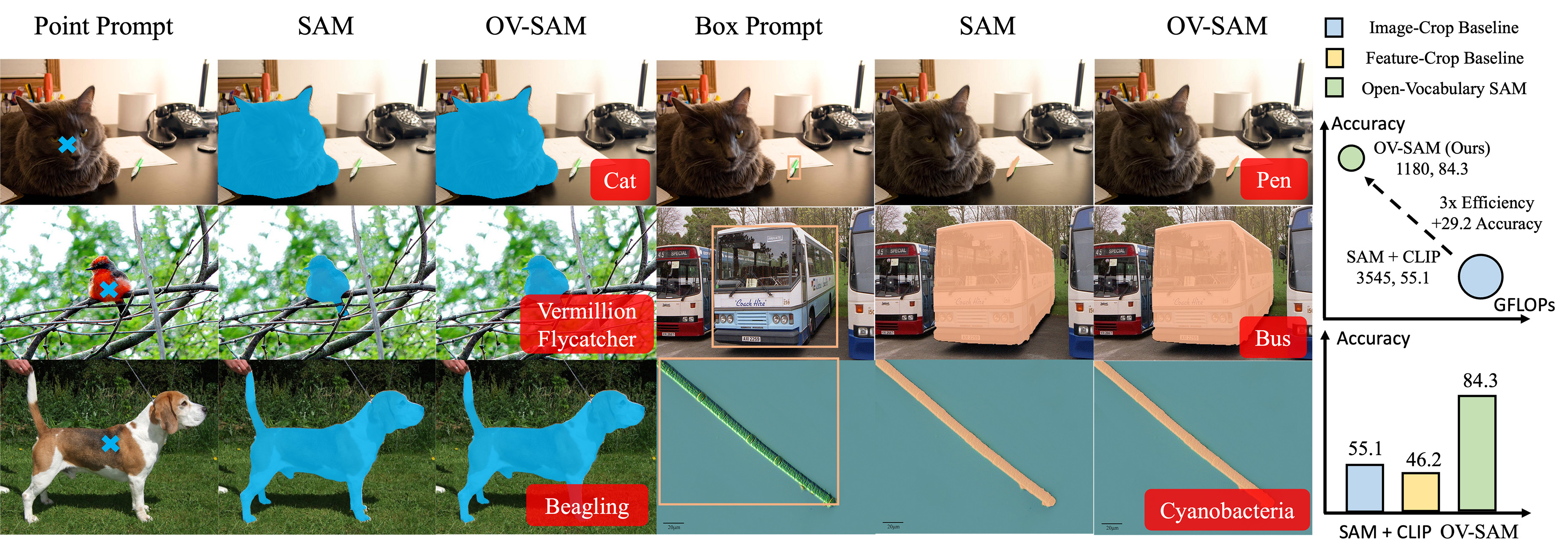
We introduce the Open-Vocabulary SAM, a SAM-inspired model designed for simultaneous interactive segmentation and recognition, leveraging two unique knowledge transfer modules: SAM2CLIP and CLIP2SAM. The former adapts SAM's knowledge into the CLIP via distillation and learnable transformer adapters, while the latter transfers CLIP knowledge into SAM, enhancing its recognition capabilities.
🔧Usage
To play with Open-Vocabulary SAM, you can:
- Try the online demo on the 🤗Hugging Face Space. Thanks for the generous support of the Hugging Face team.
- Run the gradio demo locally by cloning and running the repo on 🤗Hugging Face:
git lfs install git clone https://huggingface.co/spaces/HarborYuan/ovsam ovsam_demo cd ovsam_demo conda create -n ovsam_demo python=3.10 && conda activate ovsam_demo python -m pip install gradio==4.7.1 python -m pip install -r requirements.txt python main.py - Try to train or evaluate in this repo following the instructions below.
⚙️ Installation
We use conda to manage the environment.
Pytorch installation:
conda install pytorch torchvision torchaudio pytorch-cuda=12.1 cuda -c pytorch -c "nvidia/label/cuda-12.1.0" -c "nvidia/label/cuda-12.1.1"
mmengine installation:
python -m pip install https://github.com/open-mmlab/mmengine/archive/refs/tags/v0.8.5.zip
mmcv installation (note that older version mmcv before this commit may cause bugs):
TORCH_CUDA_ARCH_LIST="{COMCAP}" TORCH_NVCC_FLAGS="-Xfatbin -compress-all" CUDA_HOME=$(dirname $(dirname $(which nvcc))) LD_LIBRARY_PATH=$(dirname $(dirname $(which nvcc)))/lib MMCV_WITH_OPS=1 FORCE_CUDA=1 python -m pip install git+https://github.com/open-mmlab/mmcv.git@4f65f91db6502d990ce2ee5de0337441fb69dd10
Please ask ChatGPT to get COMCAP:
What is the `Compute Capability` of NVIDIA {YOUR GPU MODEL}? Please only output the number, without text.
Other OpenMMLab packages:
python -m pip install \
https://github.com/open-mmlab/mmdetection/archive/refs/tags/v3.1.0.zip \
https://github.com/open-mmlab/mmsegmentation/archive/refs/tags/v1.1.1.zip \
https://github.com/open-mmlab/mmpretrain/archive/refs/tags/v1.0.1.zip
Extra packages:
python -m pip install git+https://github.com/cocodataset/panopticapi.git \
git+https://github.com/HarborYuan/lvis-api.git \
tqdm terminaltables pycocotools scipy tqdm ftfy regex timm scikit-image kornia
📈 Datasets
Datasets should be put in the data/ folder of this project similar to mmdet. Please prepare dataset in the following format.
COCO dataset
├── coco
│   ├── annotations
│   │   ├── panoptic_{train,val}2017.json
│   │   ├── instance_{train,val}2017.json
│   ├── train2017
│   ├── val2017
│   ├── panoptic_{train,val}2017/  # png annotations
SAM dataset
├── sam
│   ├── train.txt
│   ├── val.txt
│   ├── sa_000020
│   │   ├── sa_223750.jpg
│   │   ├── sa_223750.json
│   │   ├── ...
│   ├── ...
train.txt and val.txt should contain all the folders you need:
sa_000020
sa_000021
...
🚀 Training
Please extract the language embeddings first.
bash tools/dist.sh gen_cls seg/configs/ovsam/ovsam_coco_rn50x16_point.py 8
SAM2CLIP
SAM feature extraction:
bash tools/dist.sh test seg/configs/sam2clip/sam_vith_dump.py 8
SAM2CLIP training:
bash tools/dist.sh train seg/configs/sam2clip/sam2clip_vith_rn50x16.py 8
CLIP2SAM
CLIP2SAM training:
bash tools/dist.sh train seg/configs/clip2sam/clip2sam_coco_rn50x16.py 8
🏃♀️Inference
bash tools/dist.sh test seg/configs/ovsam/ovsam_coco_rn50x16_point.py 8
Please refer to 🤗Hugging Face to get the pre-trained weights:
git clone https://huggingface.co/HarborYuan/ovsam_models models
📚 Citation
@article{yuan2024ovsam,
    title={Open-Vocabulary SAM: Segment and Recognize Twenty-thousand Classes Interactively},
    author={Yuan, Haobo and Li, Xiangtai and Zhou, Chong and Li, Yining and Chen, Kai and Loy, Chen Change},
    journal={arXiv preprint},
    year={2024}
}
License
This project is licensed under NTU S-Lab License 1.0. Redistribution and use should follow this license.
Metadata
Owner
 HarborYuan
Metadata
[arXiv preprint] The official code of paper "Open-Vocabulary SAM".