
Hangfire
 Hangfire copied to clipboard
 HangfireIO
Added several new options to Hangfire Dashboard
Add options to Hangfire Dashboard to 1. Use the full screen width, 2. Display job arguments in all job lists, 3. Filter most job lists on a given search string, 4. Set the default numbers of rows to show in job lists, 5. Show all jobs in job lists

@JesseKlaasse, that's a really big effort, and I really like you've considered to improve Hangfire. I'm trying to do my best to keep Hangfire simple and stable, so I need to weight each feature before merging it. Because it's much harder to maintain features rather than implement them. Could you provide the following details about every feature:
- Provide better description, including sample screenshots from the dashboard.
- And more important, why did you implement them and for what cases.
- What are the consequences for current users if we merge this PR.

@odinserj I can certainly imagine it's harder to maintain features than to implement them... To answer your questions, per feature:
1. Use the full screen width Use case: I am using Hangfire in some fairly large projects. In most of these projects, the only user(s) of the Dashboard are developers, who want to see as much information at once as possible. The default width is especially an issue when using long job id's or names.
For example:

When you would use a full HD widescreen together with the new option, this now looks something like this:

This new feature is off by default, and can be enabled by setting the UseFullWidth property of HangfireDashboardOptions to true. So, by default, no changes for current users.
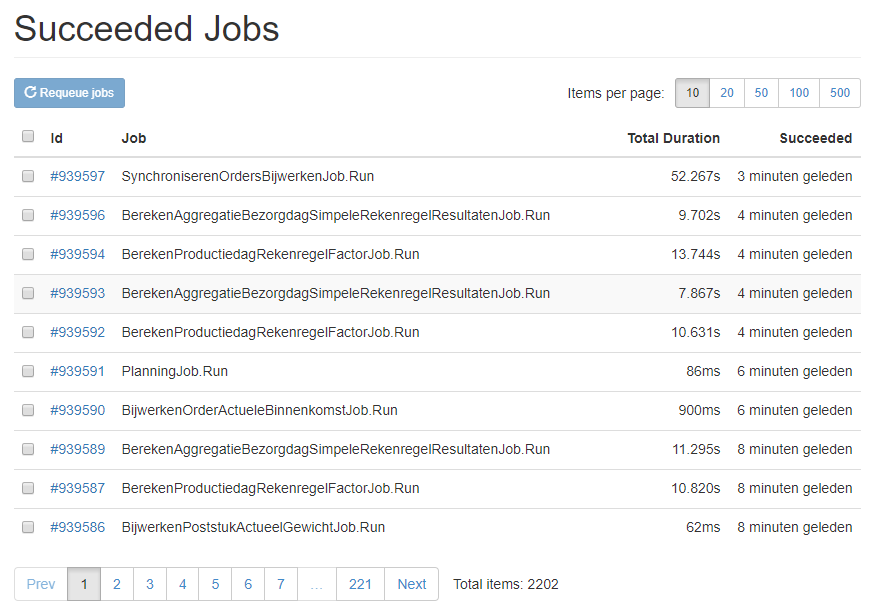
2. Display job arguments in all job lists Use case: when there are a lot of jobs where the arguments matter a lot, I would like to be able to see the arguments in the job lists.
The default situation:
The situation when using my new feature:
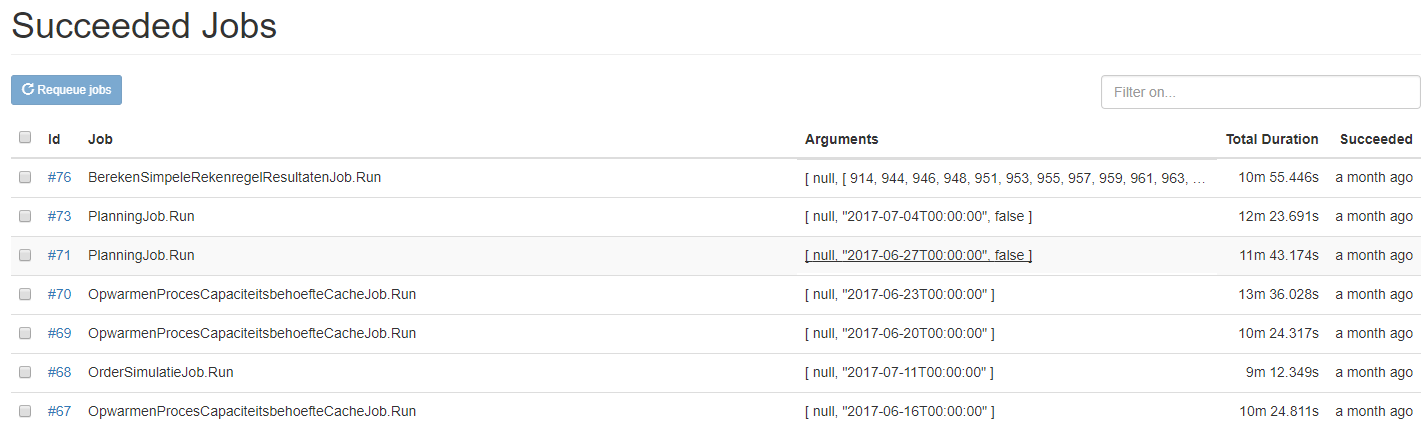 (Use Full Width is also turned on is this example)
This new feature is off by default, and can be enabled by setting the DisplayArgumentsInLists property of HangfireDashboardOptions to true. So, by default, no changes for current users.
By the way, in the code I noticed that Hangfire already has the feature to use the DisplayName attribute for displaying a job name in the lists, also with the option of using arguments in this. I couldn't find this in the documentation, but I think it's very useful. Like this:
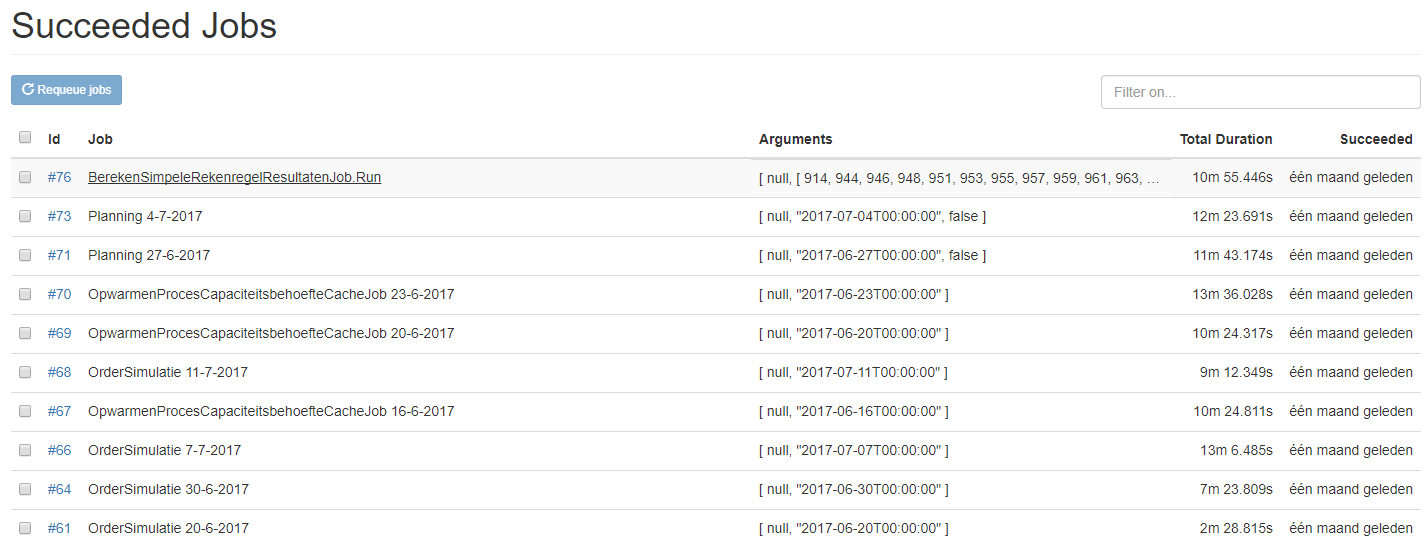 Using this feature, you wouldn't always have to display the arguments.
3. Filter most job lists on a given search string Use case: When there are a lot of jobs, for example in the succeeded job list, most of the times I am looking for a specific job.
This new feature allows database filtering. For example, when I have this list:

Now, if I only want to display order-related jobs, I can type "order" in the filter box and press enter:
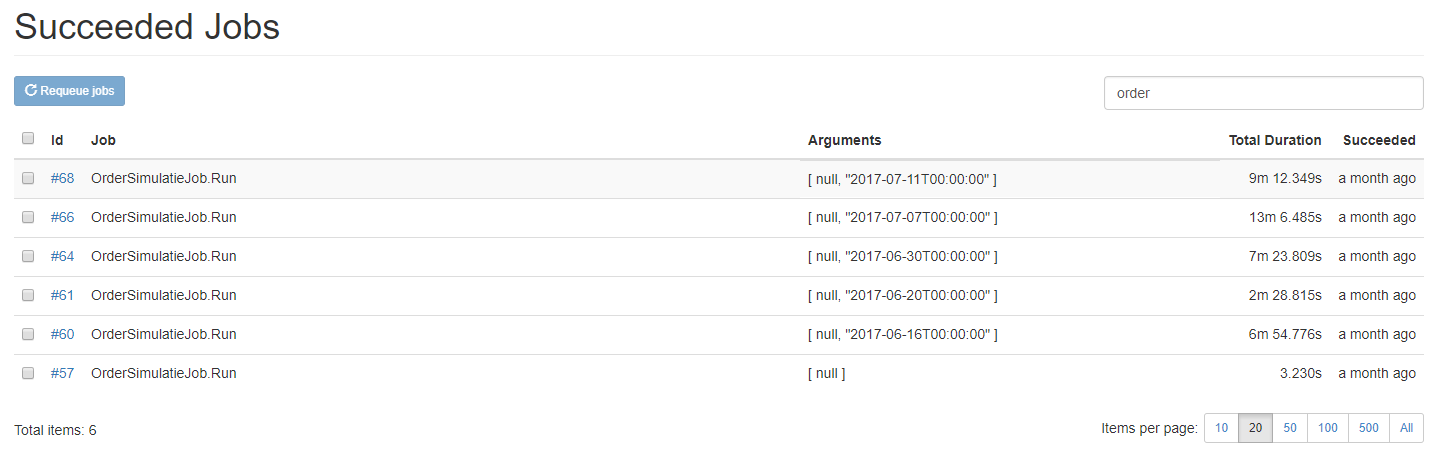
This new feature is off by default, and can be enabled by setting the EnableJobFilters property of HangfireDashboardOptions to true. So, by default, no changes for current users, except that the Page Size selector has moved to the bottom of the page.
4. Set the default numbers of rows to show in job lists
Use case: when the Dashboard is only used by known users, and you know that those users use big screens, I would like the default number of rows to be shown to be 20, for example (instead of the current default of 10). That way, the default view would be like this:

This feature can be enabled by setting the DefaultRecordsPerPage property of HangfireDashboardOptions to the number you want. Nothing changes for current users, since the default is still 10.
5. Show all jobs in job lists Use case: sometimes, I just want to see all jobs in a list, not using the normal max of 500. For example, when I would like to copy/paste all jobs for counting purposes, or so.
So, I have added 'All' to the Page Size selector (which is not actually 'All' but int.MaxValue).
Like this:
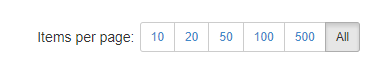
This new button is added by default, so current users will notice this new button in the Page Size selector.

@odinserj Is there something more I can do? Could you tell me if you are planning to merge this pull request? I completely understand your concerns about maintaining features, but I kind of need to know whether or not I should plan to keep using my own fork or not. Thanks!
@JesseKlaasse, sorry for the delay, and thank you for detailed description. I'll write some thoughts for each feature.
Display job arguments in all job lists
Did you know you can show arguments using the DisplayNameAttribute class?
[DisplayName("MySuperDescription: {0} ({1})")]
public void Method(string userName, int id)
In this case, background job will be displayed as "MySuportDescription: odinserj (1234)" almost everywhere in the dashboard. I don't want to show arguments by default, because they can be quite long – some users encode custom objects there.
So, should this feature be implemented, when DisplayNameAttribute does exist?
Filter most job lists on a given search string
Unfortunately this feature relates only to SQL Server storage and breaks a lot of existing interfaces. Even if we merge those changes, other storages will require other methods to have a search feature. Maybe sorting can be implemented as an extension to Hangfire? What do you think?
Show all jobs in job lists
By using this button we could accidentally ruin our storage, when we have a huge number of jobs – there may be millions of background jobs. Maybe we should just add yet another button with higher value?
"Set the default numbers of rows to show in job lists" and "Use the full screen width"
These ideas are interesting, and I don't see any downsides. Let's start one by one in separate pull requests, because the features before will be showstoppers for these ones.
Hi @JesseKlaasse Your stuff seems pretty cool, have you considered the option to make an extension as odinsej suggested? The search option is particularely interesting!

Any update on this? especially the option to set DefaultRecordsPerPage on DashboardOptions would be really useful, e.g. when only have 12 or 15 jobs, it would be great to just have them all on one page.

@odinserj Any updates on this? We're running into usable space issues with long job names -- the "Use the full screen width" feature is exactly what we need.

Any news when this will be implemented? Looking forward to the feature "Set the default numbers of rows to show in job lists". If you have many Jobs it can be really helpfull to show all Jobs

@SimonHostettler At a minimum, the branch conflicts need to be resolved before the changes can be approved. Of course, it's been almost 3yrs since @JesseKlaasse first issued the pull request -- I'm not sure if he's willing / able to take a look anymore. And even if the conflicts are resolved, who knows if anyone will review and/or merge the PR in a timely fashion.
At this point, I wouldn't get your hopes up.

Absolutely love Hangfire, but not having an easy full width option was driving me crazy. For anyone else that stumbles upon this thread, and you want full width, here's a (hackish) way to do it without forking - https://stackoverflow.com/questions/69994049/make-hangfire-dashboard-full-width/69994050#69994050

Full width support will be included by default in the upcoming Hangfire 1.8 release, you can preview it there – http://demo.hangfire.io/hangfire. There were troubles with error popup and sidebar that required a little bit another implementation.
The filtering, full screen, and arguments in list would really help my team. Is there a plan to merge this branch soon?

Please check my previous messages regarding full width and visible arguments, these features are already implemented, but filtering and search require cross-storage implementation to be running on both RDBMS and NoSQL storages, and such implementation is much harder to abstract.
@odinserj hey mate :-) any idea when the 1.8 dashboard with the fullwidth support will be available? Just running into this now as our server names are getting long (container names in k8) and would find the full width support really handy at the moment...
