

 HSF
HSF
Make collections info panel compact
The idea is to make the Collections table have a different layout for mobile / smaller views.
This is the current view of the collections info panel.
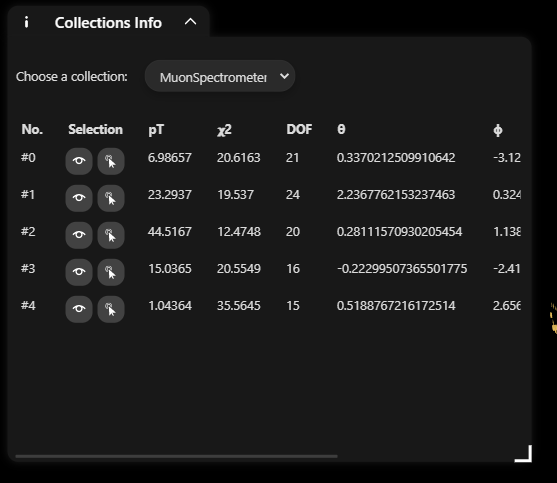
On smaller screens (and small panel size), the data gets cut off and we have to scroll horizontally. It would be great if we could have a different layout on smaller view. (Maybe something where each column is on a separate line)


@9inpachi
Can you please give me the link to the location of the code or give me some more information regarding this issue?
Also, can you tell me where can I find this page in the online version?
You can find it if you go to an experiment from the main page (for example, https://hepsoftwarefoundation.org/phoenix/#/atlas) and click on the "i" icon in the bottom UI menu to open the collections info panel.
Also please take a look at guides/users.md to understand how everything
works.
If this information is not enough to know the code location then let me know. :)
On Fri, Feb 26, 2021, 12:33 AM Karthik Shetty [email protected] wrote:
@9inpachi https://github.com/9inpachi Can you please give me the link to the location of the code or give me some more information regarding this issue? Also, can you tell me where can I find this page in the online version https://hepsoftwarefoundation.org/phoenix/?
— You are receiving this because you were mentioned. Reply to this email directly, view it on GitHub https://github.com/HSF/phoenix/issues/206#issuecomment-786148676, or unsubscribe https://github.com/notifications/unsubscribe-auth/AIZVY6JACUJWYW7KLR5H6WLTA2QXFANCNFSM4WLCNQSA .
Yes, I got the code location and will try implementing the functionality. Thank You!
According to your suggestion, the UI on small screens should be such that the columns are one below the other, right?
Indeed.
On Fri, Feb 26, 2021, 11:10 AM Karthik Shetty [email protected] wrote:
According to your suggestion, the UI on small screens should be such that the columns are one below the other, right?
— You are receiving this because you were mentioned. Reply to this email directly, view it on GitHub https://github.com/HSF/phoenix/issues/206#issuecomment-786435946, or unsubscribe https://github.com/notifications/unsubscribe-auth/AIZVY6L2PCEDVGMXDYHVD7LTA43NPANCNFSM4WLCNQSA .
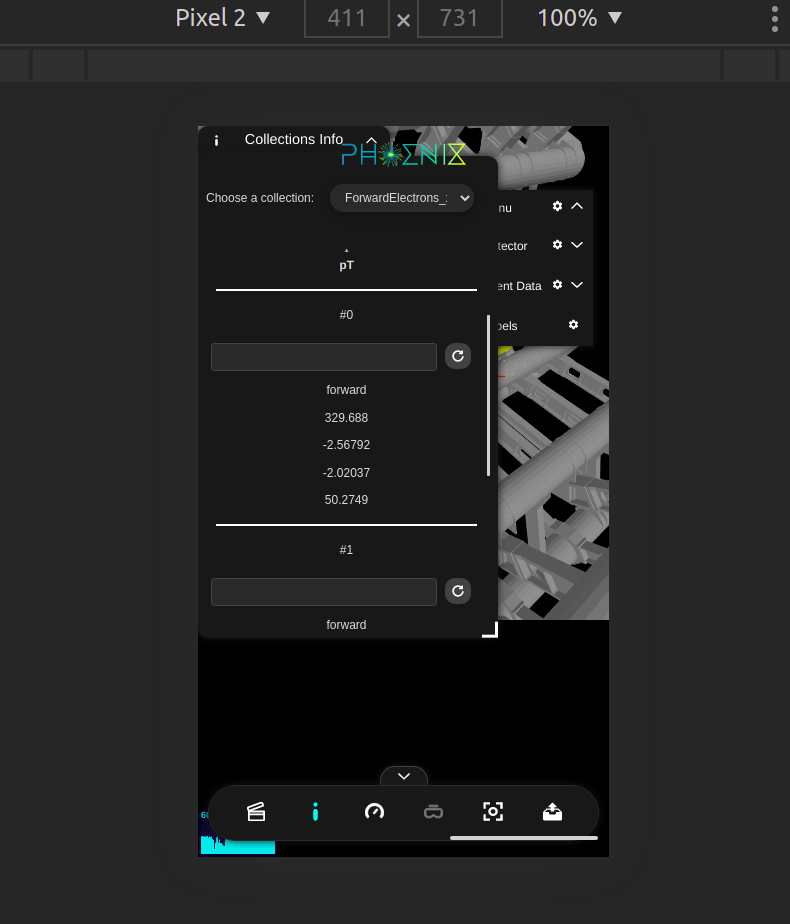 @9inpachi Is this fine?
@karthikshetty03 Good progress so far! Thanks.
The next step would be to show the column name for each value at the left. Something like.
columnName1: The value columnName2: Some other value
Also it'd be interesting if it worked with resizing the overlay on desktops as well.
The next step would be to show the column name for each value at the left. Something like.
columnName1: The value columnName2: Some other value
Yeah, will do that
Also it'd be interesting if it worked with resizing the overlay on desktops as well.
@9inpachi As in if the table requires a horizontal scroll on the desktop, then I have to display all columns one below the other as well?
Yes exactly.
On Fri, Feb 26, 2021, 5:22 PM Karthik Shetty [email protected] wrote:
Also it'd be interesting if it worked with resizing the overlay on desktops as well.
@9inpachi https://github.com/9inpachi As in if the table requires a horizontal scroll on the desktop, then I have to display all columns one below the other as well?
— You are receiving this because you were mentioned. Reply to this email directly, view it on GitHub https://github.com/HSF/phoenix/issues/206#issuecomment-786615637, or unsubscribe https://github.com/notifications/unsubscribe-auth/AIZVY6MV5I5EB7V7C53VIDLTA6HBNANCNFSM4WLCNQSA .
@9inpachi Apologies for the delay, I was busy with my college exams for a week. I resumed working on this but am stuck on the part on how to determine whether there is a horizontal scrollbar or not. Like if there is a scrollbar, then the layout will be changed to a small screen view (each column on a separate line) I tried looking around the overlay-component.ts file, where the overlay window resizing is handled but the clientWidth and scrollWidth of the overlayCard do not seem to be of much help. Any hints or suggestions on how to go about this?
Not a problem.
Could you open up a pull request so I can take a look (probably tomorrow) at your approach so far? I can comment better after that.
On Wed, Mar 10, 2021, 12:42 AM Karthik Shetty [email protected] wrote:
@9inpachi https://github.com/9inpachi Apologies for the delay, I was busy with my college exams for a week. I resumed working on this but am stuck on the part on how to determine whether there is a horizontal scrollbar or not. Like if there is a scrollbar, then the layout will be changed to a small screen view (each column on a separate line) I tried looking around the overlay-component.ts file, where the overlay window resizing is handled but the clientWidth and scrollWidth of the overlayCard do not seem to be of much help. Any hints or suggestions on how to go about this?
— You are receiving this because you were mentioned. Reply to this email directly, view it on GitHub https://github.com/HSF/phoenix/issues/206#issuecomment-794359721, or unsubscribe https://github.com/notifications/unsubscribe-auth/AIZVY6IIL7TECQC6IKLHE7DTCZ2YPANCNFSM4WLCNQSA .
I used media queries that changes the layout for small screens.
Could you open up a pull request so I can take a look (probably tomorrow) at your approach so far?
Yeah, will do that.
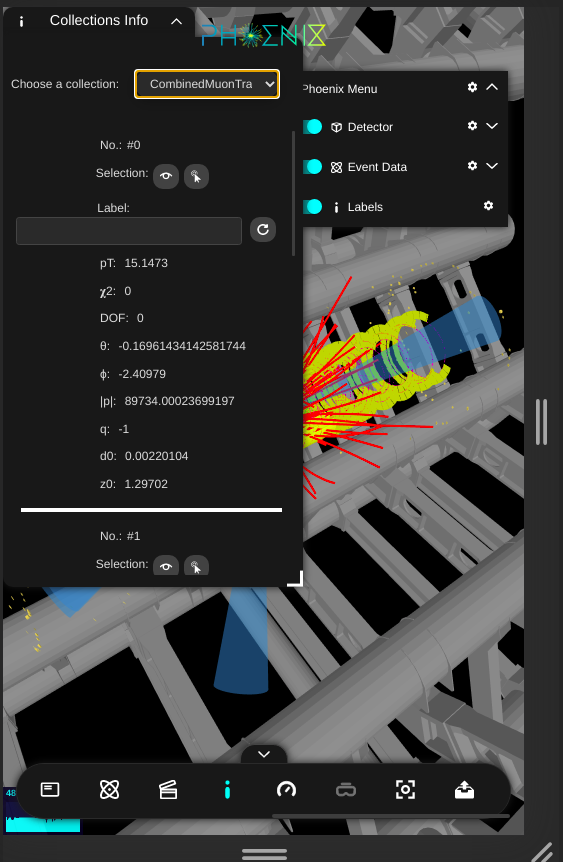
@9inpachi this works fine for mobile/smaller views. Need to work on resizing the overlay on desktops. I have opened a PR: #228
Yes, I got the code location and will try implementing the functionality. Thank You!
can you share the code location please


hello can I work on this?
Absolutely! Feel free to ask us with any questions.


Not sure. @staru09 are you taking this? Please look at the earlier PR too.


Yes, please do!
On Thu, 12 Dec 2024 at 10:51, Pratham @.***> wrote:
Hello, can I start working on this?
— Reply to this email directly, view it on GitHub https://github.com/HSF/phoenix/issues/206#issuecomment-2538401113, or unsubscribe https://github.com/notifications/unsubscribe-auth/ABTTQSOB75J73YVFSDGE5VL2FFMDDAVCNFSM6AAAAABS5PQVRGVHI2DSMVQWIX3LMV43OSLTON2WKQ3PNVWWK3TUHMZDKMZYGQYDCMJRGM . You are receiving this because you commented.Message ID: @.***>
