

 Gytaco
Failed to open file
Had this script working fine a couple months ago and now the OpenNavisFile.OpenFile node cant open the file.

Any ideas why?


Hello All
I was wondering if anyone can help, or share their experiences.
I am getting the following error when trying to initialise Navisworks Manage 2017 through DynaWorks node.
"Warning: OpenNavisFile.OpenFile operation failed. Retrieving the COM class factory for component with CLSID {DCFC9E99-1E2A-5BF0-9113-DC98B93E56E3} failed due to the following error: 80040154 Class not registered (Exception from HRESULT: 0x80040154 (REGDB_E_CLASSNOTREG))."

I am using Windows 10 (just installed); Revit and Navis 2017; Dynamo version 2.0.1, and Dynaworks 18, I have had this error on another win 10 machine, with the same software as above, but the problem rectified itself. I did have to update windows .net framework 3.5 and 4, not sure if it is related.
I found the following discussion on COM registry, but being a novice I didn't want to start messing around with registry files before I get some sound advice. https://stackoverflow.com/questions/1496214/how-to-solve-com-exception-class-not-registered-exception-from-hresult-0x80040
any help would be much appreciated.

Hi
You need to use DynaWorks17 each version of DynaWorks is actually aligned with the version of Navisworks so the featureset should be the same. This is due to the COM libraries being different for each version
Let me know if this solves your issue.
Adam
Sent from Mailhttps://go.microsoft.com/fwlink/?LinkId=550986 for Windows 10
From: vez247 [email protected] Sent: Tuesday, February 5, 2019 8:18:35 PM To: Gytaco/DynaWorks Cc: Adam Sheather; Comment Subject: Re: [Gytaco/DynaWorks] Failed to open file (#9)
Hello All
I was wondering if anyone can help, or share their experiences.
I am getting the following error when trying to initialise Navisworks Manage 2017 through DynaWorks node.
"Warning: OpenNavisFile.OpenFile operation failed. Retrieving the COM class factory for component with CLSID {DCFC9E99-1E2A-5BF0-9113-DC98B93E56E3} failed due to the following error: 80040154 Class not registered (Exception from HRESULT: 0x80040154 (REGDB_E_CLASSNOTREG))."
[image]https://user-images.githubusercontent.com/47350660/52266067-8bb73500-2946-11e9-86ff-5b805075d914.png
I am using Windows 10 (just installed); Revit and Navis 2017; Dynamo version 2.0.1, and Dynaworks 18, I have had this error on another win 10 machine, with the same software as above, but the problem rectified itself. I did have to update windows .net framework 3.5 and 4, not sure if it is related.
I found the following discussion on COM registry, but being a novice I didn't want to start messing around with registry files before I get some sound advice. https://stackoverflow.com/questions/1496214/how-to-solve-com-exception-class-not-registered-exception-from-hresult-0x80040
any help would be much appreciated.
— You are receiving this because you commented. Reply to this email directly, view it on GitHubhttps://github.com/Gytaco/DynaWorks/issues/9#issuecomment-460583891, or mute the threadhttps://github.com/notifications/unsubscribe-auth/AFZflfCkH0chQnHEi_VpD_TjnBsaZLiTks5vKVp7gaJpZM4NVI_t.
Hi Adam
Thankyou very much for getting back to me.
That fixed the problem,
Thankyou again.
Adam,
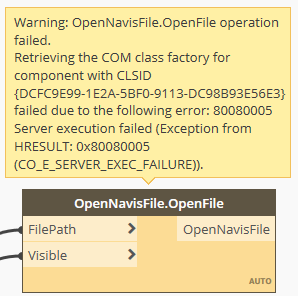
Greetings with a similar issue, but different error code (see snapshot below). Could you shed some light on a potential cause for the failure?

Hi Adam
I am using Navis Manage 2020 with DynaWorks 20 and im getting the following error:
Warning: OpenNavisFile.OpenFile operation failed. Retrieving the COM class factory for component with CLSID {A21A30F2-5768-5584-A931-51CDD84ED222} failed due to the following error: 80080005 Server execution failed (Exception from HRESULT: 0x80080005 (CO_E_SERVER_EXEC_FAILURE)).
The package is aligned but the error this time points to a server execution error.
Can you help?
Thanks in advance!
On Tue, 5 Feb 2019 at 19:58, Adam Sheather [email protected] wrote:
Hi
You need to use DynaWorks17 each version of DynaWorks is actually aligned with the version of Navisworks so the featureset should be the same. This is due to the COM libraries being different for each version
Let me know if this solves your issue.
Adam
Sent from Mailhttps://go.microsoft.com/fwlink/?LinkId=550986 for Windows 10
From: vez247 [email protected] Sent: Tuesday, February 5, 2019 8:18:35 PM To: Gytaco/DynaWorks Cc: Adam Sheather; Comment Subject: Re: [Gytaco/DynaWorks] Failed to open file (#9)
Hello All
I was wondering if anyone can help, or share their experiences.
I am getting the following error when trying to initialise Navisworks Manage 2017 through DynaWorks node.
"Warning: OpenNavisFile.OpenFile operation failed. Retrieving the COM class factory for component with CLSID {DCFC9E99-1E2A-5BF0-9113-DC98B93E56E3} failed due to the following error: 80040154 Class not registered (Exception from HRESULT: 0x80040154 (REGDB_E_CLASSNOTREG))."
[image]< https://user-images.githubusercontent.com/47350660/52266067-8bb73500-2946-11e9-86ff-5b805075d914.png
I am using Windows 10 (just installed); Revit and Navis 2017; Dynamo version 2.0.1, and Dynaworks 18, I have had this error on another win 10 machine, with the same software as above, but the problem rectified itself. I did have to update windows .net framework 3.5 and 4, not sure if it is related.
I found the following discussion on COM registry, but being a novice I didn't want to start messing around with registry files before I get some sound advice.
https://stackoverflow.com/questions/1496214/how-to-solve-com-exception-class-not-registered-exception-from-hresult-0x80040
any help would be much appreciated.
— You are receiving this because you commented. Reply to this email directly, view it on GitHub< https://github.com/Gytaco/DynaWorks/issues/9#issuecomment-460583891>, or mute the thread< https://github.com/notifications/unsubscribe-auth/AFZflfCkH0chQnHEi_VpD_TjnBsaZLiTks5vKVp7gaJpZM4NVI_t
.
— You are receiving this because you commented. Reply to this email directly, view it on GitHub https://github.com/Gytaco/DynaWorks/issues/9#issuecomment-460781393, or mute the thread https://github.com/notifications/unsubscribe-auth/AtKDhP8I7fkcDidX7oMG0rPE7rch9zgkks5vKeJZgaJpZM4NVI_t .
-- VEZ**design Awais**hussain BAhons, MArch, PGdip E : [email protected] T : 07437 010 968 F : 07010 030 839
http://www.facebook.com/pages/VEZ-design/407850262597026 http://www.linkedin.com/profile/edit?trk=hb_tab_pro_top