
todo-tree
 todo-tree copied to clipboard
 Gruntfuggly
[Bug] C# Extension causes VSCode to lag
Edit: see comments below
I have a 30MB 7zip file in the root of my project folder. Whenever I enable todo-tree, the editor slows down hard. I can mitigate this by adding "**/*.7z" to the todo-tree.filtering.excludeGlobs.
I do have this file in my gitignore, but it seems that todo-tree doesn't detect this.
I feel that todo-tree should both
- ignore binary files
- or track which files take "too long" to parse and dynamically exclude them from the search in the future
- and ignore files listed in the
.gitignore- maybe add this as a toggleable setting (
trueby default) ~~
- maybe add this as a toggleable setting (
Related issues:
- #662
- #636
- #576
- #522
Settings
{
  "todo-tree.general.tags": [
    "BUG",
    "HACK",
    "FIXME",
    "NOTE",
    "REFACTOR",
    "TODO",
  ],
  "todo-tree.highlights.defaultHighlight": {
    "background": "#303030",
    "opacity": 0
  },
  "todo-tree.highlights.enabled": true,

  "todo-tree.highlights.customHighlight": {
    "BUG": {
      "icon": "bug",
      "foreground": "#f87b15",
    },
    "HACK": {
      "icon": "tools",
      "foreground": "#F00000",
    },
    "FIXME": {
      "icon": "flame",
      "foreground": "#F00000",
    },
    "NOTE": {
      "icon": "alert",
      "foreground": "#FFFF00",
    },
    "REFACTOR": {
      "icon": "rocket",
      "foreground": "#48D1CC"
    },
    "TODO": {
      "icon": "check-circle",
      "foreground": "#FFC0CB",
    },
  },

  "todo-tree.filtering.excludeGlobs": [
    "**/node_modules",
    "**/bin",
    "**/obj",
    "**/.vscode",
    "**/__*",
    "**/*.7z", // Toggle this
  ],
}
VSCode build info
Version: 1.72.2 (user setup)
Commit: d045a5eda657f4d7b676dedbfa7aab8207f8a075
Date: 2022-10-12T22:15:18.074Z
Electron: 19.0.17
Chromium: 102.0.5005.167
Node.js: 16.14.2
V8: 10.2.154.15-electron.0
OS: Windows_NT x64 10.0.19044
Sandboxed: No

Wait, it's still happening, and i've moved the files out of the folder. hmmm
Edit: After playing with it some, I now believe it is due to some conflicting extensions. I need to investigate further.
Ok, after peforming an Extension Bisect, i've identified C# as the issue. It only happens when both C# and todo-tree are enabled.
perhaps something to do with intellisense?
VSCode extensions
adammaras.overtype
adpyke.vscode-sql-formatter
alphabotsec.vscode-eclipse-keybindings
Azurite.azurite
bungcip.better-toml
burkeholland.simple-react-snippets
dakara.transformer
dbaeumer.vscode-eslint
DotJoshJohnson.xml
eamodio.gitlens
fabiospampinato.vscode-highlight
geddski.macros
Gruntfuggly.todo-tree
hashicorp.terraform
HTMLHint.vscode-htmlhint
IBM.output-colorizer
jongrant.csharpsortusings
matt-meyers.vscode-dbml
mechatroner.rainbow-csv
mhutchie.git-graph
ms-dotnettools.csharp
ms-dotnettools.vscode-dotnet-runtime
ms-mssql.data-workspace-vscode
ms-mssql.mssql
ms-mssql.sql-bindings-vscode
ms-mssql.sql-database-projects-vscode
ms-python.python
ms-python.vscode-pylance
ms-vscode.azure-account
ms-vscode.cmake-tools
ms-vscode.cpptools
ms-vscode.hexeditor
ms-vscode.live-server
Reptarsrage.vscode-manage-user-secrets
Shan.code-settings-sync
streetsidesoftware.code-spell-checker
TheNuProjectContributors.vscode-nushell-lang
twxs.cmake
vadimcn.vscode-lldb
Vallentin.vscode-bnf
VisualStudioExptTeam.intellicode-api-usage-examples
VisualStudioExptTeam.vscodeintellicode
yo1dog.cursor-align
yzhang.markdown-all-in-one
Have you tried disabling all extensions and only enabling c# and todo-tree?
I've never experienced any issue with those two.
Can you create a reproduction repository?

Ok, after some fiddling, I've narrowed it down to 3 extensions.
Enabling all 3 on a bare C# repo causes it. Albeit, the lag seems to get worse the more files you have
I don't have overtype mode enabled, and disabling any one of the three "fixes" the lag. (in testing, i made sure to wait for omnisharp to finish loading)
Full VSCode settings json
{
    //#region VSCode settings
    "debug.onTaskErrors": "abort",
    "editor.accessibilitySupport": "off",
    "editor.fontSize": 18,
    "editor.minimap.enabled": false,
    "editor.renderControlCharacters": true,
    "editor.renderWhitespace": "all",
    "editor.suggestSelection": "first",
    "editor.wordSeparators": "`~!@#$%^&*()-=+[{]}\\|;:'\",.<>/?_",
    "editor.wrappingIndent": "indent",
    "explorer.confirmDelete": false,
    "explorer.confirmDragAndDrop": false,

    "extensions.autoUpdate": true,
    "extensions.ignoreRecommendations": true,

    "files.associations": {
      ".bash_aliases*": "shellscript"
    },
    "files.eol": "\n",

    "hexeditor.columnWidth": 5,
    "hexeditor.defaultEndianness": "little",
    "hexeditor.inspectorType": "aside",
    "hexeditor.showDecodedText": true,

    "markdown.extension.orderedList.marker": "one",

    "search.searchOnType": true,
    "terminal.integrated.defaultProfile.windows": "Git Bash",
    "vsintellicode.modify.editor.suggestSelection": "automaticallyOverrodeDefaultValue",

    "window.customMenuBarAltFocus": false,
    "workbench.statusBar.visible": true,
    "workbench.tree.indent": 20,
    "workbench.tree.renderIndentGuides": "always",
    //#endregion

    //#region macros
    "macros": {
        "endComma": [
            "cursorLineEnd",
            {"command": "type", "args": {"text": ","}},
        ],
        "endSemi": [
            "cursorLineEnd",
            {"command": "type", "args": {"text": ";"}},
        ],
        "endCurly": [
            "cursorLineEnd",
            {"command": "type", "args": {"text": "{"}},
          ],
          "endDefault": [
            "cursorLineEnd",
            {"command": "editor.action.insertSnippet", "args": {"name": "Default"}},
        ],
    },
    //#endregion

    //#region todo comment customizations

    "todo-tree.general.tags": [
      "BUG",
      "HACK",
      "FIXME",
      "NOTE",
      "REFACTOR",
      "TODO",
    ],
    "todo-tree.highlights.defaultHighlight": {
      "background": "#303030",
      "opacity": 0
    },
    "todo-tree.highlights.enabled": true,

    "todo-tree.highlights.customHighlight": {
      "BUG": {
        "icon": "bug",
        "foreground": "#f87b15",
      },
      "HACK": {
        "icon": "tools",
        "foreground": "#F00000",
      },
      "FIXME": {
        "icon": "flame",
        "foreground": "#F00000",
      },
      "NOTE": {
        "icon": "alert",
        "foreground": "#FFFF00",
      },
      "REFACTOR": {
        "icon": "rocket",
        "foreground": "#48D1CC"
      },
      "TODO": {
        "icon": "check-circle",
        "foreground": "#FFC0CB",
      },
    },

    "todo-tree.filtering.excludeGlobs": [
      "**/node_modules",
      "**/bin",
      "**/obj",
      "**/__pycache__",
      "**/.vscode",
      "**/__*",
      "**/*.7z",
    ],


    "highlight.regexes": {
      // "(//|<!--|#)( )?(TODO)(:)?( )?": [
      //   {},
      //   {},
      //   {"color": "pink"},
      //   {"color": "red"},
      //   {},
      // ],
      // "(//|<!--|#)( )?(NOTE)(:)?( )?": [
      //   {},
      //   {},
      //   {"color": "yellow"},
      //   {"color": "red"},
      //   {}
      // ],
      // "(//|<!--|#)( )?(FIXME)(:)?( )?": [
      //   {},
      //   {},
      //   {"color": "red"},
      //   {"color": "red"},
      //   {}
      // ],
      "(//)( )?(#)(end)?(region)( )?(.*)": [
        {},
        {},
        {"color": "#c49d68"},
        {"color": "#c49d68"},
        {"color": "#c49d68"},
        {},
        {},
      ]
    },
    //#endregion

    //#region settings sync
    "sync.gist": "<>",
    "sync.forceUpload": false,
    "sync.autoDownload": true,
    "sync.autoUpload": true,
    "sync.quietSync": true,
    "settingsSync.keybindingsPerPlatform": false,
    //#endregion

    //#region git
    "diffEditor.maxComputationTime": 0,
    "git.autofetch": true,
    "gitlens.advanced.messages": {
      "suppressDebugLoggingWarning": true,
    },
    "gitlens.outputLevel": "debug",
    "gitlens.views.repositories.branches.layout": "list",
    "github.gitAuthentication": false,
    //#endregion

    //#region js
    "javascript.updateImportsOnFileMove.enabled": "always",
    //#endregion

    //#region python
    "python.languageServer": "Pylance",
    "python.pythonPath": "/usr/bin/python",
    //#endregion

    //#region C/C++
    "cmake.configureOnOpen": false,
    //#endregion

    //#region C#
    "csharp.referencesCodeLens.enabled": false,
    "omnisharp.enableImportCompletion": true,
    // https://github.com/OmniSharp/omnisharp-vscode/issues/4754
    "omnisharp.enableRoslynAnalyzers": false,
    //#endregion


    //#region Spell check
    "cSpell.userWords": [
      "bapi",
      "bapp",
      "borked",
      "Castable",
      "chainable",
      "Ecommerce",
      "endregion",
      "errored",
      "Hcpcs",
      "jank",
      "lexeme",
      "MSRP",
      "Pcns",
      "postgres",
      "pylint",
      "pywinauto",
      "Qidian",
      "raspbian",
      "sbin",
      "struct",
      "todo",
      "Tpas",
      "unenumerable",
      "unjank",
      "Untransmitted",
      "use",
      "varchar",
      "webapp"
    ],
    "editor.find.autoFindInSelection": "multiline",
    "diffEditor.ignoreTrimWhitespace": false,
    "gitlens.blame.ignoreWhitespace": true,
    "explorer.copyRelativePathSeparator": "/",
    "mssql.connections": [
      {
        "server": "localhost\\SQL_SERVER_2019",
        "database": "EDW",
        "authenticationType": "Integrated",
        "password": ""
      },
      {
        "server": "<>",
        "database": "<>",
        "authenticationType": "SqlLogin",
        "user": "sa",
        "password": "",
        "emptyPasswordInput": false,
        "savePassword": true,
        "profileName": ""
      }
    ],
    //#endregion
  }
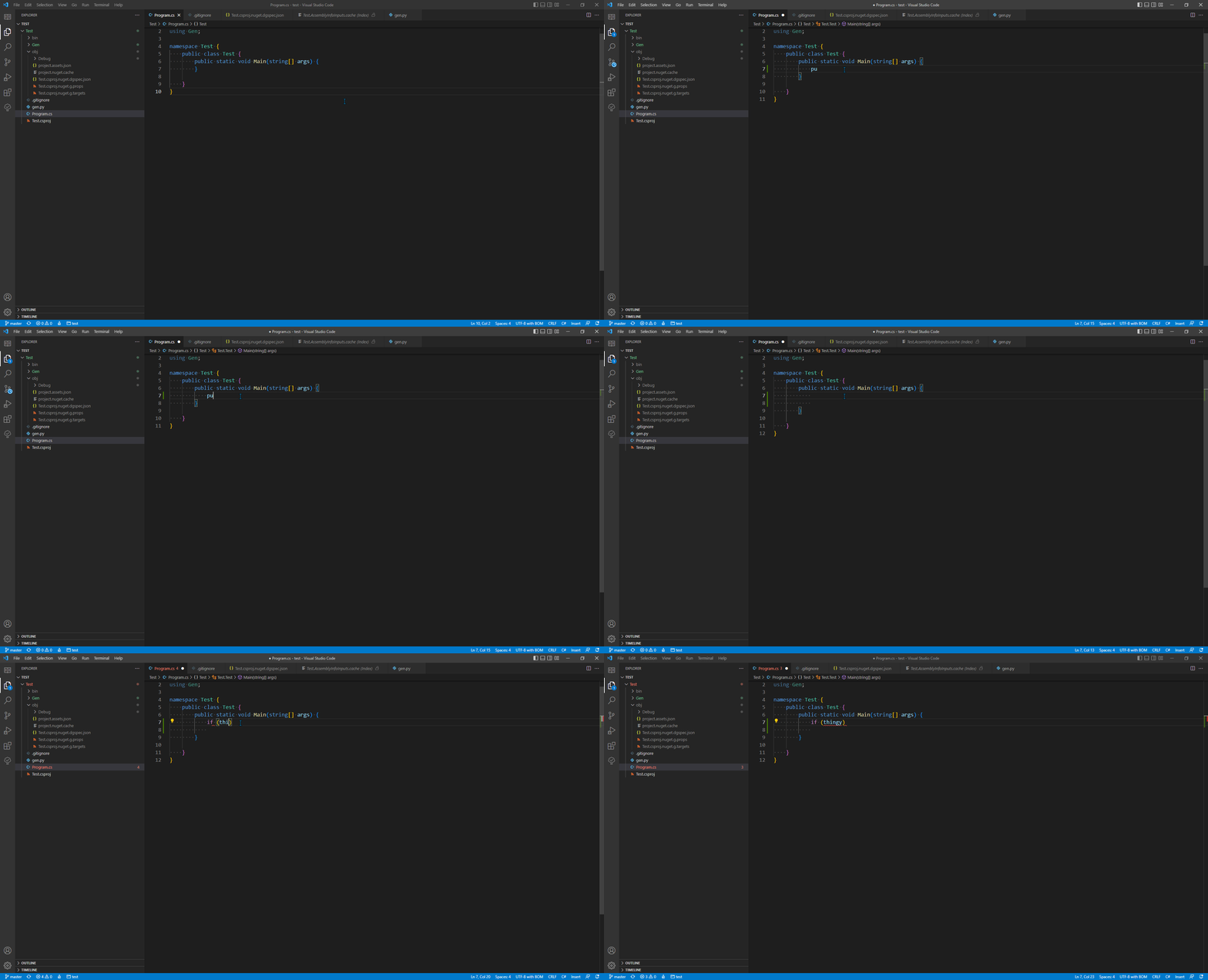
Something I just noticed, is that the lag spikes seem to correlate with the Source Control refreshing.
Whenever vscode is updating it's Source Control stats [whenever the loading icon is displayed on the side bar], the text stops rendering.
Might just be down to how change events are handled inside vscode. Might be worth opening an issue on that repo, but I have no idea where to start debugging, to be honest.
Maybe look at the profiler inside the dev tools?
I was browsing the overtype repo and noticed that it hasn't been maintained in 6 years. There's an active fork but it still has the lag issue.
There's a huge thread in the vscode repo about overtype mode. Which makes me think that this might be better solved by submitting a PR for a native overtype mode.
Otherwise, I can try to find the specific cause
(Although i don't have much vscode extension dev experience)
I have the same problem. When I use the TodoTree with C# extension,C# intellisense is very slow. But,when I switch to Todohighlight extension with C# extension,there is no problem. I think the problem is related to TodoTree extension.

The difference between this extension and todohighlight is that this one searches files for todos. You can try setting the scan mode to "Scan open files only" and see if that makes a difference?
Also, can you post your 'todo-tree' settings - just in case there is something obvious?

I'm sorry to reply after a few days.
I tried a lot of settings, but none of them were effective.
There is my setting: "todo-tree.general.showActivityBarBadge": true, "todo-tree.highlights.useColourScheme": false, "todo-tree.tree.scanAtStartup": false, "todo-tree.tree.scanMode": "current file", "todo-tree.tree.showCountsInTree": true, "todo-tree.general.tagGroups": { "Bug": [ "//BUG", "//Bug", "//bug" ], "Fix": [ "//FIXME", "//Fix", "//fix" ], "Todo": [ "//TODO", "//Todo", "//todo" ] }, "todo-tree.general.tags": [ "//BUG", "//Bug", "//bug", "//HACK", "//FIXME", "//Fix", "//fix", "//TODO", "//Todo", "//todo" ]
I found a phenomenon, that when I was editing code related to C# with the TodoTree on, the intellisense became slower, but when I was editing code related to other language,like html,css, the intellisense was normal,even in .cdhtml file. This type of file mixed C# code and html code,when I type a "public class" symbol, it's slow, when I type "div" at the same time, it's normal.
I guess that for C#-related code, the OmniShape replaced the intellisense of VS Code and adopted its own analysis engine. Because the OmniShape work like Visual Studio, it will analyze the various files and the loaded assembly in the project. But for non C#-related code, it borrows the Intellisense engine of the VS code.
So the problem is that the TodoTree is compatible with Intellisense engine of the VS code, but not compatible with Intellisense engine of the OmniShape.
C# intelligence lags a lot with this extension. I had to disable it to get my C# back.
