

 GrognardsFromHell
Add help in Spell Selection Dialog
I propose to add opening help page on right click in Spell Selection Dialog (when memorizing and during level up), which should open spell help entry.

Isn't right click already used as an alternative to drag-and-drop?
I definitely agree this would be a good feature to have, though. It's annoying that the game doesn't give you a way to see what spells do while you're picking them.

Well there's the "press H for help mode" toggle. Is that too obscure?
On a related note, I thought you might be referring to character creation, because apparently the help box is bugged there (in Temple+).

I didn't know H did that, at least. I guess that's probably in the manual I didn't read 20 years ago? :)
My wish would concern only Context Menu spells now - let's make right click to behave as Help mode is active. Or make middle click to behave as Help mode is active.
Right click is common help in IWD2 and KotC.
Also I can confirm Help mode works fine in Creation Dialog, Inventory Dialog and Context Menu.
But right click is used to choose spells, so why should it be changed to open spells? Unless I'm missing something...
Also what are "context menu spells"?
But right click is used to choose spells, so why should it be changed to open spells? Unless I'm missing something...
Yes, true. That's why I do not see this option viable anymore (changed my mind) in dialogs.
But in context menu (see the pic) there is no way to see the Help.
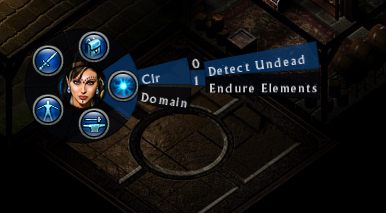
Oh, that's called the radial menu. Well for that you can also press H, but I agree that right click can also do the same. Although, currently it does closes the radial menu, no?
Although, currently it does closes the radial menu, no?
It does nothing. Radial menu remains open. Right click is ignored.