

 GregTechCE
[BUG] RecipeMaps using a prime number of item input or output slots greater than 3 do not display them in JEI
Describe the bug When creating a RecipeMap using a minimum of 0 item inputs and/or outputs and a maximum of 5, regardless of the quantities of the other slot types, the item section(s) will not be generated in JEI. Looking at the uses or recipe for an item which should be displayed in the item slot still brings up the relevant JEI page. Fluid slots are unaffected. This is visible in the image provided in the Screenshots section. In the Additional Context section, more information is presented and demonstrates that the effect extends to all primes greater than 3.
Versions Forge: 14.23.5.2847 GTCE: 1.13.0.681
Setup Playing Solo. Happens on old and new worlds.
Steps To Reproduce
- Adding the following code to
RecipeMaps.javawill create a RecipeMap for example purposes:
public static final RecipeMap<SimpleRecipeBuilder> TEST_RECIPES = new RecipeMap<>("test_recipes", 0, 5, 0, 5, 0, 5, 0, 5, new SimpleRecipeBuilder())
       .setProgressBar(GuiTextures.PROGRESS_BAR_ARROW, MoveType.HORIZONTAL);
Note that this is using a minimum of 0 inputs or outputs, and a maximum of 5 inputs or outputs for each type. Increasing the item maximum counts to 6 does not result in this bug.
- Add the following code to
MachineRecipeLoader#registerMixingCrystallizationRecipes:
RecipeMaps.TEST_RECIPES.recipeBuilder()
       .input(OrePrefix.dust, Materials.Stone)
       .fluidInputs(Materials.Water.getFluid(1000))
       .output(OrePrefix.dust, Materials.Steel)
       .fluidOutputs(Materials.Lava.getFluid(1000))
       .duration(64).EUt(16)
       .buildAndRegister();
This creates a recipe for testing purposes.
-
Build and run the game, and enter an existing world or create a new one. This has no bearing upon the bug.
-
Using JEI, look at the recipes for steel dust, and open the Test RecipeMap tab. You will find that the items will be missing in both the input and output sides, but the rest of the recipe is still visible.
-
Close the JEI window, and now look at uses of stone dust. Navigate back the the Test RecipeMap tab, and you will find the same situation.
Expected behavior It is expected that the item slots will be displayed in a similar manner to the fluid slots visible on the Test RecipeMap's jei page, however items and their slots do not show at all.
Screenshots
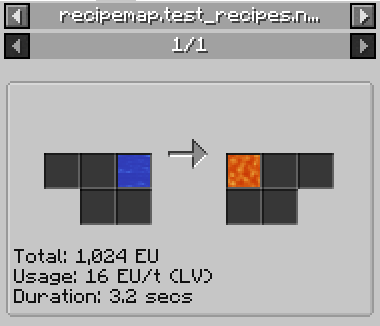
Additional context
Through my own digging into this issue, I believe it is caused by RecipeMap#determineSlotsGrid. When passing a value such as 5, the square root is evaluated to approximately 2.2. 2.2 % 1 = 0.2, so it then attempts to use the first else if statement. Here, 5 % 3 = 2, so it moves to the final else if statement. There, 5 % 2 = 1, so itemSlotsToLeft and itemSlotsToDown remain at zero and are returned. This results in no item slots being generated for the JEI page. The above outcome holds true for every prime number greater than 3, as shown with 7 here: sqrt(7) % 1 = ~0.6, 7 % 3 = 1, and 7 % 2 = 1. The pattern repeats for all primes greater than 3.

A simple fix would be to just create a bigger square?
Something like:
      else  {
            // fallback to square
            itemSlotsLeft  = itemSlotsToDown =  1 + (int) sqrt;
      }
For 5 and 7 you would get 3x3, for 11 and 13 you get 4x4, etc.
You could in principle add extra processing to trim any blank row at the bottom, e.g.
      else  {
            // fallback to square
            itemSlotsLeft  = itemSlotsToDown =  1 + (int) sqrt;
           // trim unwanted last row
            if (itemSlotsLeft * (itemSlotsDown - 1) >= itemInputsCount) {
                --itemSlotsDown;
           }
      }
So 5 would now be 3x2 and 7 would be 3x3
I haven't tested the above code.
