

 Gottwik
Hello World Example not working
I'm trying to run the hello world example, but am getting the following error when loading the admin interface:
Possibly related to https://github.com/Gottwik/Enduro/issues/91 but unclear what the solution was (wrong folder?)
Error: ENOENT: no such file or directory, stat '_generated_prebuilt_settings.css.html' at Error (native) TypeError: Cannot set property 'juicebox_enabled' of undefined at api_call.call (\Roaming\npm\node_modules\enduro\libs\admin_api\get_application_settings.js:14:40)

Hi, I just went and did the Hello World example on my machine, and it seems to be working for me. (I'm on High Sierra MacOS).
The solution for issue #91 seemed to be not running enduro_dev in the right folder. However if I do that in another directory, it runs fine, but there's no pages to show and I don't get the same issue. I also tried tried removing enduro.json as it almost appeared from your error above that it wasn't there, but that didn't product the same issue either.
Can you tell me what OS/Version you are running? Also I would try completely uninstalling enduro and refollowing the hello world example again. (Sorry, that's basically saying have you tried turning it off and back on again haha)

It's on Windows needless to say. 10 to be specific.
Also, I noticed that it loads the admin interface okay the first time (when I hit the /admin URL) but if I click the file name on the left, I get this issue.
I did see this error on install, but figured it might not be a big deal because I'm unlikely to need font conversion... It could be causing the issue though. Anything with gyp is notoriously difficult to install on Windows...
> (node-gyp rebuild > builderror.log) || (exit 0)

gyp ERR! build error
gyp ERR! stack Error: `C:\Windows\Microsoft.NET\Framework\v4.0.30319\msbuild.exe` failed with exit code: 1
gyp ERR! stack     at ChildProcess.onExit (C:\Users\kgoulding\AppData\Roaming\npm\node_modules\npm\node_modules\node-gyp\lib\build.js:258:23)
gyp ERR! stack     at emitTwo (events.js:106:13)
gyp ERR! stack     at ChildProcess.emit (events.js:191:7)
gyp ERR! stack     at Process.ChildProcess._handle.onexit (internal/child_process.js:219:12)
gyp ERR! System Windows_NT 10.0.16299
gyp ERR! command "C:\\Program Files\\nodejs\\node.exe" "C:\\Users\\kgoulding\\AppData\\Roaming\\npm\\node_modules\\npm\\node_modules\\node-gyp\\bin\\node-gyp.js" "rebuild"
gyp ERR! cwd C:\Users\kgoulding\AppData\Roaming\npm\node_modules\enduro\node_modules\ttf2woff2
gyp ERR! node -v v6.11.3
gyp ERR! node-gyp -v v3.6.2
gyp ERR! not ok
So I just did a fresh install of Enduro and the Hello World app on my windows 10 machine and did the things you said you did and didn't run into an issue.(Haven't touched powershell in QUITE a while haha).
It sounds like it may be a node-gyp issue. I had the very difficult time setting that up in the past on Windows as well.
Additional info about my machine I just tested on if it helps: Windows 10 Home, Version 1709, OS Build 16299.192. Node Version 6.10.2 (Haven't upgraded in a bit)
By chance I get new laptop today :) - and install from scratch enduro (Windows 10). I do this steps - works fine.
Pre install
- Install node 8.94 LTS - this also install NPM
npm version : 5.6.0
node version : 8.9.4
- Install git (Do "next next next" = default install setting).
command: git version
output: git version 2.15.1.windows.2
- Open Node.js command prompt
run
npm install enduro -g
install finish - test and run enduro --version output 1.4.45
Hello world
-
run
enduro create helloworldget message "Creating new project helloworld - Project created successfully." -
Cd (Get inside helloworld folder)
cd helloworld -
Adding User - Add username ("test") and password ("1234")
enduro admin add test 1234 -
enduro dev -
Go to URL:
localhost:5000/admin -
Fill up user name and password --> Submit --> Works fine
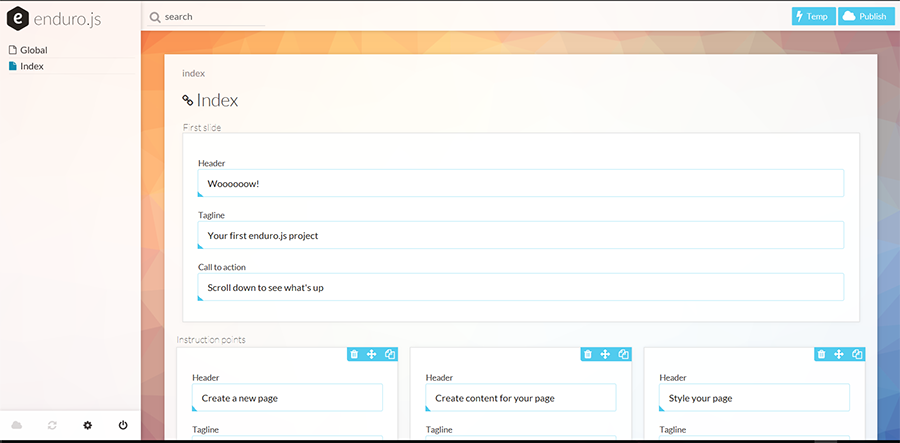
One time I get this error when I skip "add user" step 6
Maybe this is related I am not sure

I'm not entirely sure if it's the lack of an admin user, unless it's related to newer versions of node. When I did my test to assist with the issue I forgot to add a user, and I got the standard note when logging in that I needed to create a user first. But I'd love to see if that works for @gouldingken.
Unfortunately I can't get it to work. I'm pretty sure it's that issue with gyp, but I don't have time to troubleshoot it. What is the need for compiled binaries in this repo? Could this be an optional dependency?
I had similar issues, Here are the steps that I took to resolve the gyp issues
-
Install windows build tools npm install --global windows-build-tools From https://www.npmjs.com/package/windows-build-tools
-
Install node-gyp npm install --global node-gyp From https://github.com/nodejs/node-gyp
-
Set environment variable to point to python setx PYTHON "%USERPROFILE%.windows-build-tools\python27\python.exe" From https://stackoverflow.com/questions/15126050/running-python-on-windows-for-node-js-dependencies/39648550#39648550
-Steven
