

 GoogleCloudPlatform
Automatic focus on "Console" view when a new log is shown
(please ensure you are running the latest version of CT4E with Help > Check for Updates.)
- Eclipse version
Version: Oxygen Release (4.7.0) Build id: 20170620-1800
- Cloud Tools for Eclipse version:
Google Cloud Tools for Eclipse Version: 1.3.0.201708031339
- Google Cloud SDK version: (run
gcloud version)
Google Cloud SDK 165.0.0 app-engine-java 1.9.54 app-engine-python 1.9.57 beta 2017.03.24 bq 2.0.25 core 2017.07.28 gcloud gsutil 4.27
- OS:
Microsoft Windows version 1703 (build SO 15063.540)
- Java version:
java version "1.8.0_111" Java(TM) SE Runtime Environment (build 1.8.0_111-b14) Java HotSpot(TM) 64-Bit Server VM (build 25.111-b14, mixed mode)
With the previous plugin for Eclipse (Google Eclipse Plugin) the Console view automatically focused with a new log line.
Now, with CT4E, it simply goes bold but it doesn't focus

In the Eclipse toolbar of Console view I do not see a configuration like "focus when content change", so I'm wondering if the configuration I'm looking for was related to Google Eclipse Plugin itself and not Eclipse IDE.

Can this behaviour be accomplished with the new CT4E?

Can you explain what you mean by focused in this context? Simply come to the front ahead of other panes?


I don't recall that I ever configured something like this while I was using GPE, this is why I refer to GPE this kind of behaviour.
I checked on my Eclipse configuration and it is ALREADY as you suggested
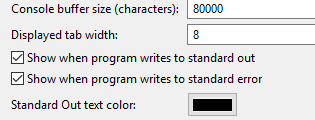 but as mentioned in the first post, the Tab only goes in Bold title when a new entry appaer, but does not get in front of other tabs
Thanks for bringing this up, @NicolaSpreafico. I've done a bit of digging, and we aren't wiring up our console streams to respect the Show on Standard Output and Show on Standard Error settings!
GPE gets this for free as its native Web Application launch extends the JDT JavaLaunchDelegate and runs the devappserver directly (com.google.appengine.tools.development.DevAppServerMain). The JDT launch delegate associates the process directly with the launch, which creates a ProcessConsole which listens for these changes.
Because we delegate launching to appengine-plugins-core, we set up our own console… and we're not wiring up these changes.
I think the better longer-term change would be to figure out how to recast our CloudSdk Process as an org.eclipse.debug.core.model.IProcess and leverage the Eclipse Debug's ProcessConsole of type java, which should also let us get hyperlinking for free (#2140). We have some vestiges of an DevAppServerRuntimeProcess and DevAppServerProcessFactory. But perhaps better would be to modify appengine-plugins-core to allow passing in an IVMRunner to use for execution.
But perhaps better would be to modify appengine-plugins-core to allow passing in an IVMRunner to use for execution.
Although this might work for devappserver1, where we directly launch a JVM, it doesn't work for the Python-based devappserver2.
In addition to the dev appserver console, we have a console for deploy too. However, I'd say because the deploy job isn't a run/debug launch, in some sense the auto-focus preferences do not apply to the deploy job.

Removing "low priority". The flex JAR deploy for Maven projects opens two consoles: one for "mvn package" and the other for deploy. When "mvn package" completes, the deploy console is not brought to the front.
BTW, note that the deploy console and the local run console are constructed in very different ways.