

 GoogleChromeLabs
Autosubscribe push notifications for App
Hey guys, I am new to the land of PWA and push notifications. What I want to achieve is:
- Normal website users should not be prompted to subscribe for push notifications at all (if they can it is okay, but I do not want to disturb them, as nobody ever uses this on desktop)
- The App (via bubblewrap) should always subscribe to push notifications, the user should not even need to push any button for this, as it should look like a native app. Users expect to have such notifications
Is that possible? For me it currently looks, that I do have to prompt the users to subscribe, which would be quite annoying. Is there a way to work around or improve?

When using a Trusted Web Activity the user does not need to manually confirm push notification permissions.
Simply call the PushManager.subscribe method. It should create and return a web push subscription without any popups.
This only works for TWAs with successfull digital asset linking.

Excuse me, but I am new to this and I have not written any code about this yet, I am just using WordPress plugins. I am a developer though, so I can understand.
So you are saying, that the permission popup will never show, but the website/pwa must call the subscribe method, right? So now my question is, if my plugin already does this or if this must be implemented. And what happens for none-TWA applications? Will they get a user prompt? Is there a way to only do that for TWA apps? Or am I thinking too complicated here?
The usual push subscription process is something line this:
- Register a service worker.
- Call
Notification.requestPermission(), this will display the push notification permission dialog. - Call
PushManager.subscribe, this will return a web-push subscription. - Pass subscription to your server/notification service.
- Your server sends notifications to your users.
With trusted web activities this flows stays exactly the same, with the exception of step 2. When using a TWA, push permission will be granted by default, so requesting it will not open a prompt. Your web application still has to create a service worker, get the subscription and send the push notification.
In a nutshell a trusted web activity is nothing more than a browser tab with more (default) permissions than usual.
Your normal, non-TWA, users will see the prompt. If you want to prevent that, you will need to check if the user is using your TWA before running your code.
Detecting if your user is using a TWA is not that easy though! Currently I am using this code document.referrer.startsWith('android-app://'). This does not work 100% reliable though. There might be other & better ways to do that.
Alright, thanks a lot for clarifying! Do you know any better ways or examples to detect the TWA?
I think none of the tested push plugins does support this yet, however adding it should look easy, at least your simple solution. This would be a great addition to those plugins.
Some off-topic questions: Can you also help here? https://github.com/GoogleChromeLabs/bubblewrap/issues/647
Using a query parameter is the recommended way of identifying if your site has been launched as a TWA: https://developer.chrome.com/docs/android/trusted-web-activity/query-parameters/

Alright, but this would mean the notification plugin on my website have to listen to this query parameter, remember it in a session cookie and sends out the subscribe request? Or maybe the session cookie is not even needed, once subscribed?
@PEConn I just tried that out once more with multiple devices. It seems that I need to enable the request dialog, as you said. However the browser will then prompt a message if you want to subscribe for the notifications. That is the opposite of what you said.
Now my question is, if that information was incorrect or only the case for chrome, but no other browser supports this auto-subscribe?
This is the brave browser:
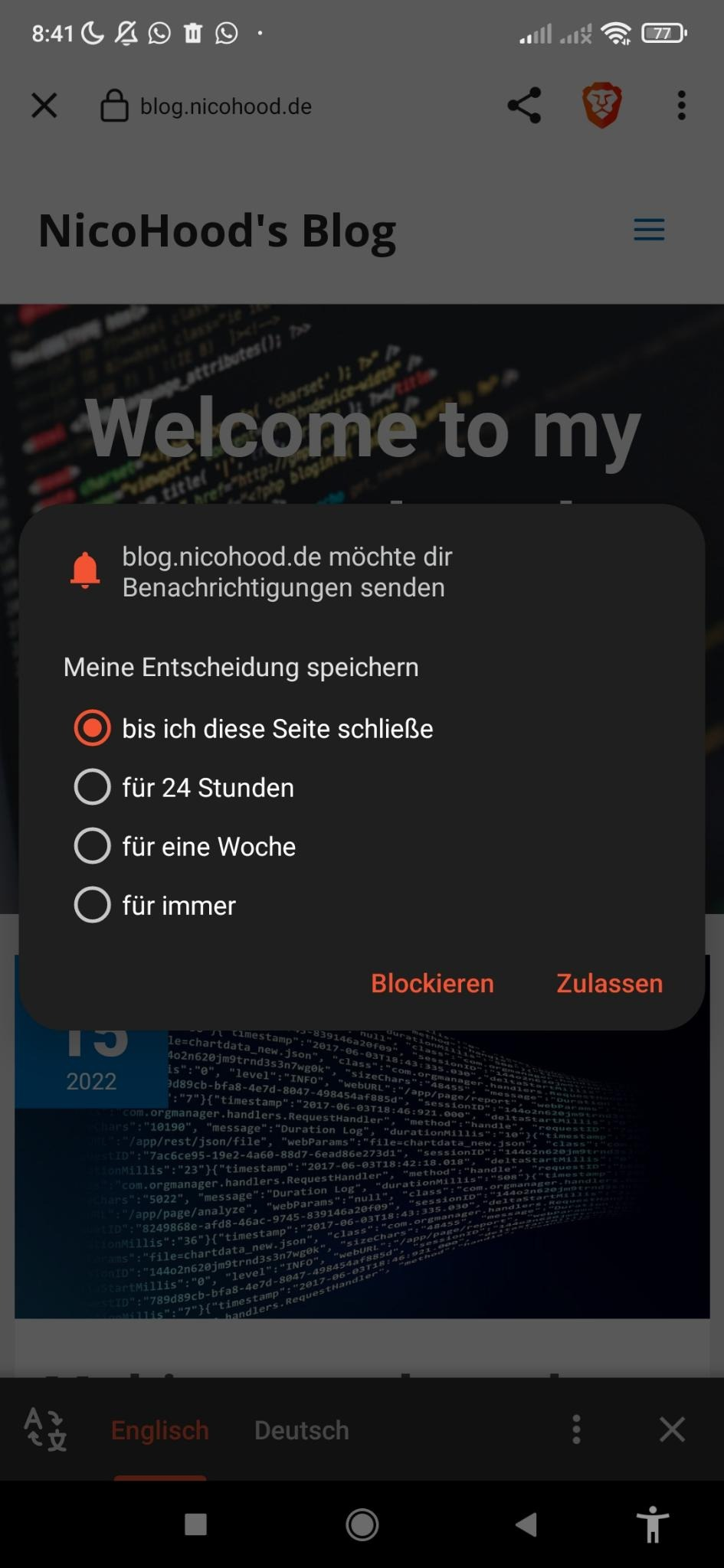
Now I also tried this on Chrome and it seems it does NOT autosubscribe. And that is an issue, as I can imagine lots of people using the PWA/TWA will just block this, although it is a useful addition to the App (when used as app, not as browser tab):

but this would mean the notification plugin on my website have to listen to this query parameter, remember it in a session cookie and sends out the subscribe request?
Yes, that's correct.
However the browser will then prompt a message if you want to subscribe for the notifications.
if that information was incorrect or only the case for chrome, but no other browser supports this auto-subscribe?
Yeah, I only know that Chrome supports this, I don't know whether other browsers do (I suspect not, but I've not checked).
Now I also tried this on Chrome and it seems it does NOT autosubscribe.
Looking at the Chrome screenshot, it looks like you're on a web page where verification has failed (when the verification fails, you get the top bar with the URL). Notification auto-enrolment will only work when verification succeeds. You may need to check that you've got your Digital Asset Links set up correctly.
@PEConn Thank you so much, that really solved the issue!
It also seems to fix this issue, or at least it is now gone! https://github.com/GoogleChromeLabs/bubblewrap/issues/647
I just have one more question @PEConn
There seem to be two keys for signing: An App and an Upload key.
Bubblewrap seems to use the App Key: bubblewrap/bubblewrap fingerprint generateAssetLinks
Google Play seems to use the App Key as well.
The keytool seems to use the upload key: keytool -printcert -jarfile app-release-signed.apk | grep SHA256
Now I have two apps:
- One published via playstore
- One only installed via apk file
The one published via playstore required the hash of the app key while the local apk file requires the upload key it seems. Otherwise the TWA app will show the URL at the top.
Now does it make sense to add BOTH shasums to the assetlinks.json file? Because if I want to test my playstore app using the apk file it just won't work. And I dont want to test everything through google play.
I think I missunderstood something, hopefully you can clarify.
Having both fingerprints in your asset link file is definitely more convenient, and it's something that I personally do. However, my TWAs are for testing, so I'm not too concerned about security implications.
The downside is that you increase your attack surface - if someone steals your debug key (which is probably sitting unencrypted, with some default password on your computer) they could claim to be associated with your website (and intercept links to it from their app).