
lighthouse
 lighthouse copied to clipboard
 GoogleChrome
Improve layout shift elements when near to 0
FAQ
- [X] Yes, my issue is not about variability or throttling.
- [X] Yes, my issue is not about a specific accessibility audit (file with axe-core instead).
URL
https://modus-icons-test.netlify.app/common-outline/save/
What happened?
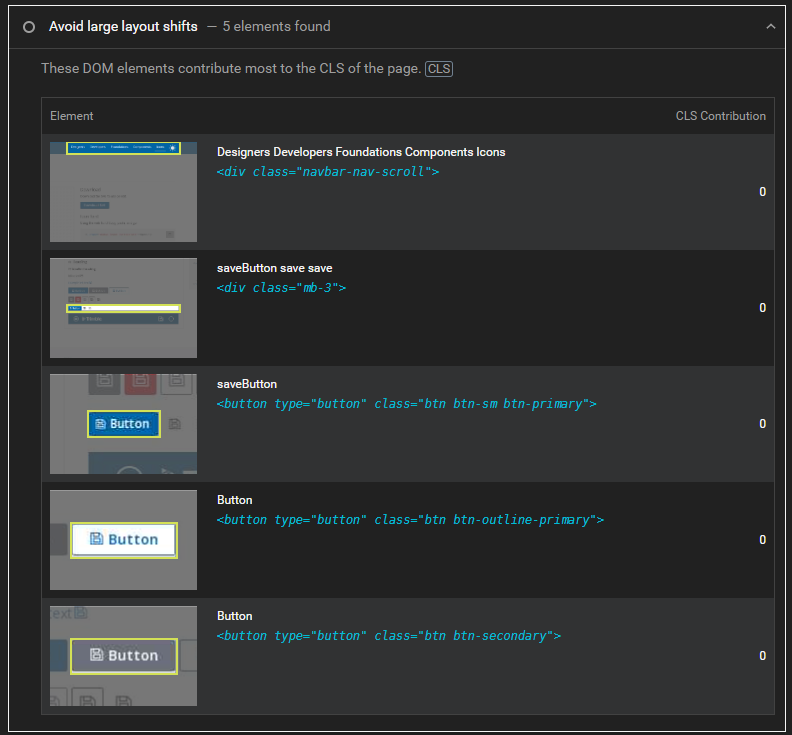
The Avoid large layout shifts diagnostic panel shows with 5 elements found - however none of them contribute to CLS.
What did you expect?
It would be better for this panel to not display at all if there are no elements which do not contribute anything to CLS
What have you tried?
I think I've noticed this issue on other pages/sites. I think there should be a threshold so the 'Avoid large layout shifts' diagnostic panel only shows if there is more than a small defined amount causing CLS.
How were you running Lighthouse?
Other
Lighthouse Version
9.3.0
Chrome Version
Edge 101
Node Version
No response
OS
Windows 10 Pro
Relevant log output
URL: https://googlechrome.github.io/lighthouse/viewer/?psiurl=https%3A%2F%2Fmodus-icons-test.netlify.app%2Fcommon-outline%2Fsave%2F&strategy=desktop&category=performance&category=accessibility&category=best-practices&category=seo&utm_source=lh-chrome-ext

The layout shift score is close to 0 but not exactly 0. There was some extremely minor impact on CLS that get's rounded down to 0. I don't see a problem with just reporting these elements in an informative audit.

We should consider changing the rounding maybe, so we would never show 0 if we decide to not filter.

- layout-shift-elements should do the top-5 filtering, TraceElement should just give us every shift
- ~should probably add a filter to layout-shift-elements to only show shifts >= 0.001 (the granularity we use)~ increase / drop granularity so we never show 0
- we should look again into how to determine layout shift element contributions–we do a bunch of math ourselves, but maybe trace events has it? Or we could ask for one?
- cumulative-layout-shift shouldn't format with
cumulativeLayoutShift.toLocaleString