

 Gizeta
"Error: 304" after pressing "Attach/Detach" button
OS: Windows 10 - 64bit
Reproduction steps:
- Start Shadowverse
- Start ShadowWatcher.exe
- Click on "Attach/Detach" button => error shows up (check screenshot)
Any ideas how to fix this? Probably something related to injector?
No anti-virus on PC, Windows Defender turned off. Tried running ShadowWatcher and Shadowverse as admin and normal way - both cases shows same error.
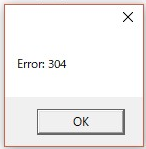
Cheers!

I also heard the same error from other people. But I cannot reproduce the error, so I have no idea to solve this. I want to know whether the older version works well.
Here is the source code of SVInjector. I tried to update the dependencies to solve this yesterday, but I don't know if it works. https://bitbucket.org/Gizeta_sf/svinjector/src/9cd1f83db0695a0edee97209d673c64744d1c67d/SVInjector/main.cpp?at=master&fileviewer=file-view-default#main.cpp-70
Error 304 means that the mono runtime fails to load Observer.dll.
I guess the dependencies of Observer.dll may be broken or not compatible with mono .net runtime.
But, I don't meet this error on my PC.
I would appreciate that if someone could fix it or tell me more details.

It doesn't work on both versions of injector (old and new one) if it helps somehow. Maybe some libraries are missing on PC (for example too old version of .NET framework or something like that). Just guessing. Can't help much in this case.